
Messages are not arriving
Outbound working while inbound does not is a specific, common failure with a specific, common cause.
The first thing to establish is which direction is broken, because outbound and inbound fail independently and for entirely different reasons.
Send a message out, and have somebody send one in. If outbound works and inbound does not, you have narrowed the problem enormously — that is nearly always the webhook, and on a manually configured channel the webhook is your responsibility.
There is also a category of "not arriving" that is really "not visible", which catches agents in particular.
Before you start
- A test message you can send in, and a phone to send it from.
- Manager or admin access, since an agent cannot see unassigned traffic.
Steps
Establish which direction is broken
Test both. Outbound fine plus inbound broken is a completely different problem from both broken, and the fixes have nothing in common.
If only inbound is broken, check "last event"
The connection card shows when the last event arrived. If that time is stale while customers are messaging you, the provider is not calling your webhook.
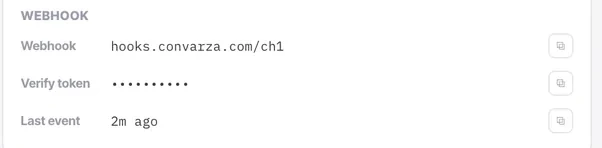
Confirm the webhook is registered on the provider's side
Copy it from the connection card and check it in their console. On Facebook sign-in channels this is handled for you; on manual setups it is yours.
Check the event subscriptions
A webhook subscribed to nothing never fires. Message events are the minimum.
Check the channel is connected and enabled
Refresh rather than trusting the page, and check the Enabled state while you are there.
A disabled channel is a common and embarrassing cause of this symptom. It accepts nothing, reports nothing, and looks like a provider problem.
Check the conversation is not simply invisible to you
Agents see only what is assigned to them. Unassigned bot traffic is invisible to them by construction — have a manager look with the assignee filter set to None before concluding nothing arrived.
Check auto-close and the status filter
A channel with auto-close on will close quiet conversations. They are not missing; they are closed, and the default filter may be hiding them.
Check whether a contact was created at all
"Do not create contact" on the channel changes what you can find and where. The conversation exists; the record does not.
Check it worked
Once messages are arriving, send one more from a number that has never contacted you before. First-contact behaviour differs from an ongoing thread, particularly on WhatsApp, and it is the case customers hit.
The parts people get wrong
- For WhatsApp specifically, a wrong business account ID produces "connected but nothing works" and an empty templates card at the same time.
- On Facebook sign-in channels the webhook is handled for you, which makes it much less likely to be the cause.
The ones people actually ask
How do I narrow this down quickly?
Establish which direction is broken by testing both. Outbound fine with inbound broken is a completely different problem from both broken, and the fixes have nothing in common.
Outbound works, inbound does not.
Check last event on the connection card while you send yourself a message. If that time is stale, the provider is not calling your webhook — confirm it is registered on their side, and that it is subscribed to message events at minimum. A webhook subscribed to nothing never fires.
An agent says nothing arrived but a manager can see it.
Agents see only what is assigned to them, so unassigned bot traffic is invisible to them by construction. Have a manager look with the assignee filter set to None before concluding anything arrived or did not.
The conversation exists but there is no contact record.
Do not create contact is on for that channel. The conversation is real; the record was never made, which changes what you can find and where.