
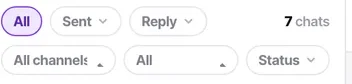
The filter chain: All, Sent, Reply, channel, assignee, status
Every filter is a facet on the conversation itself — nothing is a saved search you have to maintain. Learn the chain and you can find anything in two clicks.
The Inbox is the only conversation list in the product. There is no per-bot list, no per-channel inbox and no separate queue — because one bot can serve three channels, any of those groupings would be a fiction.
That puts the whole weight on the filter chain, which is why it is worth ten minutes. Six controls, read left to right, and every one of them is a fact about the conversation rather than a saved search somebody has to maintain.
Before you start
- A login and some conversations to filter. The assignee control only appears for managers and admins.
Steps
Read the chain left to right
It starts with All · Sent · Reply and a chat count, then channel, assignee and status on the row beneath.
They combine. Every filter you add narrows what the previous one left.
Sent is about delivery, not authorship
All, failed, or not failed. This is where you find messages that never reached anyone.
It is the most overlooked filter in the product. A failed message looks identical to an unanswered one from the customer's side — and identical to a handled conversation from yours, until somebody complains.
Reply is about whether anybody answered
All, replied, or unreplied. "Unreplied" is a first-class state, not a report you build, and it is the single most useful number in the Inbox.
Then narrow by channel
Useful when one channel is behaving differently from the rest — which is a good first diagnostic when something feels wrong. A channel with zero recent conversations is often a channel that has quietly disconnected.
Then by assignee
Reads All · None · then every teammate by name. This control only renders for managers and admins, because an agent sees only their own work and it would list one name.
None is the AI bot. A chat the bot is handling is simply a chat nobody has taken, so it is not spelled out as a separate thing.
Then by status
Open and closed. How meaningful this is depends entirely on whether auto-close is on for that channel and whether your team agrees what "finished" means.
Combine two to answer a real question
Unreplied + assignee None is abandoned bot traffic. Unreplied + a person is a workload question. Sent failed + any channel is a delivery problem. Each is two clicks.
Check it worked
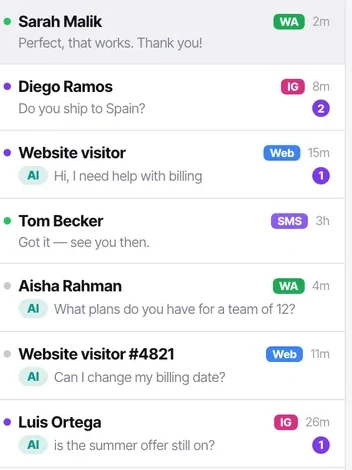
Set Reply to unreplied and assignee to None. Whatever number you see is the count of conversations your bot did not resolve and no person has picked up. If that number surprises you, you have found something worth fixing today.
The parts people get wrong
- Calls are not in the Inbox. They live under Calls and on the contact timeline, because a completed call is not something you reply to.
- Chats are never listed per bot. One bot serves many channels, so a per-bot list would be a lie.
- An agent sees only conversations assigned to them, so their Inbox is a different list — not the same list with a default filter.
The ones people actually ask
I cannot see the assignee filter.
You are an agent. It only renders for managers and admins, because an agent sees only their own work and the control would list one name and mean nothing. If a colleague is describing it and you cannot find it, that is your role rather than a fault.
What is the difference between Sent and Reply?
Sent is about delivery — did the message actually leave. Reply is about whether anybody answered. They are easy to confuse and they catch different problems: a message that failed to send looks identical to one nobody replied to until you check Sent: failed.
What does assignee None mean?
Nobody has taken it, which is the same thing as the bot handling it. The product does not model bot-handled and unassigned separately because they are not separately true, which is why there is no hand-back-to-bot action.
Which two filters answer the most questions?
Unreplied plus assignee None finds abandoned bot traffic — the leak worth checking daily. Sent: failed on any channel finds delivery problems. Both are two clicks and neither needs a report building.