
One inbox for every conversation your business has
WhatsApp, Instagram, Facebook, Telegram, Viber, LINE, your web widget, SMS and email land in a single queue your team actually works from.
Nine apps, nine notification badges, one very tired team
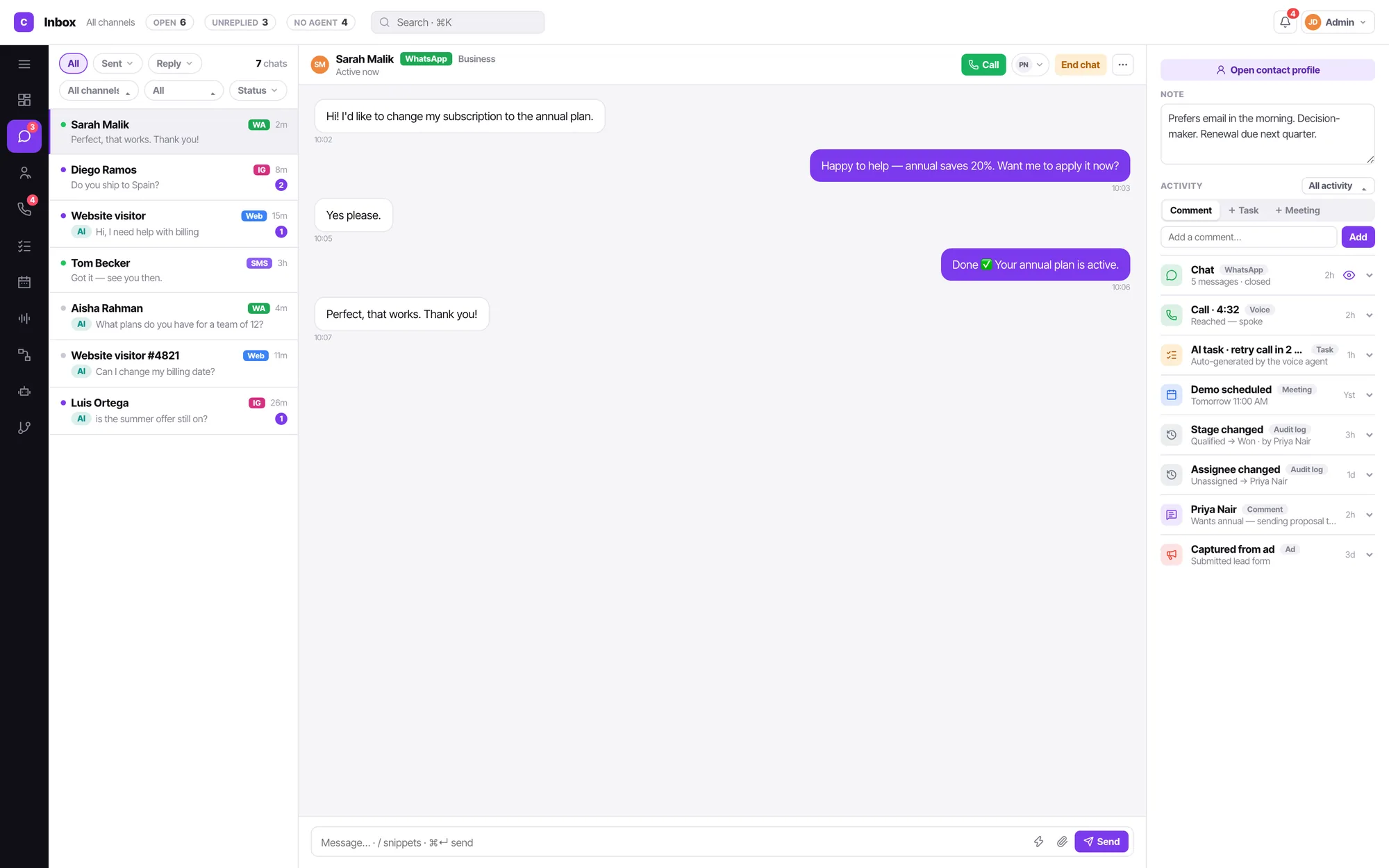
The WhatsApp Business app on someone's phone. Instagram DMs on a different phone. A shared Gmail that three people are pretending to watch. A web chat widget nobody has opened since it was installed. Convarza AI collapses that into one queue with real filters.
One list, honest filters
All · Sent · Reply · a chat count, then channels, assignee and status. Every filter is a facet on the conversation itself — nothing is a saved search you have to maintain.
The AI badge tells you who is talking
An unassigned chat is a bot chat. It carries an AI badge, and the moment a human is assigned the badge goes and the bot stops. No mode switch, no separate bot console.
The person, not just the thread
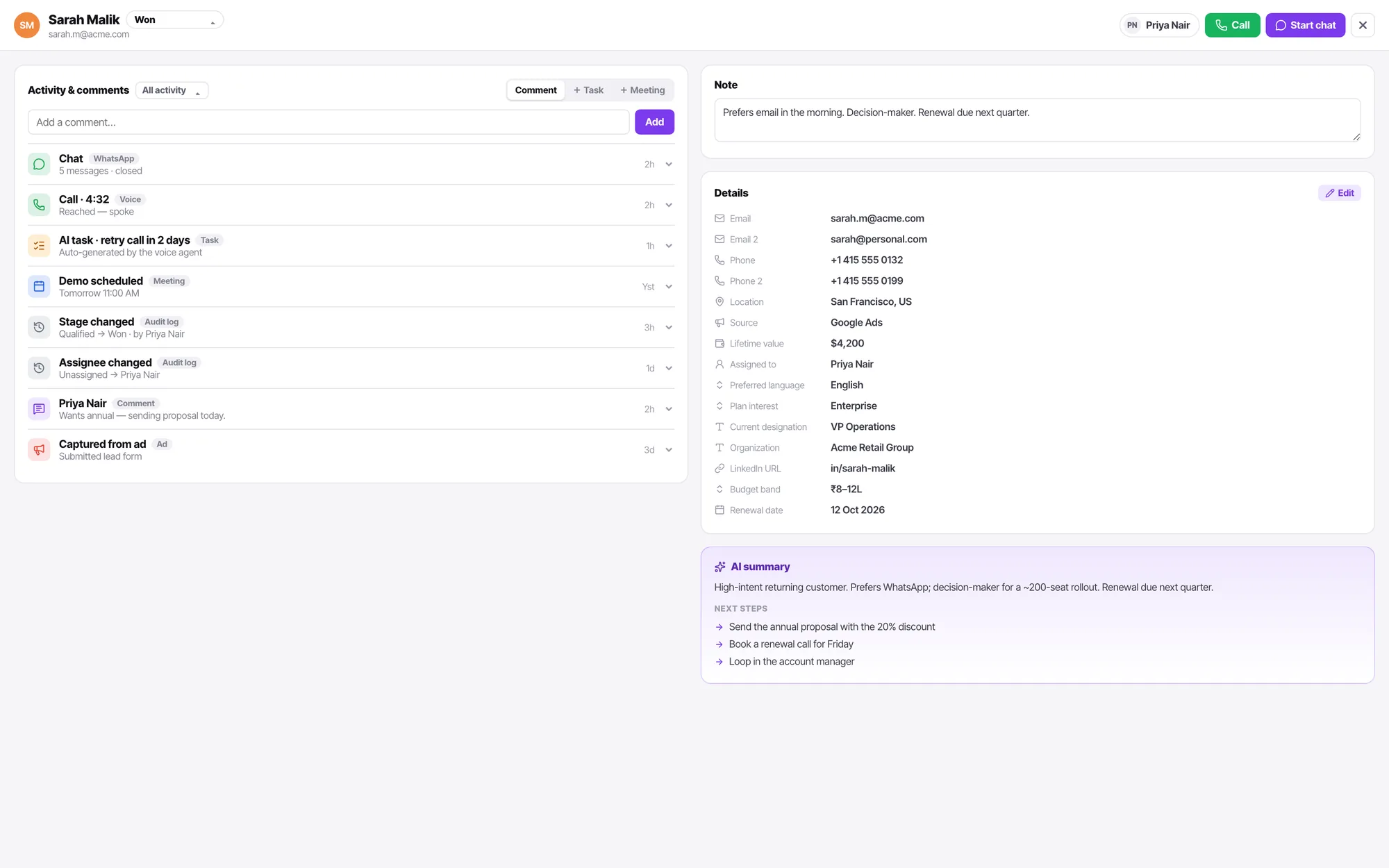
Notes your colleagues left, the last call and how it ended, open tasks, the lead stage — on the right of the conversation, always.
Everything that ever happened, in order
Chats, calls, AI tasks, meetings, stage changes, assignee changes, comments and captured form submissions all land on one feed you can filter. When someone asks "what did we tell them in June", the answer is one scroll away.
- Comment, task and meeting composers sit at the top of the feed — no modal.
- A task created from a chat is auto-assigned to you with a 15-minute reminder, and opens expanded.
- Stage and assignee changes are audit-log entries, not silent edits.
One vocabulary for "who has this"
The assignee filter reads All · None · then every teammate by name. None is the AI bot — we don't spell it out as a separate thing, because a chat the bot is handling is simply a chat nobody has taken.
Chat and calls
Managers and admins reassign through a picker. An agent can only unassign themselves — they cannot push work onto a colleague.
Contacts and tasks
Anyone can assign to anyone. These are records, not workload, so the restriction would be noise.
The assignee filter only renders for managers and admins — an agent sees only their own work, so the control would mean nothing to them.
Shared inbox FAQ
Which channels feed the shared inbox?
Nine chat channel types: WhatsApp, Instagram, Facebook Messenger, Telegram, Viber, LINE, the web widget, SMS and email. Calls are not conversations in the inbox — they live in Calls and on the contact timeline, where they belong.
How do I hand a conversation from the AI bot to a person?
You assign it. That is the entire handover. Bot-handled chats are the unassigned ones, marked with an AI badge; assigning one to a teammate takes the bot out and puts a person in.
Can agents see conversations that are not theirs?
No. An agent sees only what is assigned to them, so unassigned bot traffic is invisible to them by construction. Managers and admins see everything and get the assignee filter.
Do chats get listed per bot?
Never. One bot serves many channels, so a per-bot list would be a lie. The inbox is the only conversation list there is.
Can I find conversations nobody replied to?
Yes — the filter chain starts with All · Sent (all/failed/not failed) · Reply (all/replied/unreplied), then channel, assignee and status on the right. "Unreplied" is a first-class filter, not something you build a report for.
Written about this
What a WhatsApp shared inbox actually needs to do
Most tools give you a list of chats. The ones teams keep using give you assignment, an AI that knows when to stop, and the contact record beside the thread.
ReadHandover: the moment your AI agent should stop talking
Most disappointing deployments fail at the seam, not the answer. Name the conditions in advance and the handover stops being a failure.
ReadYour missed calls are a bigger leak than your website
You measure form conversion to two decimal places and have no idea how many people rang and gave up. Here is how to find out, cheaply.
ReadIt is all one product
Everything here reads and writes the same contacts, the same conversations and the same calendar. Nothing needs syncing.
AI chatbot
One bot answers WhatsApp, Instagram, your web widget, SMS and email — and hands the conversation to a person the moment your condition says it should.
AI voice agents
An AI agent answers your line in natural speech, follows your prompt, calls your functions, and hands to a human the moment it should.
Call flows
Ring agents, hand to an AI agent, branch on a condition, run an IVR menu, check business hours, take voicemail — as one flow you can read.
Campaigns
Pick a line, pick who answers, describe the follow-up sequence in plain English, and let it work the list inside your calling hours.
Workflows
When this happens · only if · then, in order. Numbered steps, an owner who is told when it fails, and a Live toggle. No formula builder.
Contacts & CRM
Lead stages that mean something, a schema you define yourself, and every call, chat and note on one timeline.
Calendar & booking
Connect Google or Microsoft, publish a booking link with your real availability, and let the AI agent book straight into it.