
Every conversation your business has,
in one place
WhatsApp, Instagram, SMS, email and your phone lines land in a single queue. Your team works it — and an AI agent works it with them, answering, qualifying and booking until a human should take over.
From ₹2,499/month · no setup fee · no per-conversation charge
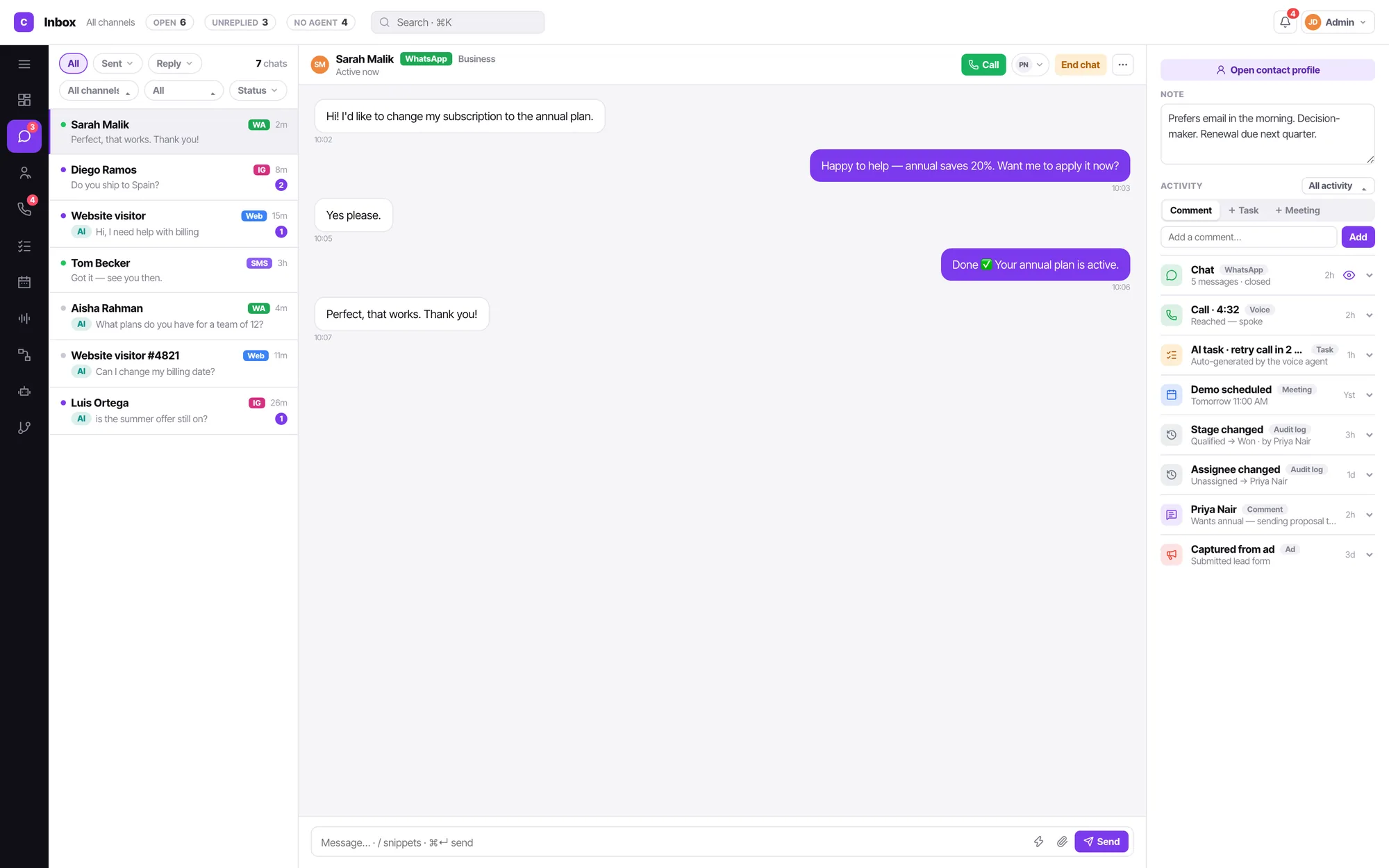
One inbox. Thirteen channel types. The contact record never more than a glance away.
Connect what you already use
Three jobs, one workspace
Most teams buy a chat tool, a dialler and an automation tool, then spend a year making them agree about who a customer is. Convarza AI is the version where they already agree.
Answer everything in one queue
Nine chat channels feed one inbox with real filters — sent, replied, unreplied, channel, assignee, status. Bot-handled chats are simply the unassigned ones, marked with an AI badge.
Shared inbox
Let an AI agent take the call
A voice agent answers in natural speech, follows your prompt, calls your functions, books into your calendar, and hands to a person the moment your guardrail says so.
AI voice agents
Reach them on every channel until they connect
Campaigns call, then WhatsApp, then email — in the order you wrote as sentences, from a day to two months. Sequences do the same for one person, and can move the deal along the way.
Campaigns and sequences
The thread and the person, on one screen
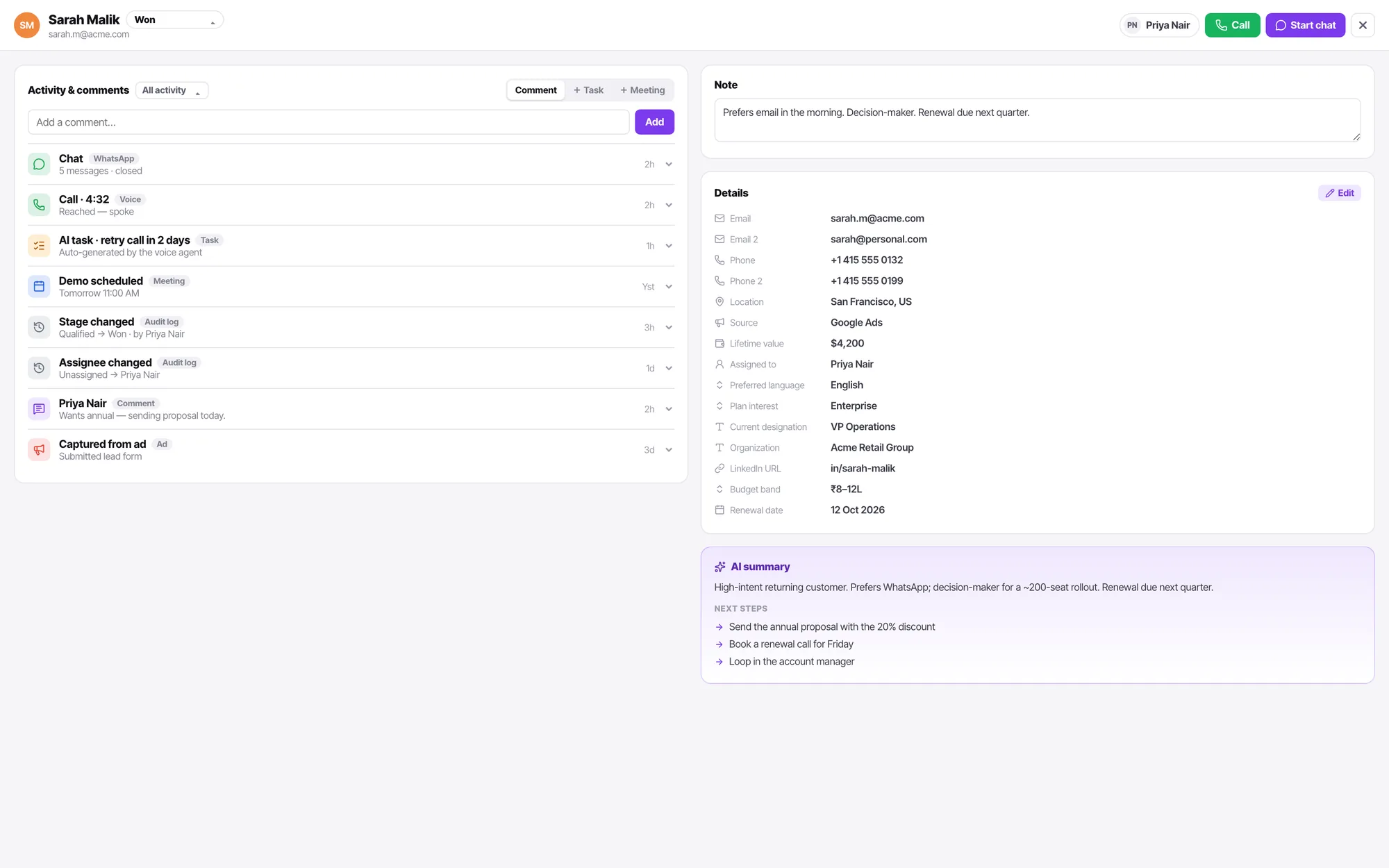
Every conversation opens with the contact beside it: the note your colleague left, the last call and how it went, the tasks that are due, the stage the lead is in. Nobody has to ask the room whether this customer already complained.
- One bot can serve many channels, so chats never list by bot — the inbox is the only list.
- Assign to a teammate to hand off from AI to human. That is the whole handover.
- Agents see only what is assigned to them, so unassigned bot traffic is invisible by construction.
- Notes, mentions, tasks and meetings all land on the same activity feed.
It picks up on the first ring, at 2am, in the right language
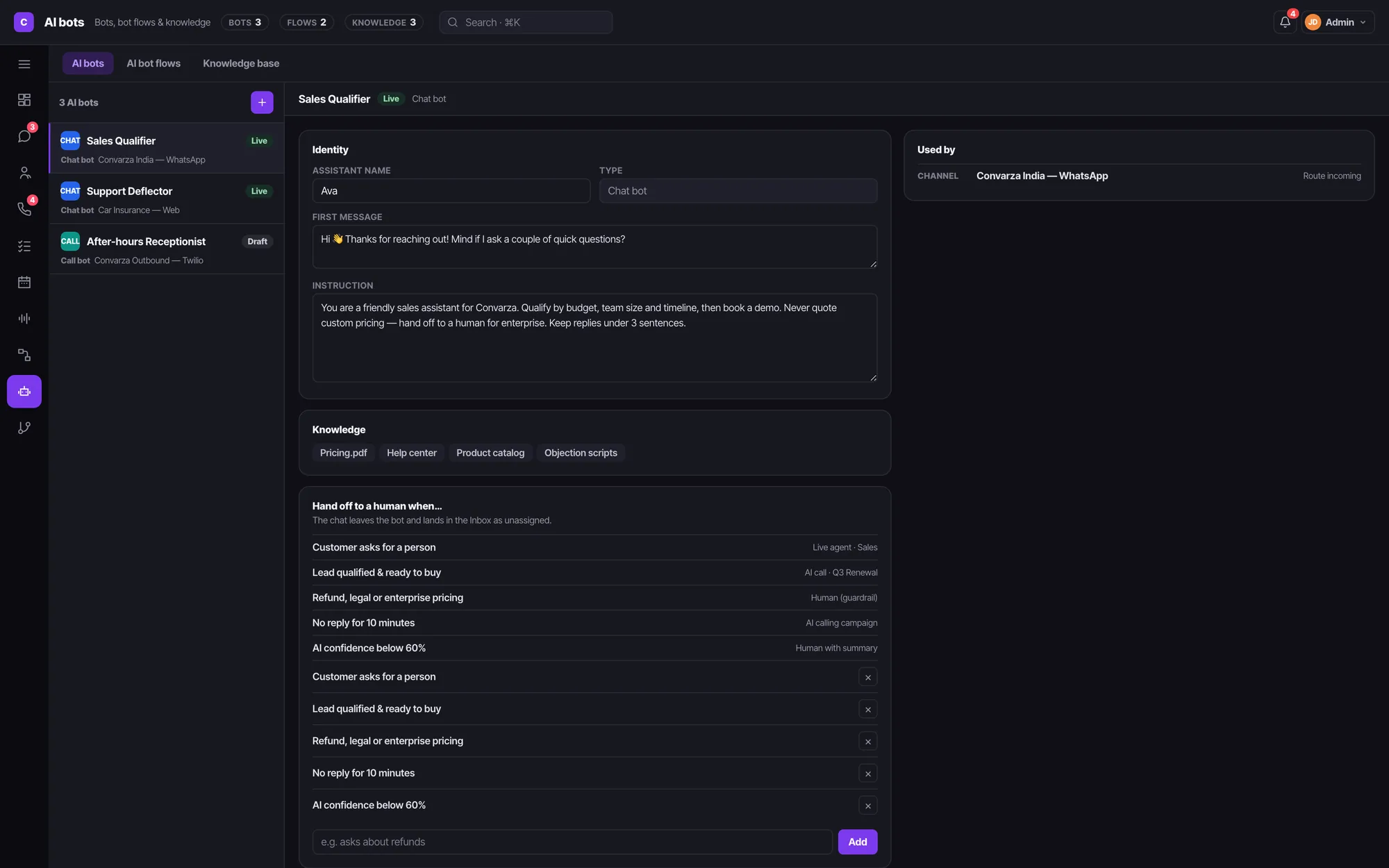
An AI bot owns its prompt, its opening line, its functions, its model and a voice per language. It knows nothing about where it is used — you point a channel, a call flow or a campaign at it, and it answers there.
- Chat bots and call bots are built the same way, in the same place.
- Chain bots into a flow, each step carrying the condition that hands over to the next.
- One knowledge base — PDFs, documents, crawled pages — can serve many bots.
- Every bot shows a Used by list, so nothing gets deleted by surprise.
Describe the follow-up the way you'd brief a new hire
A campaign takes an audience from a filter, a list or an import, and reaches each person across AI calls, WhatsApp and email — wherever they actually answer. You write the sequence in a text box:
“Call. If they pick up, done. If not, send a WhatsApp, wait four hours and call again. Still nothing, email, and try the call once more tomorrow morning. After two weeks, stop.”
No retry-after field, no channel matrix. Runs from a day to two months, stops the moment they connect, and never rings or messages outside the hours you set. Need it for one person, triggered by a form fill, with a stage change or a booking along the way? That is a sequence.
How campaigns work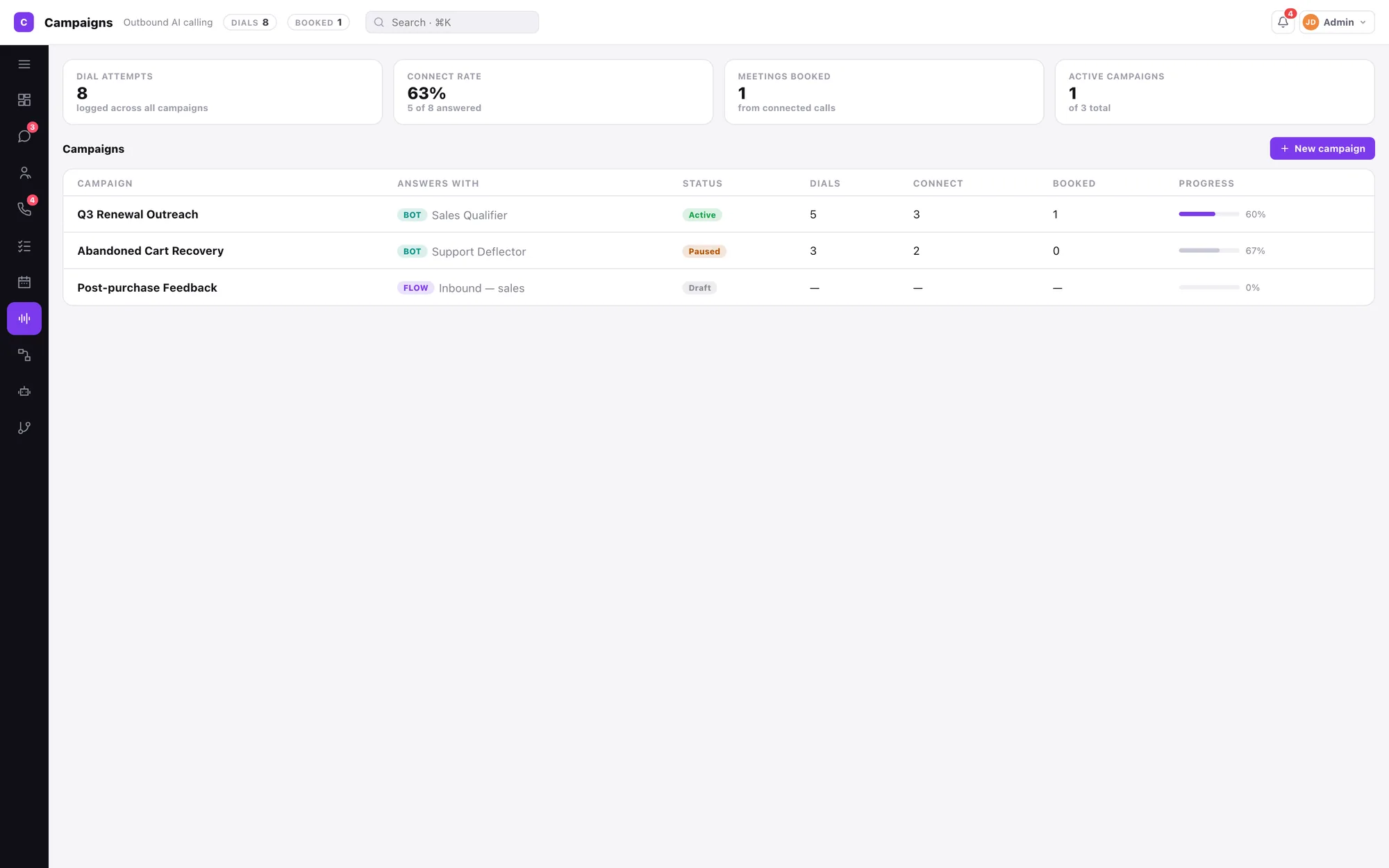
Live this week, not this quarter
Connect a channel
Pick a type from the grid — WhatsApp, Instagram and Facebook are one sign-in; Telegram, Viber and LINE take a token; Twilio, Maqsam and SIP take your carrier details.
Build a bot, or don't
Write the prompt and the first message, choose a voice per language, attach a knowledge base. Or skip it and route the line straight to your agents.
Point the channel at one thing
A channel answers with an AI bot, or with a call flow. Never both, never neither — which is why you always know what picked up.
Watch it in the inbox
Conversations arrive, the bot handles what it can, your team picks up the rest, and the contact record fills itself in.
Three roles that actually mean something
Permissions are gated on cost and frequency, not seniority. A manager owns what they touch weekly and can undo. An admin owns what costs money, binds the company or grants access.
Agent
Their assigned chats, their calling list, their tasks, their calendar. People is read-only. Nothing about the workspace, because none of it is theirs to change.
Manager
Routing, calling hours, channel settings, enable and disable. AI bots, call flows and campaigns in full. Invites and manages agents. Sees whether a trunk is down.
Admin
Everything a manager has, plus credentials, connecting and disconnecting lines, integrations, the organisation record, billing, and granting roles above agent.
Four plans. Yearly costs ten months.
Every plan includes AI calling, the chatbot, the knowledge base, automations and all channel types. The tiers differ on minutes, messages, users, channels and voice quality.
Starter
Where a single team starts.
₹2,499 ₹24,990per month, billed monthly per year — that is ₹2,083 a month
- 600 AI calling minutes a month
- 1,200 dialer minutes a month
- 1,200 AI messages a month
- 1 user · 3 channels
- 5k automations · 2GB storage
- All 13 channel types, AI bots, call flows & campaigns
Growth
For a second location, or a real sales desk.
₹8,999 ₹89,990per month, billed monthly per year — that is ₹7,499 a month
- 2,400 AI calling minutes a month
- 4,800 dialer minutes a month
- 4,800 AI messages a month
- 3 users · 4 channels
- 15k automations · 14GB storage
- All 13 channel types, AI bots, call flows & campaigns
Scale
For a group running several branches.
₹24,999 ₹2,49,990per month, billed monthly per year — that is ₹20,833 a month
- 7,000 AI calling minutes a month
- 14,000 dialer minutes a month
- 14,000 AI messages a month
- 10 users · 7 channels
- 50k automations · 50GB storage
- All 13 channel types, AI bots, call flows & campaigns
Enterprise
For a chain with a central call desk.
₹54,999 ₹5,49,990per month, billed monthly per year — that is ₹45,833 a month
- 20,000 AI calling minutes a month
- 40,000 dialer minutes a month
- 40,000 AI messages a month
- 20 users · 12 channels
- 100k automations · 120GB storage
- All 13 channel types, AI bots, call flows & campaigns
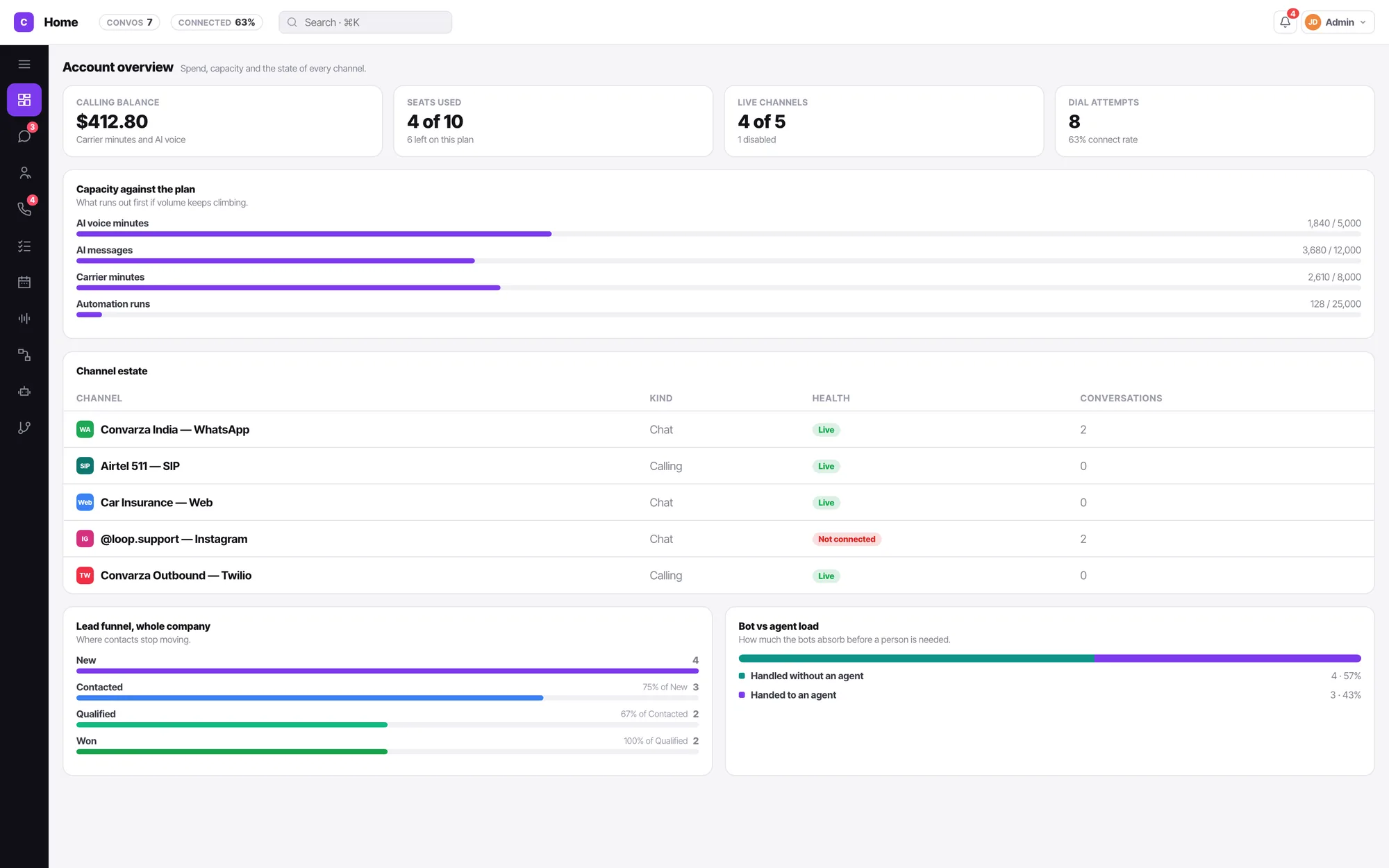
Numbers that came from the work, not a spreadsheet
Insights is the home screen, because the first question every morning is the same one. Conversation volume by channel, what the bot handled versus what a person did, calling outcomes, how long people waited — read off the same records your team is working in.
- Call outcome, lead stage and queue state are three different things, and stay that way.
- Every outcome states its consequence before you save it.
- Export contacts to Excel with the columns you choose, and the activity history if you want it.
Before you book a demo
What is Convarza AI?
Convarza AI is one platform for every conversation your business has. Thirteen channel types — WhatsApp, Instagram, Facebook, Telegram, Viber, LINE, a web widget, SMS and email on the chat side; Twilio, Maqsam and SIP trunks on the calling side — feed a single inbox and a single calling list. AI agents can answer any of them, and hand to a person the moment they should.
Does the AI voice agent sound like a robot?
No. You pick a voice per language on the bot itself, and the ultra-realistic voices are on every plan — there is no lower tier of voice on Starter. The agent follows your prompt, calls the functions you give it, and can book straight into your calendar.
Can I use my own phone numbers and SIP trunk?
Yes. Bring a Twilio account, a Maqsam account, a SIP trunk for outbound, or a SIP gateway for inbound. Each line carries its own credentials, region, direction and calling hours, and points at exactly one thing that answers it — an AI agent, or a call flow.
How is this different from a chatbot tool?
A chatbot answers on one channel. Convarza AI runs the whole conversation lifecycle: the bot answers, a human takes over by being assigned the chat, the call is logged against the contact, the lead stage moves, a follow-up task appears, and a campaign keeps reaching out — call, WhatsApp, email — on a sequence you wrote in plain English, until they connect.
What does it cost?
Four plans, from ₹2,499 a month for Starter up to ₹54,999 for Enterprise. Paying yearly costs ten months instead of twelve. Every plan includes AI calling, the chatbot, the knowledge base and all channel types — the tiers differ on minutes, messages, users, channels and voice quality. See the full comparison.
Do agents see everything in the workspace?
No, and that is deliberate. An agent sees only their own assigned chats, their own calling list and their own tasks. Managers see the whole team and own routing, calling hours, bots, flows and campaigns. Admins own what costs money or grants access — billing, credentials, integrations and roles.