
WhatsApp broadcasts that a bot or a person can answer
Send an approved template to an audience, hold it to the hours somebody can reply, and let every answer land in the shared inbox — where an AI agent or your team picks it up.
A broadcast tool sends. This one also answers.
Most WhatsApp marketing tools end at delivery. Here the reply is a conversation on a channel that already has a bot or a team on it — the same inbox, the same contact record, the same person who rang you last week.
An audience from your CRM
Segment by stage, source, attribute or last activity with the same filter builder the rest of the product uses. Not a separate list you upload and forget.
An approved template
Managed on the WhatsApp channel, with variables, samples and buttons. Approvals and rejections arrive in your notification feed.
Replies that get handled
Every answer lands in the shared inbox on the WhatsApp channel — answered by an AI agent at once, or by your team, with the full history beside it.
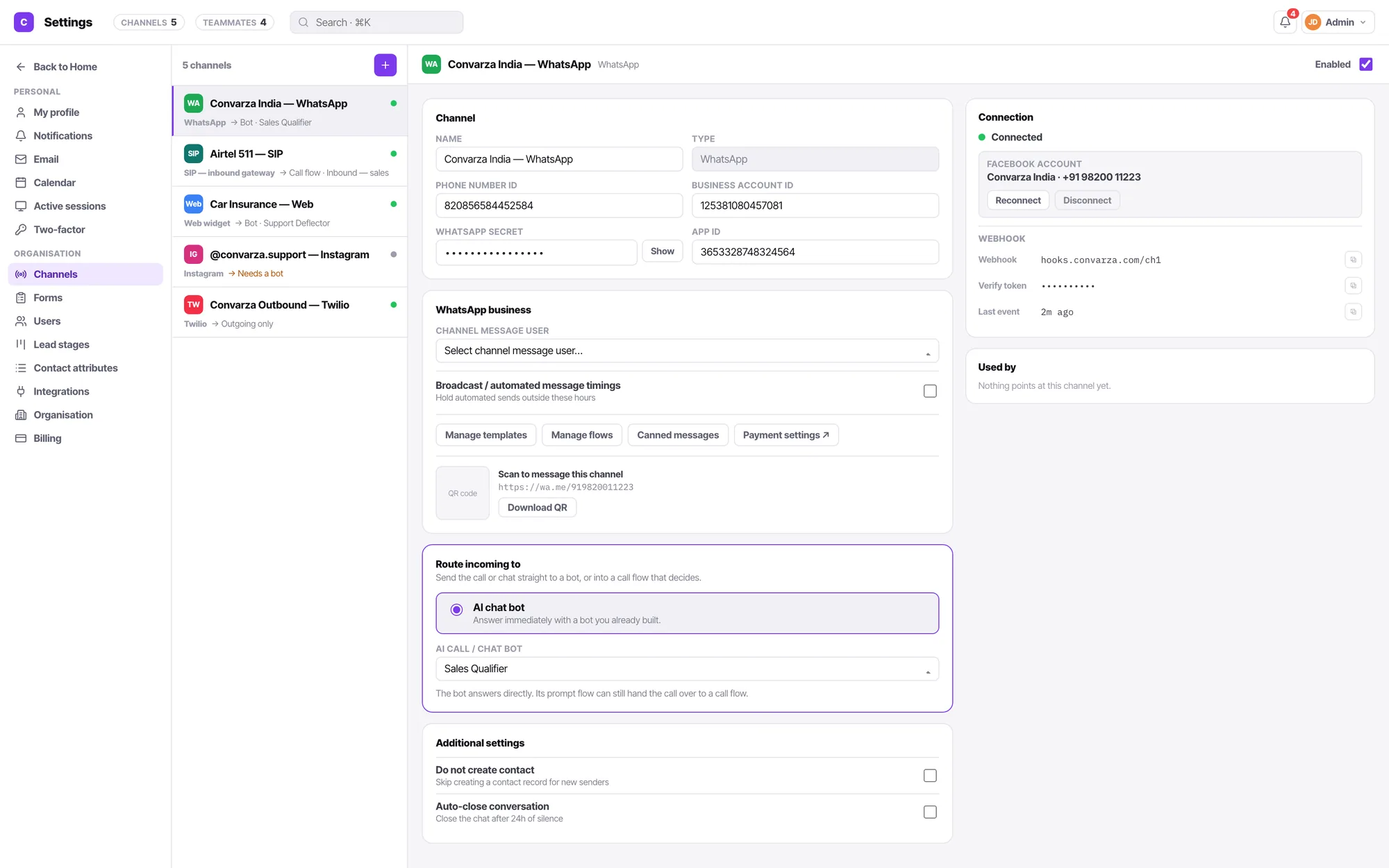
Sends wait for the hours somebody can reply
Broadcast timings live on the WhatsApp channel. A send scheduled outside them waits. That is the difference between a campaign at 9am and a queue of irritated people at 9pm — and it is about the customer's timezone, not your office's.
- Template, audience, timing. Three decisions, and the third is usually the one people skip.
- Every send is a line on the contact's activity feed.
- A reply ends the broadcast for that person and starts a conversation.
Broadcast, campaign or sequence
WhatsApp broadcast
One message, many people, now. An offer, an announcement, a reminder. Replies handled in the inbox.
Campaign
Reach each person in an audience over time, across calls, WhatsApp and email, until they connect.
Sequence
One person, triggered by what they did — and able to move their stage, create a task or book a meeting along the way.
How WhatsApp broadcasting works — from template to delivered reply
WhatsApp broadcasting is not the same as a group chat or an email blast. It is a one-to-many private message — each recipient receives your message as an individual conversation, not as a member of a visible group. Understanding the mechanics is the difference between a campaign that gets read and one that gets reported as spam.
Step 1 — Template approval
Every WhatsApp broadcast outside the 24-hour customer-service window must use a Meta-approved message template. Templates define the category (marketing, utility or authentication), the fixed text, the personalisation variables like {{first_name}} or {{order_number}}, and any call-to-action buttons. Convarza manages template creation, sample submission and approval status — rejections appear in your notification feed with the reason so you can fix and resubmit in minutes.
Step 2 — Audience segmentation
Your broadcast audience is a live segment built from your Convarza contact database — not an uploaded CSV that is already out of date. Filter by pipeline stage, lead source, last activity date, custom attributes or any saved view. Because the segment reads live contact records, "everyone at the Qualified stage who hasn't been contacted in 30 days" is always current, not a snapshot from last month's export.
Step 3 — Scheduled send within permitted hours
Convarza holds every broadcast to the sending window you configure on the WhatsApp channel. If your broadcast is scheduled at 9 pm but your permitted window closes at 7 pm, it waits until the next window opens — protecting your quality rating with Meta and ensuring replies arrive when your team or AI agent can actually respond. Timings respect the recipient's local timezone, not your office clock.
Step 4 — Reply becomes a conversation
When a recipient replies, the broadcast ends for that individual and a private two-way conversation opens in your shared inbox. The AI chatbot assigned to your WhatsApp channel picks it up immediately — answering, qualifying and booking without any human intervention. If the reply needs a person, it escalates with the full broadcast context already attached to the contact record. See how the shared inbox works.
Every send is traced. Each broadcast message appears as an activity line on the individual contact's timeline — sent timestamp, delivery status, read status and reply flag — so your CRM reflects exactly how each person engaged, not just that the campaign went out.
Why WhatsApp broadcasting is no longer optional for customer-facing businesses
Email open rates hover around 20 percent. WhatsApp messages are opened by 98 percent of recipients, typically within three minutes of delivery. The channel where your customers already spend hours every day is the channel your marketing messages should be on — and WhatsApp Business API broadcasting is how you get there at scale without losing the personal nature that makes the platform work.
Unmatched reach and open rates
WhatsApp has over 2 billion monthly active users across 180 countries, making it the single largest messaging platform on earth. Unlike email, which competes with hundreds of other messages in a busy inbox, a WhatsApp message arrives as a personal notification on the device your customer checks most. For time-sensitive offers, appointment reminders and re-engagement campaigns, no other channel delivers faster or more reliably.
Two-way conversations, not broadcasts into a void
Traditional bulk SMS and email marketing are one-way channels. A WhatsApp broadcast from Convarza is the starting point of a two-way conversation. When a customer replies with a question, a purchase intent or a complaint, your AI chatbot or a live salesperson is already in the thread — turning a mass message into an individual relationship with a measurable revenue outcome attached. Pair broadcasts with multi-channel campaigns for even deeper follow-up coverage.
Higher conversion than any other outbound channel
WhatsApp marketing messages consistently outperform email and SMS on click-through rate, reply rate and downstream conversion to sale or booking. Businesses using WhatsApp as a primary marketing channel report 3–4× higher lead-to-sale conversion versus email-only outreach — driven by the immediacy of the medium and the two-way nature of every interaction Convarza enables.
Personalisation at scale
A WhatsApp broadcast template is not a generic mass message — it uses variable placeholders to insert each recipient's name, company, product they browsed, last order date or any CRM field into the message body. The result reads like an individual message sent by a person who knows the customer, even when it is delivered to 50,000 contacts simultaneously.
Global reach in markets where email fails
In markets across South Asia, the Middle East, Latin America and Africa, WhatsApp is the primary digital communication channel — not a supplement to email, but a replacement for it. Businesses that limit their outreach to email are invisible in the markets where WhatsApp is how people communicate with companies. WhatsApp Business API broadcasting changes that without requiring a separate tool or process.
Opt-in integrity and trust signals
WhatsApp's Business API only allows messaging to contacts who have explicitly opted in to receive communications. This opt-in requirement is a feature, not a limitation — it means your broadcast audience is composed entirely of people who want to hear from you, producing engagement rates and customer satisfaction scores that cold-email lists can never match.
Specific ways WhatsApp broadcasting improves business performance
WhatsApp broadcasting is not a vanity metric — it is a revenue and retention engine when the message strategy is anchored to a real business objective. Here are the most common outcomes Convarza customers achieve within the first 90 days of running WhatsApp broadcasts.
- Abandoned cart recovery. An automated WhatsApp message sent 30 minutes after cart abandonment — personalised with the product name and a one-tap checkout link — recovers 15–25% of carts that would otherwise be lost. Email sends the same message to a spam folder. WhatsApp delivers it to the notification bar.
- Appointment confirmation and no-show reduction. A WhatsApp reminder sent 24 hours and 2 hours before an appointment reduces no-show rates by up to 40% compared to no reminder, and by 20% compared to SMS-only reminders — because customers can reply to reschedule inside the same thread.
- Re-engagement of cold leads. Contacts who stopped responding to email months ago frequently re-engage on WhatsApp within hours of a well-timed, relevant broadcast. A segment of leads inactive for 60+ days is a recoverable asset when reached on the right channel.
- Product launch and flash-sale revenue spikes. Instant reach to an opted-in audience on a high-read-rate channel means a product launch broadcast can generate measurable revenue within an hour of the send — a window that email campaigns consistently miss. Use sequences to follow up automatically with non-responders over the days after launch.
- Customer satisfaction and post-purchase follow-up. A WhatsApp message sent after delivery asking for feedback — with a one-tap rating option — generates CSAT response rates several times higher than an email survey, producing more review volume and faster identification of service issues.
WhatsApp vs other channels — why the numbers are different
- 📬 Email average open rate: ~20%
- 📲 WhatsApp average open rate: ~98%
- ⏱️ Average email read time: hours to days
- ⚡ Average WhatsApp read time: under 3 minutes
- 💬 Email reply rate: ~6%
- 💬 WhatsApp reply rate: ~40–60%
- 🛒 Cart recovery rate via email: ~5%
- 🛒 Cart recovery rate via WhatsApp: 15–25%
Figures are industry benchmarks across e-commerce, SaaS, healthcare and financial services verticals.
Protecting your sender quality rating while growing broadcast volume
WhatsApp Business API gives you access to a uniquely engaged audience — and Meta protects that audience with quality controls that can throttle or suspend a number with poor sending behaviour. Understanding the rules is not optional; it is part of the WhatsApp marketing strategy that keeps your campaigns running.
Meta template and category rules
Every broadcast template is reviewed against Meta's template guidelines before it can be used. Marketing templates cannot impersonate Meta, cannot make misleading claims, and must include a valid opt-out option for promotional content. Variables must have sample values that match the variable type. Convarza flags common rejection causes — missing samples, mismatched categories, promotional language in utility templates — before you submit, reducing back-and-forth review cycles.
Number warm-up and messaging tier growth
New WhatsApp Business numbers start at a low messaging tier — typically 1,000 business-initiated conversations per day — that grows automatically as your quality rating remains high. Trying to send to your full list on day one will trigger throttling and can lower your quality rating permanently. Convarza's sending windows and audience segmentation tools make it easy to warm a number correctly: start with your highest-affinity segment, earn a high quality score, then expand volume over weeks rather than days.
Opt-in management and list hygiene
Meta requires that every contact in a WhatsApp broadcast audience has explicitly opted in to receive messages from your business via WhatsApp. Convarza ties broadcast audience segments directly to your contact database, where opt-in status is a trackable field. Attempting to message contacts who have not opted in — or who have opted out — is the fastest route to a quality rating drop and potential number suspension. Keep your opt-in data current and your list clean.
Timing is compliance too. Sending a broadcast at midnight in the recipient's timezone is the single most common cause of spam reports. Convarza's broadcast timing controls on the WhatsApp channel enforce a send window that keeps your messages arriving when they will be welcomed — protecting your quality rating automatically, without relying on manual scheduling discipline.
Page reviewed and updated: — content verified against current Meta WhatsApp Business API policies and Convarza platform features.
WhatsApp marketing FAQ
Do I need an approved template to send a broadcast?
Yes, for anyone outside the 24-hour window — which is everybody a broadcast reaches. Meta reviews templates for category, variable placement and sample values, and rejections are almost always one of those three. Approval and rejection both appear in your Convarza notification feed.
What happens when somebody replies?
The reply lands in the shared inbox as a conversation on the WhatsApp channel, answered by whatever that channel is pointed at — an AI agent immediately, or your team. That is the difference from a broadcast tool: the reply is not an email notification, it is a conversation somebody is already handling.
Can I send at 9pm?
You can, and the replies will arrive at 9pm too. Broadcast timings on the WhatsApp channel hold automated sends to the hours somebody can answer, which is not the same as your opening hours. Set them to when a reply will actually be read.
Who is the audience?
A segment from Contacts, built with the same filter builder as everything else: stage, source, last activity, any attribute you defined, a saved view. Because it is the same record, "everyone at Qualified who has not been contacted in 30 days" is a real, current list rather than an export from last month.
How is this different from a campaign?
A broadcast is one message to many people, now. A campaign is a sequence over time across channels — call, then WhatsApp, then email — that stops per person when they connect. Use a broadcast for an announcement or an offer; use a campaign when the point is to reach each individual.
Are there limits on how many I can send?
Meta sets messaging limits per number that grow with quality rating and volume, and a rejected or reported broadcast lowers them. Convarza shows the WhatsApp channel's state and holds sends to your timings; Meta decides the ceiling. Warm a new number up rather than sending to ten thousand people on day one.
How much does WhatsApp broadcast marketing cost?
Costs have two layers. Meta charges per delivered marketing template — the rate varies by destination country and is published in Meta's pricing table. On top of that, Convarza's plan includes a message quota that covers both chatbot conversations and broadcast sends. There is no separate broadcast fee inside Convarza beyond your plan's message allowance.
Can my AI chatbot automatically book appointments from a WhatsApp broadcast reply?
Yes. When a recipient replies to a broadcast expressing interest in a meeting or service, the AI chatbot assigned to the WhatsApp channel picks up the reply, asks any qualifying questions you configured, checks live calendar availability and books the slot — all inside the same WhatsApp thread, without any human involvement.
How often should I send WhatsApp broadcast messages?
There is no single right answer, but the practical constraint is your Meta quality rating. Sending too frequently to contacts who do not engage will increase block and report rates, which lowers your quality rating and reduces your messaging tier. A useful starting rule: lead with value — a genuinely useful offer, update or reminder — and treat any engagement drop as a signal to increase the gap between sends rather than the volume of messages.
Written about this
Click-to-WhatsApp ads: the part that happens after the click
The ad is the easy part. Most of the money is lost in the minutes after the tap — and in the free 72-hour window most teams do not know they have.
ReadThe festive sale rush: a WhatsApp and calling playbook for Diwali
Your busiest weeks are when WhatsApp is most crowded and customers least patient. What to set up three weeks out, one week out, and in festive week.
ReadMessage templates that get approved, with examples
Six templates you can adapt today — order updates, reminders, callbacks, re-engagement — with the category each should be filed under and why.
ReadIt is all one product
Everything here reads and writes the same contacts, the same conversations and the same calendar. Nothing needs syncing.
Shared inbox
WhatsApp, Instagram, Facebook, Telegram, Viber, LINE, your web widget, SMS and email land in a single queue your team actually works from.
AI chatbot
One bot answers WhatsApp, Instagram, your web widget, SMS and email — and hands the conversation to a person the moment your condition says it should.
AI voice agents
An AI agent answers your line in natural speech, follows your prompt, calls your functions, and hands to a human the moment it should.
Call flows
Ring agents, hand to an AI agent, branch on a condition, run an IVR menu, check business hours, take voicemail — as one flow you can read.
Campaigns
AI call. No pickup, WhatsApp. Four hours on, call again. Still nothing, email. Written as sentences, running from a day to two months, across every channel your customer actually uses.
Sequences
Someone fills a form, or you enrol them by hand. Then a call, a WhatsApp, a wait, an email — and along the way a stage change, a task, a booked meeting. A campaign and a workflow in one.
Email marketing
Send to a segment built from the same contacts, stages and call outcomes the rest of the product uses. Replies land in the shared inbox. One record per person, not a separate list.
Workflows
Not closed in five days, move it to Lost. Owner deactivated, reassign. Form submitted, create the contact. When this happens · only if · then, in order — for records and state, so campaigns and sequences can handle the talking.
Contacts & CRM
Lead stages that mean something, a schema you define yourself, and every call, chat and note on one timeline.
Calendar & booking
Connect Google or Microsoft, publish a booking link with your real availability, and let the AI agent book straight into it.