
Decide what happens on every call, before it rings
Ring agents, hand to an AI agent, branch on a condition, run an IVR menu, check business hours, take voicemail — as one flow you can read.
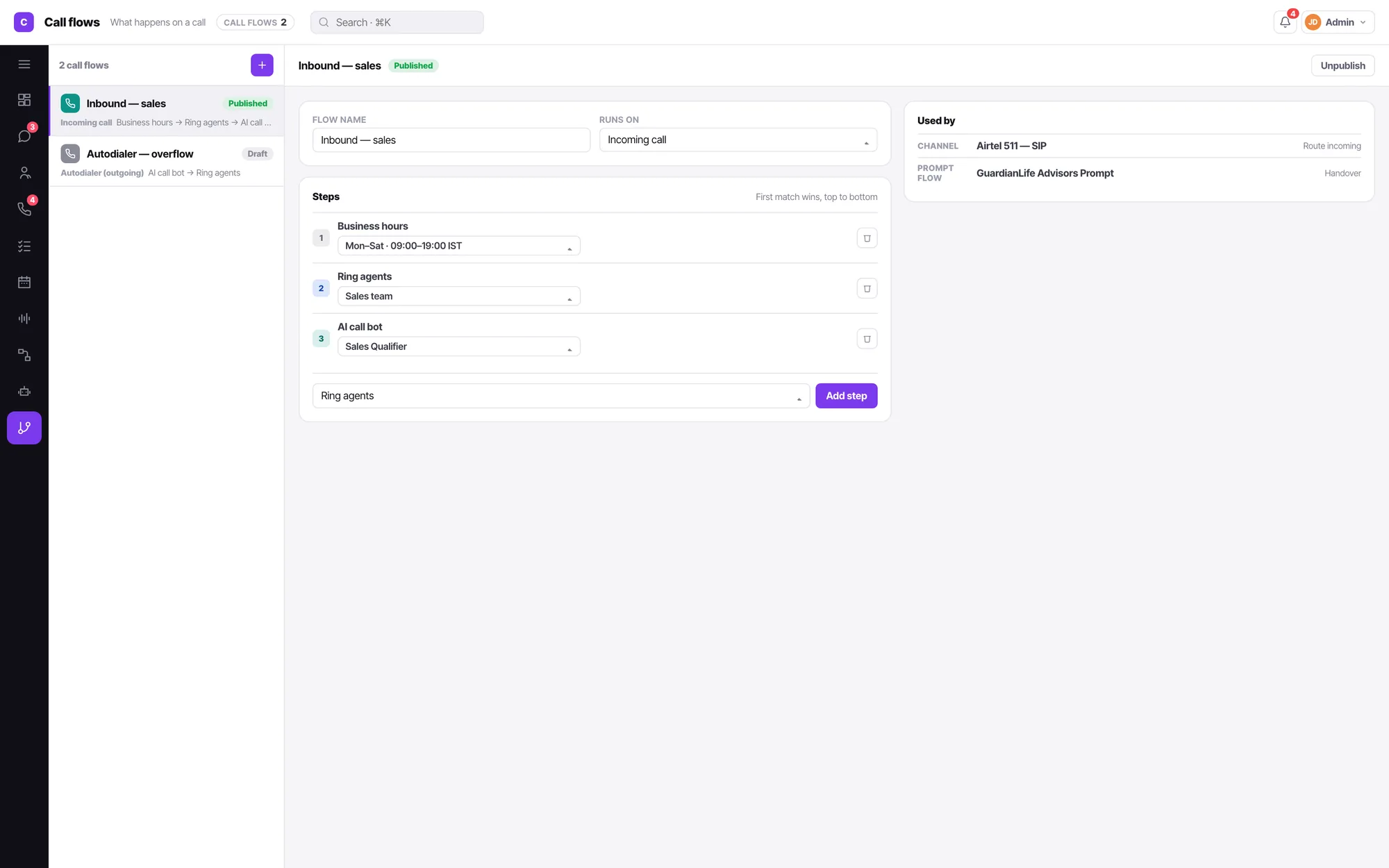
Seven steps is the whole language
A call flow is not a programming environment. It is a short list of things that can happen to a call, arranged in the order they should happen.
Ring agents
Put it through to people, by the rule you set.
AI call bot
Hand the call to a voice agent, mid-flow.
Call flow
Nest another flow — build once, reuse everywhere.
IVR menu
The classic press-1 tree, when it genuinely helps.
Business hours
Branch on whether you are open, from the channel's hours.
Voicemail
Take a message and put it on the contact timeline.
Hang up
End it cleanly rather than leaving a call ringing into nothing.
Condition
If / Else if branches, each with its own chain of steps.
Every flow tells you what depends on it
Flows are meant to be shared — a single "after hours" flow behind six numbers is the point. That only works if deleting one cannot silently break five lines, so every flow shows a Used by list of the channels, campaigns and other flows pointing at it.
- A referenced flow is not silently deletable.
- Publish and unpublish, so a half-built flow never answers a real call.
- Timezone and variables sit on the canvas, not buried three panes deep.
Call flow FAQ
What steps can a call flow contain?
Ring agents · AI call bot · another call flow · IVR menu · Business hours · Voicemail · Hang up. A condition block fans out into labelled branches, and each branch holds its own chain of steps.
What starts a flow?
A trigger: an incoming call, or the autodialer on an outgoing campaign. Everything after that is the flow you built.
Can a flow call another flow?
Yes, and a flow can contain an AI call bot, and that bot can hand back to a flow. The graph is deliberately cyclic — which is exactly why every flow carries a Used by list and a referenced flow cannot be quietly deleted.
Where do business hours come from?
The channel. Restricted call timings live on the line, with a per-day editor, Copy Mon→Fri, one timezone and date exceptions. A flow can check them; a campaign inherits them and can override for itself only.
What happens on a channel with incoming turned off?
It shows no routing at all — it reads "Outgoing only", and its row in the list says so. A flag that is stored but not consumed is a bug, so direction actually changes what you see.
Written about this
An AI voice agent is not an IVR with a nicer voice
Press 1 for sales is a menu. An AI voice agent is a conversation that can end in a booked appointment. The difference shows up in your abandon rate.
ReadSIP trunk, cloud telephony or a carrier number — which line should your AI agent answer?
The line you connect decides your per-minute cost, your control over routing, and how bad a bad day gets. A plain comparison of the three.
ReadYour missed calls are a bigger leak than your website
You measure form conversion to two decimal places and have no idea how many people rang and gave up. Here is how to find out, cheaply.
ReadIt is all one product
Everything here reads and writes the same contacts, the same conversations and the same calendar. Nothing needs syncing.
Shared inbox
WhatsApp, Instagram, Facebook, Telegram, Viber, LINE, your web widget, SMS and email land in a single queue your team actually works from.
AI chatbot
One bot answers WhatsApp, Instagram, your web widget, SMS and email — and hands the conversation to a person the moment your condition says it should.
AI voice agents
An AI agent answers your line in natural speech, follows your prompt, calls your functions, and hands to a human the moment it should.
Campaigns
AI call. No pickup, WhatsApp. Four hours on, call again. Still nothing, email. Written as sentences, running from a day to two months, across every channel your customer actually uses.
Sequences
Someone fills a form, or you enrol them by hand. Then a call, a WhatsApp, a wait, an email — and along the way a stage change, a task, a booked meeting. A campaign and a workflow in one.
WhatsApp marketing
Send an approved template to an audience, hold it to the hours somebody can reply, and let every answer land in the shared inbox — where an AI agent or your team picks it up.
Email marketing
Send to a segment built from the same contacts, stages and call outcomes the rest of the product uses. Replies land in the shared inbox. One record per person, not a separate list.
Workflows
Not closed in five days, move it to Lost. Owner deactivated, reassign. Form submitted, create the contact. When this happens · only if · then, in order — for records and state, so campaigns and sequences can handle the talking.
Contacts & CRM
Lead stages that mean something, a schema you define yourself, and every call, chat and note on one timeline.
Calendar & booking
Connect Google or Microsoft, publish a booking link with your real availability, and let the AI agent book straight into it.