
Find and use a channel webhook URL
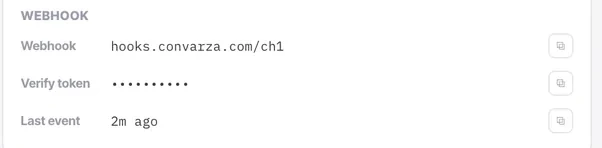
The connection card shows the webhook URL, its verify token and when the last event arrived. It is how a provider tells Convarza that something happened.
A webhook is the inbound half of a channel. Credentials let Convarza talk to your provider; the webhook lets your provider talk to Convarza. They fail independently, which is why "outbound works but nothing arrives" is such a common and confusing symptom.
On channels connected with Facebook sign-in this is handled for you. On manually configured channels it is your responsibility — and it is the step people skip, because nothing anywhere reports an error when it is missing.
Before you start
- Admin access — the webhook lives on the connection card with the credentials.
- Access to your provider's console, where the URL has to be registered.
- A manually configured channel — Facebook sign-in handles its own webhook.
Steps
Open the channel's connection card
Three rows matter: the webhook URL, the verify token, and the last event received. Each copies with one click rather than being selected by hand.
Copy rather than transcribe
These strings are long and a single wrong character produces silence rather than an error. Use the copy buttons.
Paste the URL into your provider's console
Meta, your BSP or your SMS provider each have a field for it. The verify token is the shared string the provider echoes back to prove it is talking to the right place — it is not the access token, and they are easy to confuse.
Subscribe to the right events
Message events are the minimum. Delivery and status events are what make the Inbox's Sent filter meaningful — without them you cannot tell a message that failed from a message nobody answered.
Test inbound specifically, and watch "last event"
Send a message to the channel and watch the last-event time update. This is the single most useful diagnostic on the whole card.
Check it worked
If last event updates when you send a test message, the webhook is working. If it never updates, the provider is not calling it — check the URL, then the event subscriptions, then whether the provider requires the webhook to be verified before it starts sending.
The parts people get wrong
- A channel webhook is inbound to Convarza from a provider. A catch hook is a different thing: it starts a workflow from an outside system. Confusing the two is common.
- Treat the URL as a secret. Anyone who has it can post events to your channel.
The ones people actually ask
What is the difference between the webhook and the verify token?
The webhook URL is where your provider posts events. The verify token is a shared string the provider echoes back to prove it is talking to the right place. They are different values, they are easy to confuse, and neither is the access token.
Which events should I subscribe to?
Message events are the minimum, or nothing arrives at all. Add delivery and status events too — they are what make the Inbox's Sent filter meaningful, and without them you cannot tell a message that failed from a message nobody answered.
Do I need to do this on every channel?
No. Channels connected by Facebook sign-in handle their own webhook. You only own that half on manually configured channels — and on those, forgetting it produces the classic symptom of outbound working perfectly while nothing ever arrives.