
Thirteen ways in. One way to route them.
Nine channels carry chat, four carry voice. They are configured differently because they are different — but every one of them points at a single thing that answers it.
Chat channels
9Messages, from wherever your customers already are. All nine feed one shared inbox, and any of them can be answered by an AI chatbot.
WhatsApp Business
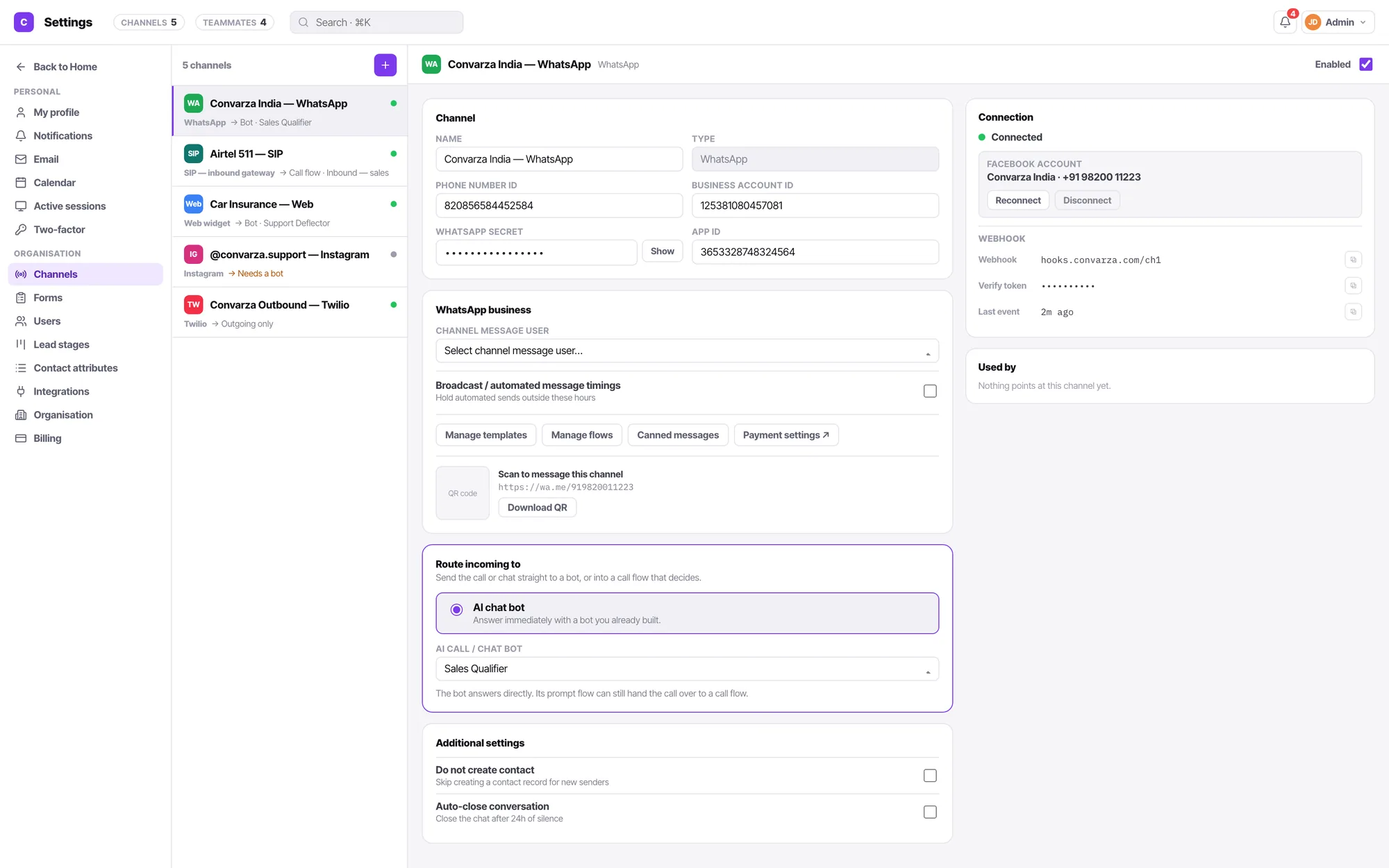
Connect your WhatsApp Business account with one sign-in, or enter the credentials yourself. Templates, flows, canned messages, payments and a QR that opens a chat.
Sign in with Facebook once. Every DM and story reply becomes a conversation your team or your AI agent can pick up.
Facebook Messenger
One Facebook sign-in connects the page. Messages route to a person or an AI agent by the same rule as every other channel.
Telegram
Paste a username and a bot token. That is the whole setup.
Viber
A URI and a token connects your Viber public account to the shared inbox.
LINE
Bot basic ID, token and secret. Connected in a minute.
Web widget
Copy one embed snippet. Allow your domains. Visitors chat, or start a voice call with your AI agent from the page.
SMS
Two-way SMS in the same thread as the customer’s WhatsApp and their last call.
Route support@ to the team or to a bot. Your own 1:1 mailbox and signature stay separate — they are not the same thing.
What every chat channel gets: a bot-or-agents routing choice, do-not-create-contact, and auto-close. What none of them gets: call timings, trunk status or a gateway readout — a chat has no calling hours.
Calling channels
4Voice, over your own carrier. Bring the line and choose what answers it — your agents, an AI voice agent, or a call flow.
Twilio
Point a Twilio number at Convarza and choose what answers it: your agents, an AI voice agent, or a call flow.
Maqsam
Connect your Maqsam account, set the region and direction, and route the line like any other.
SIP — outbound
Username, password, port, server, protocol and media encryption — with registration if your carrier wants it.
SIP — inbound gateway
Give the IP or domain of your gateway and the protocol. Incoming calls hit your flow or your AI agent.
What every calling channel gets: resource, region, direction, restricted call timings, trunk status with a refresh, a gateway config readout, and five advanced settings — forwarded-from numbers, forward-to number, IP/domain match list, ping timeout and allowed concurrent calls.
A channel answers with exactly one thing
An AI bot, or a call flow. Never both, never neither. It sounds like a small constraint. It is the reason you can always answer the question “what picked up?”
- Routing lives on the channel and nowhere else.
- A channel with incoming off reads Outgoing only and shows no routing.
- Adding one starts from a grid of all thirteen type tiles — pick a type and the channel exists, no name-entry modal.
- Connecting is an admin act; routing and hours are a manager’s.
Channel FAQ
What is the difference between a chat channel and a calling channel?
A chat channel carries messages; a calling channel carries voice. They are configured differently on purpose, and never borrow each other’s controls. Chat channels get do-not-create-contact, auto-close and a bot routing choice. Calling channels get resource, region, direction, restricted call timings and five advanced settings. A web widget has no trunk, so it is not offered one.
How many channels can I connect?
Three on Starter, four on Growth, seven on Scale and twelve on Enterprise — of any type, in any mix. All thirteen types are available on every plan. Compare the plans.
How does a channel decide what answers it?
Each channel points at exactly one thing: an AI bot, or a call flow. Never both, never neither. That single rule is why you can always say for certain what picked up. A channel with incoming turned off shows no routing at all — it reads “Outgoing only”.
Who can connect a channel?
An admin, because connecting a line means credentials, a carrier account and a bill. A manager keeps everything operational — routing, calling hours, additional settings, enable and disable, and the health readout — but not the credential fields or the connected-account row.
Can I use my own phone numbers?
Yes. Bring a Twilio account, a Maqsam account, a SIP trunk for outbound or a SIP gateway for inbound. The carrier relationship stays yours.