
A chatbot that knows when to stop
One bot answers WhatsApp, Instagram, your web widget, SMS and email — and hands the conversation to a person the moment your condition says it should.
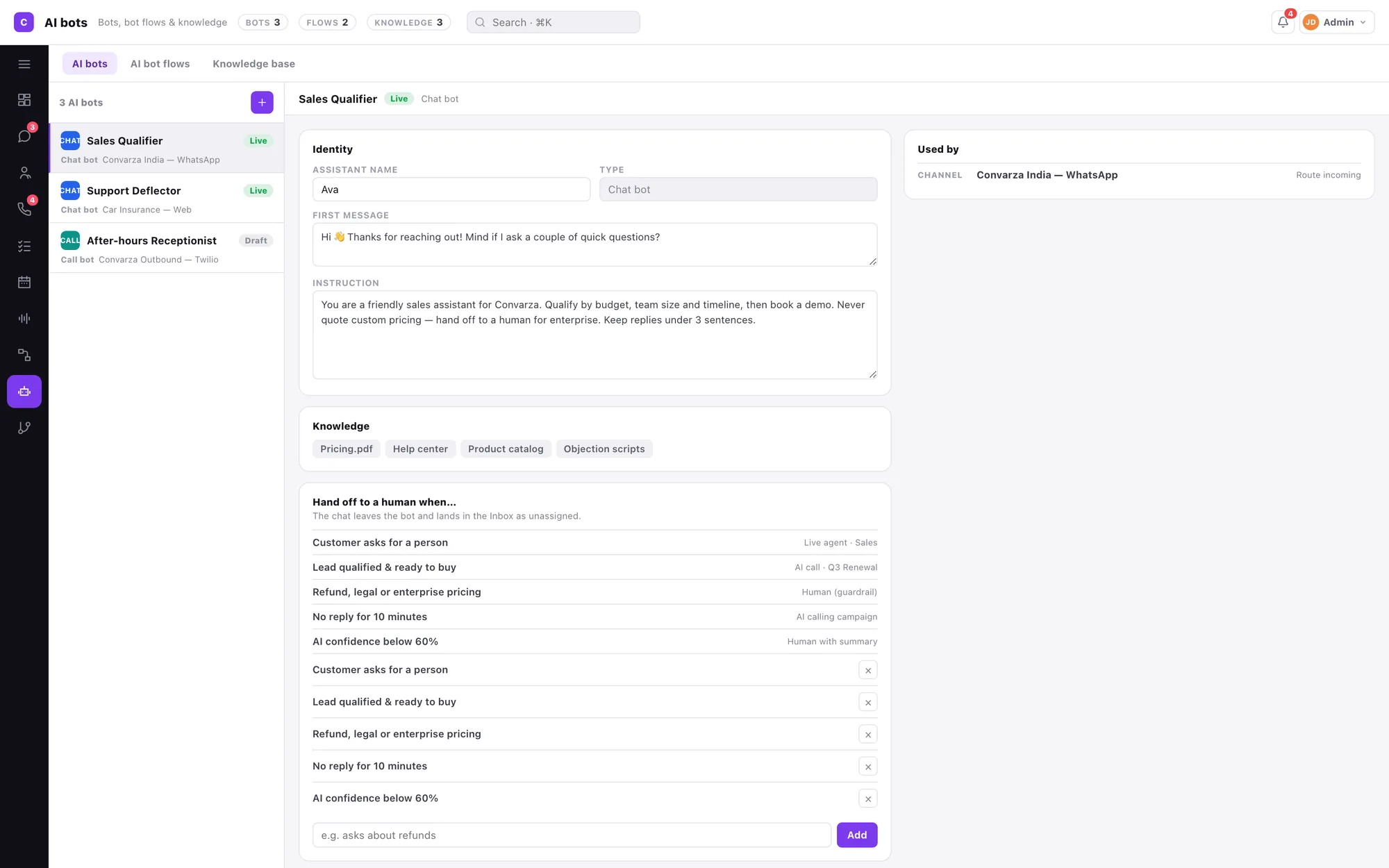
Five things, and none of them is a decision tree
You are not drawing a flowchart of every question a customer might ask. You are describing a job, giving it the material to do it, and saying when to fetch a human.
Prompt & first message
What it is for, how it should behave, and the exact line it opens with.
Knowledge base
PDFs, documents and crawled pages, indexed. One base can serve many bots.
Functions
What it may actually do mid-conversation — look something up, create a record, offer a slot.
Model
Choose per bot. A deflection bot and a qualifier do not need the same thing.
Handover conditions
The named situations that end the bot's turn and put a person in.
Bot flows
Chain bots in order, each step carrying the condition that passes to the next.
The bot's job includes knowing when it is done
Most disappointing chatbot deployments fail at the seam, not the answer. The bot handles the easy majority, then leaves a confused customer with a person who has no idea what was said.
- Each condition names where the conversation goes — a live agent, an AI call, or a human with a summary.
- Handing over means assigning the chat. The AI badge disappears, the bot stops, the thread stays whole.
- Whoever picks up is reading the same contact record, with the note, the last call and the open tasks already beside them.
Point any chat channel at it
A channel answers with one thing — an AI bot, or your agents. Same bot, as many channels as you like.
Chat bots and call bots are siblings, not rivals. A chat bot can hand a qualified lead to an AI calling campaign, and a call bot can send a WhatsApp follow-up. They are the same object with different senses.
One AI chatbot, every messaging channel your customers use
Your customers don't live on one platform — your chatbot shouldn't either. Convarza deploys a single AI chatbot across WhatsApp, Instagram, Facebook Messenger, Viber, LINE and email without duplicating your prompt, knowledge base or handover logic. Build once, respond everywhere.
WhatsApp AI chatbot
WhatsApp is the world's most-used messaging app with over 2 billion active users. Deploy a Convarza AI chatbot on your WhatsApp Business number to handle product enquiries, order tracking, appointment confirmations and support tickets — in the app your customers already have open. Rich media, quick-reply buttons and template messages are fully supported.
Instagram & Facebook Messenger bot
DMs on Instagram and messages on Facebook Messenger convert best when the first reply is instant. Convarza's AI chatbot answers within seconds of a message arriving, qualifies intent, and either resolves the query or routes it to your sales team — turning social media engagement into pipeline before a competitor can respond.
Viber & LINE chatbot
Viber and LINE dominate in South-East Asia, Central Europe and MENA markets. For businesses operating across these regions, Convarza allows the same AI agent to serve Viber and LINE conversations in the local language, with the correct voice and cultural context — without building a separate bot for each market.
Email automation chatbot
Email isn't dead — it's just slow when handled manually. Convarza's AI processes inbound email enquiries, classifies intent, drafts a response from your knowledge base and either sends it automatically or queues it for a one-click agent send. Average first-response time drops from hours to under a minute.
Web widget & live chat
Embed Convarza's chat widget on any page of your website. Visitors get instant AI-powered answers without leaving your site. The widget inherits your brand colours, opens with a personalised greeting and escalates to a live agent the moment the conversation requires human judgement.
Unified inbox across all channels
Every WhatsApp message, Instagram DM, Facebook reply, Viber chat and email lands in one shared inbox. Agents see the full contact history regardless of which channel the customer used last — no tab-switching, no copy-pasting between apps, no lost context at handover.
What an AI chatbot automates that your team shouldn't have to do manually
The highest-value chatbot deployments don't try to automate everything — they identify the high-volume, low-complexity tasks that drain agent time and remove them entirely from the human queue. Here is what Convarza handles automatically, around the clock, on every channel simultaneously.
Instant FAQ and knowledge-base answers
Attach your product documentation, policy PDFs and help articles to the chatbot's knowledge base. When a customer asks a question that exists in any of those documents, the AI locates, synthesises and delivers the answer immediately — no ticket created, no agent interrupted, no wait time.
Automated appointment and slot management
The chatbot checks real-time availability through a calendar function, proposes open slots, confirms the booking and sends calendar invitations — all within the chat thread. Rescheduling and cancellations follow the same automated path, eliminating phone tag between customers and reception.
Proactive outbound messaging
Automation works in both directions. Convarza can send proactive WhatsApp or Viber messages for order dispatch confirmations, appointment reminders, payment due dates and reactivation campaigns — triggered by events in your CRM or e-commerce platform, not by someone hitting send.
CRM record creation and updates
Every qualifying conversation writes structured data back to your CRM. New contact records are created automatically, lead scores are updated mid-chat, and deal stages advance as the chatbot gathers information — so your pipeline reflects reality in real time, not at the end of the day when notes are finally typed up.
No-code automation setup. Every automation — from FAQ responses to CRM writes — is configured in the Convarza function editor without writing integration code. Map an API endpoint, define the parameters the chatbot should collect, and the automation is live on every channel within minutes.
How an AI chatbot qualifies leads and fills your pipeline automatically
A chatbot that only answers questions is a deflection tool. Convarza AI chatbots actively qualify leads — gathering the information your sales team needs, booking appointments directly in their calendar, and passing hot prospects to a human with full context already attached.
Appointment booking through chat
A visitor expresses interest in a demo, a consultation or a service visit. The chatbot asks the qualifying questions your sales process requires — company size, use case, timeline, budget range — then checks your team's live calendar availability and books a confirmed slot, all inside the same conversation. No back-and-forth emails, no scheduling link to go and fill in separately.
Structured information gathering
Before routing a lead to a sales rep, the chatbot collects everything they need: name, company, role, requirement, preferred contact method and urgency. The data fields are configurable per bot — a real estate enquiry captures different fields from a software trial request. Every answer is written to the contact record in your CRM the moment it is given, not after the conversation ends.
Call request and callback scheduling
Some leads prefer to speak rather than type. When a prospect requests a call, the chatbot collects their number and preferred callback window, creates a task in your CRM assigned to the right team member, and sends the prospect a confirmation message with the expected call time — converting a chat enquiry into a scheduled sales call without a human touching the process. You can also route the lead directly to an AI voice agent for an immediate outbound callback.
Lead scoring happens during the conversation. Define qualification criteria in the chatbot's prompt — industry, deal size, decision-making authority, urgency — and the AI assigns a score as information is gathered. Only leads above your threshold are routed to a sales agent; lower-scoring contacts receive automated nurture content until they are ready.
Instant agent notifications when a customer can't wait
The best chatbot deployment knows the exact moment to step aside. Convarza monitors every conversation in real time and triggers immediate human escalation — with a live notification to the right agent — the moment the customer signals urgency, requests a person, or hits a topic the bot is not permitted to resolve.
- Requested agent connect. When a customer types "I want to speak to a person" or any equivalent phrasing, the bot acknowledges immediately, assigns the conversation to an available agent and sends a real-time notification — so the wait is seconds, not minutes.
- Emergency keyword detection. Define trigger words or phrases in your bot's handover conditions — "urgent", "legal", "accident", "cancel account" — and the chatbot escalates instantly, even mid-sentence, without waiting for the customer to finish the thought.
- Ticket priority flagging. Escalated conversations are marked high-priority in the shared inbox so they surface at the top of the queue, regardless of which channel the message arrived on.
- Full context delivered to the agent. The agent opening an escalated chat sees the complete transcript, the contact's CRM record, any information the bot collected and the reason for escalation — so their first message is informed, not a "Hi, how can I help you?" repeat.
What triggers an immediate agent alert
- 🙋 Customer explicitly requests a human agent
- 🚨 Emergency or high-urgency keyword detected
- 💳 Billing dispute, refund or chargeback mentioned
- 📉 Bot confidence score drops below your set threshold
- ⏱️ No resolution after a configurable number of turns
- 🏢 Enterprise or high-value account identifier matched
Each trigger is configurable per bot and per channel. A support bot may escalate after 3 unresolved turns; a sales bot may escalate the moment a specific company name appears.
Page reviewed and updated: — content reflects current Convarza AI chatbot features and supported channel integrations.
AI chatbot FAQ
What is the difference between a chat bot and a call bot?
They are built in the same place, from the same parts — prompt, first message, knowledge base, functions, model — but a bot is created as one kind or the other, because a call bot needs things a chat bot has no use for: voices per language and call timings. Pick the kind when you create it. See AI voice agents for the calling side.
Can one chatbot serve several channels?
Yes, and that is the point. One bot can answer WhatsApp, your web widget and Instagram at once, because it knows nothing about where it is used — you point each channel at it. This is also why the Inbox never lists conversations by bot: a per-bot list would be a fiction.
How does it hand over to a person?
By the chat being assigned. Bot-handled chats are the unassigned ones, marked with an AI badge; assigning one to a teammate takes the bot out and puts a person in. There is no mode to toggle and no chat being handled by both at once.
What decides when it hands over?
Conditions you write on the bot — the customer asks for a person, the lead qualifies, the topic is a refund or enterprise pricing, nobody has replied for ten minutes, confidence drops below your threshold. Each condition says where the conversation goes, so a handover is never a surprise.
Where does it get its answers?
From the prompt you write and from a knowledge base — PDFs, documents and crawled pages, indexed. One knowledge base can serve many bots, and each shows a Used-by list of the bots relying on it.
Can I chain bots together?
Yes. An AI bot flow puts bots in order, each step carrying the handover condition that moves the conversation to the next one — a greeter that qualifies, then a specialist that books.
Can the AI chatbot book appointments directly on Instagram or WhatsApp?
Yes. When a prospect expresses interest on any supported channel — Instagram DM, WhatsApp, Facebook Messenger or your web widget — the chatbot can ask qualifying questions, check live calendar availability through a calendar function, and confirm the booking inside the same chat thread. The confirmed appointment is written to the contact record and a calendar invitation is sent automatically.
What is the difference between an AI chatbot and a live chat widget?
A live chat widget routes every message to a human agent. An AI chatbot handles conversations automatically — answering questions, qualifying leads and booking appointments — and only escalates to a human when your defined conditions are met. The result is 24/7 coverage without 24/7 staffing: the AI handles the majority of conversations, and your agents focus on the interactions that genuinely require human judgement.
Does the chatbot work across WhatsApp, Instagram and Facebook from a single setup?
Yes. You configure the chatbot once — prompt, knowledge base, functions and handover conditions — and deploy it to as many channels as you like. WhatsApp, Instagram, Facebook Messenger, Viber, LINE, your web widget and email all point at the same bot. Changing the prompt or adding a new FAQ to the knowledge base updates the bot's behaviour on every channel simultaneously.
Written about this
How to write a prompt for an agent that talks to customers
Not prompt engineering. Job description writing — scope, tone, refusals, and the three sentences that prevent most embarrassing transcripts.
ReadA knowledge base your AI agent can actually use
Your help centre was written for people who are already reading it. An agent needs the same facts arranged very differently.
ReadHandover: the moment your AI agent should stop talking
Most disappointing deployments fail at the seam, not the answer. Name the conditions in advance and the handover stops being a failure.
ReadIt is all one product
Everything here reads and writes the same contacts, the same conversations and the same calendar. Nothing needs syncing.
Shared inbox
WhatsApp, Instagram, Facebook, Telegram, Viber, LINE, your web widget, SMS and email land in a single queue your team actually works from.
AI voice agents
An AI agent answers your line in natural speech, follows your prompt, calls your functions, and hands to a human the moment it should.
Call flows
Ring agents, hand to an AI agent, branch on a condition, run an IVR menu, check business hours, take voicemail — as one flow you can read.
Campaigns
AI call. No pickup, WhatsApp. Four hours on, call again. Still nothing, email. Written as sentences, running from a day to two months, across every channel your customer actually uses.
Sequences
Someone fills a form, or you enrol them by hand. Then a call, a WhatsApp, a wait, an email — and along the way a stage change, a task, a booked meeting. A campaign and a workflow in one.
WhatsApp marketing
Send an approved template to an audience, hold it to the hours somebody can reply, and let every answer land in the shared inbox — where an AI agent or your team picks it up.
Email marketing
Send to a segment built from the same contacts, stages and call outcomes the rest of the product uses. Replies land in the shared inbox. One record per person, not a separate list.
Workflows
Not closed in five days, move it to Lost. Owner deactivated, reassign. Form submitted, create the contact. When this happens · only if · then, in order — for records and state, so campaigns and sequences can handle the talking.
Contacts & CRM
Lead stages that mean something, a schema you define yourself, and every call, chat and note on one timeline.
Calendar & booking
Connect Google or Microsoft, publish a booking link with your real availability, and let the AI agent book straight into it.