
Connect WhatsApp Business with Facebook sign-in
One click connects the WhatsApp Business account. No credential form to fill in, and the sign-in route configures the webhook for you as well.
There are two ways to connect WhatsApp and they end at the same channel. Sign in with Facebook and Convarza reads the account; or open Manual setup and type the four credentials yourself.
Use the sign-in route unless you have a reason not to. It is not merely faster — it also configures the webhook, which is the half of a WhatsApp connection that people most often get wrong. On a manual setup, if the webhook is not registered on the provider's side, your outbound messages send perfectly and nothing ever arrives, which is a confusing failure to diagnose.
The one thing to sort out before you begin is the number itself. A number can be active in one place at a time, so if it is still live in the WhatsApp Business phone app you must migrate it first.
Before you start
- A WhatsApp Business account with the number already verified on Meta's side.
- A Facebook login with admin rights on that business account.
- A number that is not currently active in the WhatsApp Business phone app.
Steps
Add a WhatsApp channel
Channels → add → WhatsApp. The config pane opens straight away, which means you are configuring a real channel rather than filling in a form that might be rejected at the end.
If you abandon the setup here, the half-configured channel stays in the list showing as not connected. Delete it rather than leaving it — it consumes a channel slot and confuses whoever looks next.
Choose Sign in with Facebook
One click connects the account. Convarza reads the WhatsApp Business account you authorise, so there is nothing to copy and paste and nothing to mistype.
Authorise the correct business account
If your Facebook login administers several businesses, you will be offered a choice. Picking the wrong one is the single most common cause of a channel that connects happily and then never receives a message.
Templates are owned by the business account, so a wrong choice here also shows up later as templates that never appear on the channel.
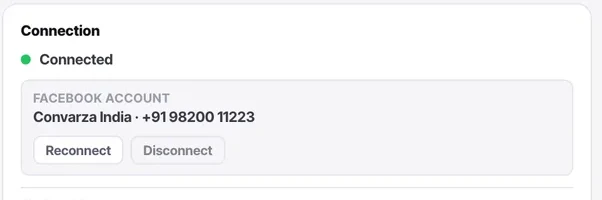
Check the connection card
It should name the Facebook account and the number it connected as. Reconnect and Disconnect sit beside it — both admin-only.
Choose what answers
Point the channel at an AI bot, or leave it to your agents. One decision, on the channel, and you can change it later without reconnecting anything.
Note the webhook, even though you do not need it
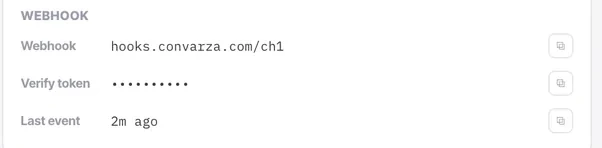
The connection card shows the webhook URL, a verify token, and when the last event arrived. With sign-in, all of this is configured for you.
Last event is the field worth remembering. It is the fastest way in the whole product to answer "is inbound working right now?"
Message the number from your own phone
It should land in the Inbox within seconds, unassigned, with an AI badge if you pointed it at a bot. Then reply, and confirm the reply arrives on your phone.
Test both directions. They fail independently.
Check it worked
Three things should now be true: the connection card names the right account, "last event" updated when you sent your test message, and your reply arrived. If the first two are fine and the third is not, the problem is on the sending side — usually the 24-hour window rather than the connection.
The parts people get wrong
- WhatsApp is the only channel type that gets an extra card: templates, flows, canned messages, payment settings and the QR block. Nothing else has those concepts.
- Template approvals and rejections appear in your Convarza notification feed as well as inside Meta, so you do not have to keep checking Business Manager.
- Outside the 24-hour customer service window you can only start a conversation with an approved template. Inside it you can send free-form.
The ones people actually ask
Do I need my own WhatsApp Business API access?
You can sign in with Facebook and let Convarza read the account, or enter the phone number ID, business account ID, secret and app ID yourself under Manual setup. Both routes end at the same connected channel.
Can one WhatsApp number serve several bots?
No. A channel points at exactly one thing that answers it. Reuse runs the other way — one bot can serve WhatsApp, Instagram and your web widget at the same time.
What happens to my number if I disconnect?
The number and the Meta relationship stay yours. Disconnecting only stops Convarza handling it.