
Connect Viber
Two fields and the channel is connected. Worth having wherever Viber is the default messenger, and identical to every other chat channel once it is in.
Viber matters regionally rather than universally — it is a default messenger across parts of Eastern Europe, the Balkans and South-East Asia, and effectively absent elsewhere. If your customers use it, they use it heavily.
The connection is two fields. Everything downstream — the Inbox, filters, assignment, the contact record, bots — treats a Viber conversation identically to a WhatsApp one. Viber differs only in how it connects.
Before you start
- A Viber public account or bot account, created on Viber's side.
- The URI and token Viber issued when you created it.
Steps
Create a Viber public account
Viber issues a URI and a token when the account is created. Keep both — the token is shown at creation.
Add a Viber channel in Convarza
Channels → add → Viber. As with every type, picking the icon creates the channel and opens its configuration immediately.
Have the URI and token from Viber to hand before you start — the token is shown once when the public account is created.
Enter the URI and token
Two fields, and the channel is connected. The secret is masked with Show so you can verify the paste.
Choose the routing
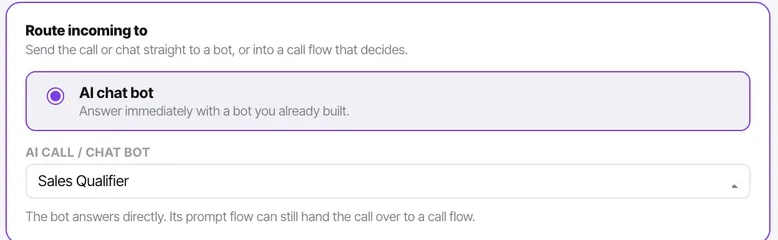
An AI bot, or unassigned for your team. Nothing downstream treats Viber differently from WhatsApp, so whatever routing works for your other chat channels works here.
If Viber is a regional channel handled by a specific group of people, remember that routing to your agents means unassigned — a manager still has to assign it to somebody who speaks the language.
Message the account to test
Once it is in, it is the same conversation, the same filters and the same assignment as every other chat channel — including the AI badge on bot-handled chats.
Check it worked
Confirm the conversation carries a Viber chip in the Inbox and that the contact record was created (or deliberately was not, if you switched that off).
The parts people get wrong
- A Viber public account has its own approval and naming rules on Viber's side. Those are settled before you reach Convarza.
- Nothing downstream treats Viber differently. If a Viber conversation behaves oddly, the cause is almost always a general setting rather than anything Viber-specific.
The ones people actually ask
I did not keep the token when I created the public account.
The token is shown once, at creation. If you no longer have it, re-issue it from your Viber public account settings and paste the new value into the channel. Have both the URI and the token to hand before you start the Convarza side.
Does Viber behave differently from other chat channels?
No. Once connected it is the same conversation, the same filters, the same assignment rules and the same AI badge as WhatsApp or Instagram. Whatever routing works for your other chat channels works here.
Our Viber traffic is in a language only some of the team speak.
Routing to your agents means arriving unassigned, so a manager still has to assign it to somebody who speaks the language — nothing routes by language automatically. If that is a daily problem, point the channel at a bot that handles the language and hands over with a summary.