
Connect Telegram with BotFather
Token-based setup, no OAuth dance. A Telegram bot username and its token are the whole prerequisite — and there is one Telegram rule that catches people out.
Telegram is the easiest of the token-based channels because you create the credential yourself in about a minute, inside Telegram, using its own bot-creation bot.
One Telegram rule causes more confusion than the setup does: a bot cannot start a conversation with someone who has never messaged it. That is Telegram's policy, not Convarza's, and it means Telegram is an inbound support channel rather than an outbound one. Do not plan a Telegram broadcast campaign around it.
Before you start
- A Telegram account.
- Two minutes inside the Telegram app.
Steps
Create a bot with BotFather
In Telegram, message @BotFather and send /newbot. It asks
for a display name — what customers see — and then a username, which must be unique across
all of Telegram and must end in bot.
It replies with a token that looks like a long number, a colon, then a string of letters.
Copy the token straight away
It is shown once in that chat. If you lose it, /token in BotFather issues a
new one — which immediately invalidates the old one and breaks the channel if it was
already connected.
Set the bot's description and picture while you are there
/setdescription and /setuserpic in BotFather. This is what a
customer sees before they press Start, and a bot with no description looks abandoned.
Add a Telegram channel in Convarza
Channels → add → Telegram. Username and Token are the only two fields. Enter the
username without the leading @.
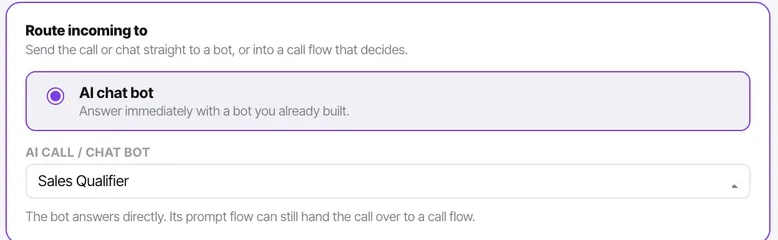
Point it at a bot or your team
The same routing decision every channel makes: one thing answers.
Telegram traffic is usually support rather than sales, because a bot cannot start a conversation on Telegram — everybody who reaches you here came looking. That makes it a strong candidate for a knowledge-base-backed bot.
Message your bot to test
Search for the username in Telegram, press Start, and send anything. Pressing Start is required — a Telegram bot receives nothing until the user has started the conversation.
Check it worked
Your message should appear in the Inbox with a Telegram chip. If it does not, the two likely causes are that you never pressed Start, or that the token was regenerated after you pasted it.
The parts people get wrong
- Regenerating the token in BotFather silently breaks the channel. Nothing in Convarza can detect it in advance — the channel simply stops receiving.
- The username is permanent and unique across Telegram. Choose one you are happy to keep.
The ones people actually ask
I lost the token BotFather gave me.
Send /token to BotFather and it will issue a new one. Be aware that this immediately invalidates the old token, so if the channel was already connected it will break until you paste the new value in.
I messaged the bot and nothing arrived in Convarza.
Check that you pressed Start. A Telegram bot receives nothing at all until the user has started the conversation — this is Telegram's rule, not ours, and it is the most common cause of a Telegram channel that looks broken on the first test.
BotFather rejects my username.
Two rules. It must end in bot, and it must be unique across the whole of Telegram — not just your organisation. The display name is separate and has neither constraint, so put the readable name there.
Can the bot start a conversation with a customer?
No. On Telegram everybody who reaches you came looking, which is why this channel is support rather than sales traffic and why it suits a knowledge-base-backed bot particularly well.