
Read channel health and fix a disconnection
Most outages are visible on the connection card before customers notice. How to read it, read the whole estate at once, and what breaks per channel type.
A dead channel is the most expensive silent failure in the product, because it looks exactly like a quiet week. Nobody complains, the queue is calm, and enquiries are going into a void.
There are two places to look. The channel estate on Home shows every channel, its kind, its health and its conversation count in one table — which is the thirty-second version. The connection card on an individual channel is where you diagnose.

Before you start
- Manager or admin access to read health and toggle a channel.
- Admin access if credentials turn out to need re-entering.
Steps
Start from the channel estate on Home
Every channel, its kind, its health and how many conversations it is carrying. A channel showing Not connected here is the whole answer to "why has that gone quiet".
Make reading this table somebody's Monday habit. It takes half a minute.
Open the channel and refresh, rather than trusting the page
Press refresh before you read anything. Whatever the page showed when it loaded is history, and on a calling channel the trunk reading is the one that matters.
Check it is not disabled
Enable and disable is a manager action and is very easy to leave switched off after testing. A disabled channel is not a broken one, and it will not report an error.

For token channels, suspect the token
Telegram, Viber and LINE all break the same way: the token was regenerated or expired somewhere else. Re-issue it and paste the new value in.
LINE additionally expires short-lived tokens on a schedule, so a LINE channel that dies after a few weeks usually has a short-lived token.
For SSO channels, suspect the authorisation
WhatsApp, Instagram and Facebook lose access when the authorising person leaves, changes their password, or has their permissions on the business account removed.
This is why connecting Meta channels with a personal account belonging to somebody who might leave is a bad idea. Reconnect with an account that still has rights.
For carrier channels, take the readout to the carrier
Trunk status red with unchanged credentials usually means something moved on their side — an IP allow-list, a certificate, or your permitted concurrency.
The gateway config readout on the connection card is what you send them.
Check "last event" on manually configured channels
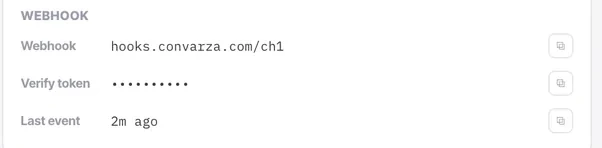
If the connection is green but "last event" has not updated while customers are messaging you, the connection is fine and the webhook is not.
Check it worked
After any reconnection, send a real message in and confirm it arrives — do not trust a green dot alone. Then check whether anything queued up while the channel was down and needs answering.
The parts people get wrong
- Only an admin can re-enter credentials. A manager can see health, toggle the channel and change routing, but cannot fix an authentication failure.
- A channel that has been dead for a week has a week of enquiries that never arrived. Once it is fixed, tell whoever handles those customers.
The ones people actually ask
The page says connected but customers say they cannot reach us.
Press refresh before you believe anything. A status rendered when the page loaded is history, not evidence about now. Then check last event on a manually configured channel: if the connection is green but that time has not updated while customers are messaging you, the connection is fine and the webhook is not.
A channel has gone quiet and nothing shows as broken.
Check whether it is simply disabled. Enabling and disabling is a manager action, it is very easy to leave switched off after testing, and a disabled channel is not a broken one — it will never report an error. Start from the channel estate on Home, where the disabled count is shown alongside the live one.
How often should somebody look at this?
Weekly, as a habit, rather than when something feels wrong. The failures this catches are silent: a dead channel looks exactly like a quiet week, so waiting for a symptom means waiting for a customer to complain. Reading the channel estate takes about thirty seconds.