
Catch hooks versus channel webhooks
Two URLs, opposite jobs, endlessly confused. Five minutes here saves a long afternoon.
Both are URLs. Both are inbound. They do completely different jobs, and the confusion between them causes a specific and very frustrating debugging session where somebody checks the wrong one repeatedly.
The fastest way to keep them straight is by what breaks. If messages are not arriving on a channel, that is a channel webhook. If a workflow is not starting, that is a catch hook.
Before you start
- Admin access, since both URLs sit with credentials.
- A channel or a workflow you are actually trying to debug.
Steps
A channel webhook is how a provider talks to Convarza
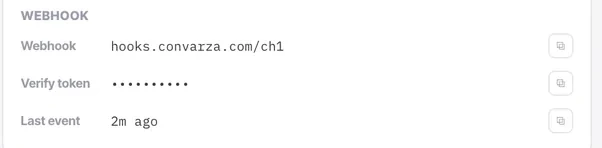
Meta, your BSP or your SMS provider posts to it when a message arrives. It lives on the channel's connection card and you paste it into their console.
A catch hook is how anything else starts a workflow
Your website, your ERP, Zapier or Make posts to it and a workflow runs. It belongs to the workflow, not to a channel.
Tell them apart by the symptom
Messages not arriving on a channel → channel webhook. A workflow not starting → catch hook. That one rule resolves nearly every case.
Know which one is your responsibility
Channels connected by Facebook sign-in handle their own webhook. You only own that half on manually configured channels. A catch hook is always yours.
Treat both as secrets
Anyone with either URL can post to it, so both belong wherever you keep credentials rather than in a shared document.
If one leaks, treat it as a credential incident: regenerate it and update whatever was using it, in that order.
Test each in the right direction
For a channel webhook, send a message to the channel and watch "last event". For a catch hook, post from the outside system and check the workflow ran.
Check it worked
Write both URLs down in your integration notes with a one-line description of what each does. The next person to debug this will be very grateful, and it may be you.
The parts people get wrong
- A channel webhook has both a URL and a verify token, and neither is the access token you entered as a credential. All three are long strings from the same console, which is why they get transposed.
- "Last event" on the connection card is the single fastest way to tell whether a channel webhook is working.
The ones people actually ask
How do I tell which one I need?
By the symptom. Messages not arriving on a channel is a channel webhook. A workflow not starting is a catch hook. That one rule resolves nearly every case.
Which one is my responsibility?
A catch hook is always yours. A channel webhook is only yours on manually configured channels — ones connected by Facebook sign-in handle their own.
Are they secrets?
Both. Anyone with either URL can post to it, so they belong wherever you keep credentials rather than in a shared document. If one leaks, treat it as a credential incident: regenerate it, then update whatever was using it.