
Set up WhatsApp payments and take money inside the chat
What WhatsApp Payments really requires: a supported gateway, a named payment configuration and an order_details message — plus the limits that bite mid-sale.
In-chat payment removes the worst drop-off point in a chat sale: the moment you send a link and the customer leaves the conversation to open a browser. Instead the customer taps Review and Pay inside the thread, pays, and stays where they were.
Almost none of this is configured in Convarza, and being clear about that saves you a wasted afternoon. Meta decides where payments are available and which gateways are supported. Your payment gateway takes the money. Convarza holds the channel the message is sent on and shows the transaction against the contact. Get the Meta half right first — everything below assumes you have.
Before you start
- A WhatsApp channel connected through the WhatsApp Business Platform (Cloud API). The consumer WhatsApp Business app cannot do this.
- A business entity registered in a market where WhatsApp Payments is available to businesses — in practice India, where the flow described here applies.
- An account with Razorpay, PayU, BillDesk or Zaakpay for the deep-integration route, or any gateway that can generate a UPI Intent for the other one.
- Your products in a Meta catalog. The payment message is built from catalog items.
- Admin access in Convarza — every credential in the product is admin-only.
Steps
Confirm payments are actually available to you before anything else
This is the step that saves the wasted afternoon, and it is not a formality. Native in-chat business payments are a market-by-market arrangement between Meta, local regulators and local payment infrastructure — not a global feature with a switch.
India is the market where the full flow described in this tutorial works. Brazil went the other way: Meta discontinued direct card payments to businesses on WhatsApp on 15 January 2026, leaving Pix, boleto and payment links. Elsewhere, the honest answer for most businesses is a payment link sent in the chat, which is a different thing and needs no setup here.
Check Meta's current availability for your country before you design a sales process around this. If you are not in a supported market, stop here — nothing in Convarza changes that.
Choose your integration model — this decides everything downstream
There are two, and they are not variations on a theme. Pick deliberately.
Payment gateway deep integration. The customer pays without leaving WhatsApp. Supported gateways are Razorpay, PayU, BillDesk and Zaakpay — that is the list, and a gateway outside it cannot be used this way. This route natively supports UPI, cards, netbanking and wallets, and it is the only one that gets you refunds through the WhatsApp APIs and native payment-status webhooks.
UPI Intent. The customer taps, their default UPI app opens with the payment pre-filled, they pay there and come back. This works with any gateway that can generate a UPI Intent, so it is the route when yours is not one of the four. The trade is real: UPI only, no cards or netbanking, and you need your own VPA IDs, Merchant Category Code and Processing Category, plus server-to-server UPI Intent calls and your own webhook handling.
If you have a choice, deep integration is the better customer experience and the less work. If your gateway is not one of the four, you are choosing UPI Intent by default.
Link the gateway to Meta and create a named payment configuration
Done in Meta Business Suite, not in Convarza, and it needs the person who owns the payment gateway account to authorise the link — usually not the same person as your WhatsApp admin. Line them up before you start.
The output of this step is the thing everything else refers to: a payment
configuration with a name you choose, up to 60 characters. Every payment message
you ever send names that configuration, so give it something readable and stable —
razorpay-india-live rather than config1. Renaming it later means
changing every message that references it.
Make a second one for test credentials if your gateway offers them, named so nobody can confuse the two at a glance.
Open the WhatsApp card in Convarza and enter the payment settings
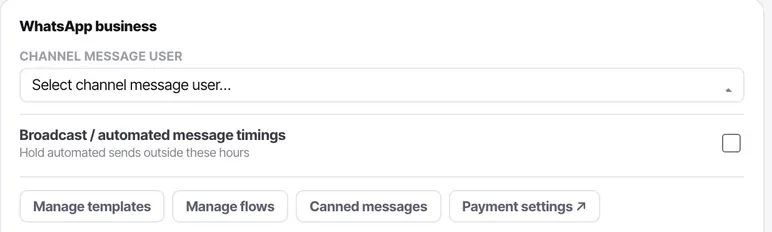
Payment settings sit on the WhatsApp channel's own card, beside templates, flows, canned messages and the QR block — the features no other channel type has. Admin-only, like every credential in the product.
Enter the payment configuration name exactly as you created it in Meta Business Suite, and select the type you set up: the gateway for deep integration, or UPI Intent. A configuration name that is one character out fails at the moment a customer tries to pay, which is the worst possible time to find out. Paste it; do not retype it.
Learn the shape of the payment message before you send one
The payment message is an order_details interactive message, and it has four
parts: an optional header image (Meta falls back to the first product's
image), a required body of up to 1,024 characters, an optional
footer of up to 60, and the action — the Review and Pay
button carrying the payment details.
The fields inside that action are where mistakes live:
reference_id— your order number. Maximum 35 characters, letters, digits, underscores, dashes and dots, and it must be unique per message. Reusing one is a rejected message.type—digital-goodsorphysical-goods. Physical goods additionally require beneficiary details: name, address and postal code.currency—INR. That is the whole list today.total_amount— sent as a value multiplied by an offset, and for INR the offset must be 100. ₹499.00 is49900. Getting this wrong by a factor of a hundred is the single most expensive typo available here.
Two limits worth knowing before you design around them: a payment message expires at a timestamp you set, with a minimum of 300 seconds, and you may include at most 10 items when using custom item images.
Know the ceiling on UPI, and what it means for your basket
UPI transactions are capped at ₹5,00,000. For most businesses this never binds; for B2B orders and high-value retail it does, and it fails at the customer's end where you cannot see the reason.
If your average order sits anywhere near that, use the deep-integration route so cards and netbanking are available as alternatives, and say plainly in the message body what to do if the payment will not go through. Bank and card limits are set by the customer's own issuer and are frequently lower than UPI's ceiling.
Handle the status webhooks, but verify every one
Payment status arrives by webhook as pending and then captured
once the gateway has the money. Individual transactions carry success,
pending or failed with a timestamp and the method used.
Meta is explicit that you must not rely on these webhooks alone, for security reasons. Before you fulfil anything, confirm the payment with the payment lookup API — an authenticated call to Meta asking what actually happened. A webhook is a prompt to go and check, not a receipt.
This is the step that separates a working integration from one that ships goods against a forged notification. Build it before you go live, not after the first incident.
Send order status updates as the order moves
An order starts at pending. From there you send order_status
messages to move it to processing, partially_shipped,
shipped, completed or canceled.
Two rules bite. completed and canceled are terminal
— nothing moves after them, so do not mark an order complete while anything is still
outstanding. And canceled is only permitted when no successful payment exists;
once you have the money, a cancellation is a refund, which is a separate
operation and only available on the deep-integration route.
Decide now who sends these and from what. If your order system already knows when something ships, a workflow catch hook is the right place for this rather than somebody remembering.
Write down who may request money, and put it somewhere findable
A payment request sent by mistake is much harder to unwind than a wrong message, and the customer experience of receiving one is bad. Agree the rule before launch: which roles may send one, up to what value, and who authorises anything above it.
Convarza does not enforce a per-agent payment ceiling, so this is a process control rather than a product one. Written down and known beats assumed.
Test with a real payment, all the way to settlement
Not a test-mode transaction — a real one, for ten rupees, on a real phone. Then follow it the whole way:
- The message rendered correctly and the amount was right (check the offset).
- The webhook arrived, and your lookup call confirmed it independently.
- The transaction appears on the contact's activity feed in Convarza.
- It reconciles against your gateway's dashboard, to the rupee.
- Your
order_statusupdate reached the customer. - You can refund it — try, on the deep-integration route, and watch it land.
Then repeat the test with a payment you deliberately fail, by cancelling in the UPI app. The failure path is the one your customers will find, and it is the one nobody tests.
Check it worked
Run one real transaction end to end, including a refund, before any customer sees this. Payments are the one area of the product where a partly working setup is worse than none at all — a broken message loses you a sale, but a payment you cannot confirm or refund loses you the customer.
Then check the two things that break quietly over time: the gateway authorisation in Meta Business Suite, which ends when the person who granted it loses access, and your payment configuration name, which nothing in Convarza validates.
The parts people get wrong
- Availability, supported gateways, transaction limits and settlement are set by Meta and your payment gateway. Convarza surfaces the settings and records the transaction; it does not change their rules and cannot raise their limits.
- The ₹5,00,000 UPI cap and the 100 offset for INR are Meta's current documented values. Both are the kind of number that changes — confirm against Meta's documentation before you rely on either in code.
- Refunds are available through the WhatsApp APIs on the payment-gateway deep-integration route. On UPI Intent, refunds are your gateway's problem, handled in their console.
- Disputes and chargebacks are between you and your gateway. Nothing about them appears in Convarza.
- Brazil: direct card payments to businesses on WhatsApp ended on 15 January 2026. Pix, boleto and payment links continue, and one-click card payments remain for returning customers.
The ones people actually ask
Can I use WhatsApp Payments with the WhatsApp Business app rather than the API?
No. Accepting business payments through the order_details flow requires the WhatsApp Business Platform (Cloud API), which is what Convarza connects to. Meta has separately offered QR-code payments to small businesses in the consumer Business app in some markets, but that is a different product and is not what this tutorial covers.
Which payment gateways work with WhatsApp Payments?
For the deep integration, where the customer pays without leaving WhatsApp: Razorpay, PayU, BillDesk and Zaakpay. For UPI Intent, where the customer's UPI app opens and then returns them to the chat, any gateway that can generate a UPI Intent will do.
Why did my payment message get rejected?
The three usual causes are a reference_id that is not unique or exceeds 35 characters, a payment configuration name that does not match the one in Meta Business Suite, and a total_amount sent without the required offset of 100 for INR. Check those three before anything else.
Can I take payments in a currency other than INR?
Not through this flow. INR is the only currency documented for it. For other markets, send a payment link from your gateway inside the conversation instead — it works everywhere and needs no setup on the channel.
How do I refund a payment taken through WhatsApp?
On the payment-gateway deep integration, through the WhatsApp payments refund endpoint. On UPI Intent, in your payment gateway's own console. Either way, send an order_status update afterwards so the customer sees it in the thread.