
The AI bot is not answering
Almost always one of six things, and the first one accounts for most of them.
One cause dominates this list by a wide margin: the channel is not pointed at the bot. Check that first, every time, before anything else.
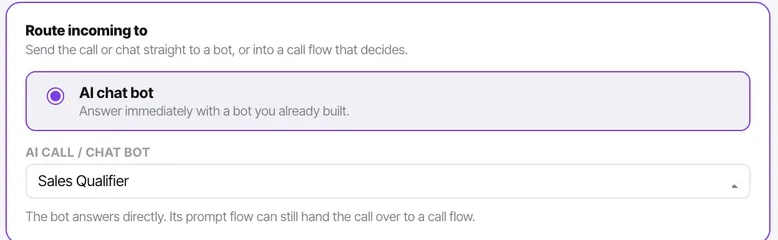
A channel routed to your agents accepts conversations perfectly happily and lets them sit unassigned — which, from the outside, looks like a bot that has stopped working.
Before you start
- The channel list open, so you can read what each channel answers with.
- Manager or admin access to see unassigned conversations.
Steps
Check the channel is pointed at the bot
A channel answers with exactly one thing. If it is set to your agents, chats arrive unassigned and nothing answers them.
The channel list states this on every row, so walking that list is the fastest possible version of this check.
Check whether the conversation is assigned
Assignment is the handover — the moment a human is assigned, the bot stops permanently for that thread. A conversation somebody picked up will not go back to the bot.
Check the channel is connected at all
If nothing is arriving, the problem is the channel rather than the bot. Send yourself a test message.
Check your AI message allowance
AI messages are metered: 1,200 a month on Starter up to 40,000 on Enterprise. If the allowance is exhausted, the bot stops sending while your team is unaffected — which is a confusing pattern until you know to look.

For a call bot, check its call timings
A bot outside its permitted timings does not answer, and the call falls through to whatever is next in the flow.
Test the bot directly
Use the web widget's start-call test card, which exercises a bot without dialling or messaging anything. That isolates the bot from every channel question.
Check it worked
Once it is answering, send three messages that should each trigger a different handover condition. A bot that answers but never hands over is a different and worse problem.
The parts people get wrong
- Agents cannot see bot-handled conversations at all. An agent reporting "the bot is not working" is inferring it from silence — have a manager check with assignee set to None.
- A bot in Draft answers nothing. Check its state as well as the channel's routing.
The ones people actually ask
What is the first thing to check?
That the channel is actually pointed at the bot. A channel set to your agents accepts chats happily and leaves them unassigned, where nothing answers them. The channel list states the routing on every row, so walking that list is the fastest version of this check.
The bot answered earlier in the conversation and then stopped.
Somebody was assigned. Assignment is the handover — the moment a human is assigned the bot stops permanently for that thread, and a conversation somebody picked up will not go back to it.
The bot stopped for everyone but agents are unaffected.
Your AI message allowance is exhausted. Messages your team types are not metered, so this produces exactly that pattern — confusing until you know to look for it.