
What the AI badge means
One small marker answering the only question that matters at a glance: is a person or a bot talking to this customer right now?
The AI badge is the smallest feature in the Inbox and one of the most useful, because it makes a state visible that most products leave you guessing about.
It also encodes the product's central rule: unassigned and bot-handled are the same state. Not two states that usually coincide — the same one.
Before you start
- A channel pointed at a bot, so there are badged conversations to look at.
Steps
Look for the badge on the conversation row
An unassigned chat is a bot chat, and it carries an AI badge beside the preview text.
Because it sits on the row rather than inside the conversation, you can read a whole list at a glance and see immediately how much of your queue the bot is holding.
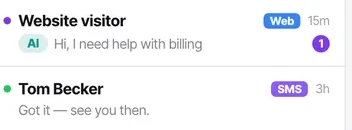
Read it as "nobody has taken this"
The product does not model bot-handled and unassigned separately, because they are not separately true. That is why there is no "hand back to bot" action — there is nothing to hand back to.
Assign to make it disappear
The moment a human is assigned, the badge goes and the bot stops — permanently, for that conversation.
There is no third state and nothing to toggle, which is exactly why the badge can be trusted: if it is there, the bot has it; if it is not, a person does.
Use assignee: None to see all of them at once
That list is your bot's live workload. If it is growing while your unreplied count grows too, the bot is not coping and nobody has noticed.
Check it worked
Compare the no-agent count in the top bar against your unreplied count. Both high means the bot is accepting conversations it cannot finish, which is a handover conditions problem rather than an Inbox problem.
The parts people get wrong
- Agents cannot see badged conversations at all, because unassigned traffic is not theirs. An agent reporting "the bot is broken" is inferring it from silence — have a manager check.
- The no-agent count in the Inbox header is the same population seen from above — every badged conversation, counted. If it climbs while unreplied climbs too, the bot is taking on more than it can finish.
The ones people actually ask
Can I hand a conversation back to the bot?
No, and there is nothing to hand back to. The badge means nobody has taken the conversation — assigning a person is what stops the bot, permanently for that thread. Unassigning returns it to the unassigned state where the bot may answer again mid-thread, which is rarely what you want after a person has been involved.
The number of badged conversations is climbing. Is that good?
Only if your unreplied count is not climbing with it. High bot-handled with high unreplied is the dangerous combination: the bot is accepting conversations it cannot finish and nobody is catching them. Filter to assignee None and read ten of them.
My agents say they cannot see any badged conversations.
Correct. Badged conversations are unassigned, and agents only see what is assigned to them. A manager needs to look with the assignee filter set to None.