
Point a channel at one thing that answers it
A channel answers with exactly one thing — an AI bot, a call flow, or your agents. Never both, never neither, which is why you always know what picked up.
This is one control and one decision, and it is probably the most consequential setting in the product. It is also the first thing to check when somebody reports that a bot is not answering — a channel still pointed at your agents will cheerfully accept conversations and let them sit unassigned forever.
The constraint is deliberate: one thing answers. Not a priority list, not a fallback chain. That is what makes "what picked up this call?" a question with an answer.
Before you start
- A connected channel.
- A bot or a call flow to point it at, if you want one.
Steps
Open the channel and find the routing card
It is one control on the channel itself, not a rules engine somewhere else. Managers can change it — you do not need an admin for this.
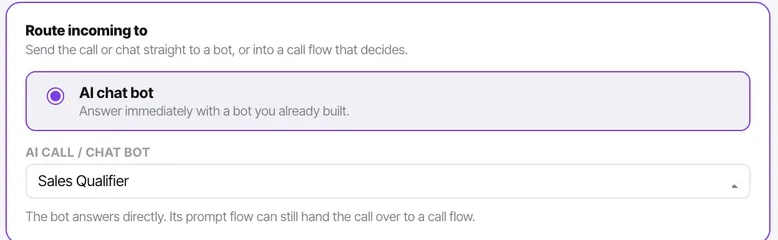
For a chat channel, choose a bot or your agents
Point it at an AI bot and incoming chats are answered immediately and carry an AI badge in the Inbox. Leave it on your agents and chats arrive unassigned for a person to take.
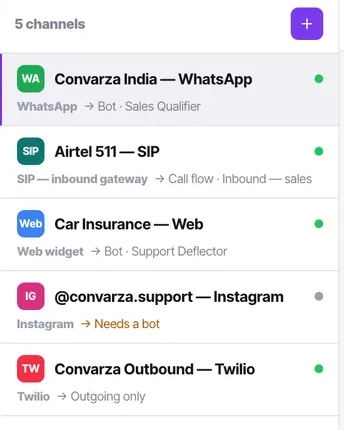
Both are valid. What is not valid is leaving it unrouted and assuming somebody is watching — the channel list will show "Needs a bot" and conversations will pile up invisibly to your agents.
For a calling channel, choose a voice agent or a call flow
A voice agent picks up and talks. A call flow decides what happens first — check business hours, ring agents, run an IVR menu — and can hand to the bot as one of its steps.
Use a flow whenever the honest answer is "it depends"
If what should happen depends on the time of day, or on which option the caller picks, or on whether anyone is free, you want a call flow rather than a bot. The flow can still hand to the bot; the bot cannot check your business hours.
Reuse one bot across many channels
Point WhatsApp, the web widget and Instagram at the same bot. Reuse runs that way round — one bot, many channels — never one channel, many bots.
This is also why the Inbox never lists conversations by bot: with one bot serving three channels, a per-bot list would be a fiction.
Confirm it from the channel list
The list shows what each channel answers with, by name. Walking that list is the fastest audit in the product, and it catches the channel somebody connected in a hurry and never routed.
Check it worked
Send a message or place a call to the channel and confirm the right thing answers. If you pointed it at a bot, the conversation should appear in the Inbox unassigned with an AI badge, and the bot should have replied with its first message.
The parts people get wrong
- Changing the routing does not affect conversations already in progress. A chat a person has been assigned stays with that person.
- A calling channel with incoming disabled shows no routing at all, because nothing will arrive on it to route.
- Assigning a conversation to a person takes the bot off it permanently for that thread. Routing decides who answers first, not who owns it forever.
The ones people actually ask
Can a channel be answered by two bots?
No, and the constraint is deliberate. One channel answers with exactly one thing, which is what makes it always possible to say what picked up. If you need different behaviour in different situations, use a call flow, which can decide and then hand to a bot as one of its steps — or a bot flow, which chains bots in order.
What happens to conversations already in progress if I change the routing?
Nothing. Routing decides who answers first, not who owns a thread forever. A chat already assigned to a person stays with that person, and a conversation the bot is mid-way through is unaffected.
My channel is connected but nothing is answering.
Check the routing before anything else. A channel left on your agents accepts conversations perfectly happily and leaves them unassigned, where your agents cannot see them — the channel list will show it as needing a bot. Walking that list is the fastest version of this check.