
Create a task
A promise with a name and a time on it. Tasks are records rather than workload, which changes who is allowed to assign them.
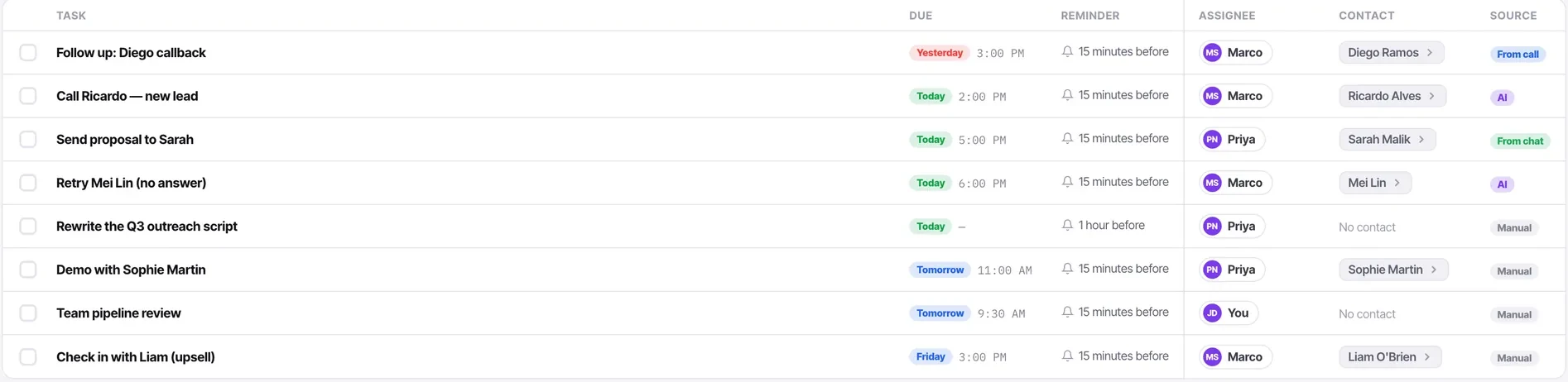
Every task in Convarza carries the same four things: what to do, who is doing it, when it is due, and a reminder. It also records where it came from — manual, from a call, from a chat, or generated by AI — which turns your task list into a readable account of how work arrives.
Create tasks where the context is, not in the abstract. A task created from a contact carries that contact with it, so whoever opens it can see the whole history rather than just your description of it.
Before you start
- Somewhere with context to create it from — a contact feed or the call logger.
- The outcome you need, phrased as a question rather than an activity.
Steps
Create it where the context is
From the composer at the top of a contact's activity feed, from the call logger, or from Tasks directly with New task. The first two attach the contact automatically.
Write the outcome, not the action
Name the question you need answered rather than the activity. Three days later the word "follow-up" will not remind you which of four conversations it belonged to.
Set a due time you mean
Due dates that are aspirational rather than real train everybody, including you, to ignore the list.
Assign it to whoever should do it
Anyone can assign a task to anyone. Tasks are records, not workload, so the restriction that applies to conversations does not apply here.
Attach the contact wherever there is one
A task without a contact — "Rewrite the Q3 outreach script" — is fine for internal work. For anything about a customer, the attachment is what makes it actionable.
Let it land on the feed
It appears on the contact's activity feed, so the next person sees the commitment as well as the reminder.
Check it worked
Open Tasks and find your new task. Check the contact is attached, the due time is right, and the source is what you expect. Those three columns are what make the list worth reading.
The parts people get wrong
- A task created from a chat is auto-assigned to you with a 15-minute reminder and opens expanded — the defaults assume you meant to do it soon.
- A callback requested during a call creates a task at the time you set on the call logger.
The ones people actually ask
Where should I create a task from?
Wherever the context is — the composer at the top of a contact's activity feed, or the call logger. Both attach the contact automatically, and that attachment is what makes a task actionable, because it gives the assignee the history, the notes and the previous calls.
What should the task say?
The outcome you need, not the activity. Confirm whether we can ship before the 14th beats follow up — in three days the word follow-up will not remind you which of four conversations it belonged to.
Can I assign it to somebody else?
Yes, anyone to anyone. Tasks are records rather than workload, so the restriction that applies to conversations does not apply here.