
Create a task from a conversation
A task created from a chat is auto-assigned to you with a 15-minute reminder and opens expanded — the defaults assume you meant to do it soon.
The defaults on this composer are opinionated and worth understanding, because they are right about half the time and wrong the other half.
A task created from a chat is auto-assigned to you with a 15-minute reminder, and opens expanded. That is right for "I need to check something and come straight back". It is exactly wrong for "chase them on Thursday", and leaving the default there is how a real follow-up becomes a notification you dismiss.
Before you start
- An open conversation with a contact attached.
- A clear idea of the outcome you need, rather than the activity.
Steps
Use the task composer at the top of the activity feed
It opens expanded, because a task worth creating is usually worth describing.
Accept the defaults when they are right
Checking something and coming back inside the hour: assigned to you, 15 minutes. Perfect, change nothing.
Change the time for a real follow-up
If you told the customer Thursday, set Thursday. A 15-minute reminder on a Thursday task trains you to ignore reminders, which costs you far more than the one task.
Reassign it if it is somebody else's job
Anyone can assign a task to anyone. Tasks are records rather than workload, so the restriction that applies to conversations does not apply here.
Describe the outcome, not the action
"Confirm whether we can ship before the 14th" beats "follow up". In three days you will not remember which of four things this was about.
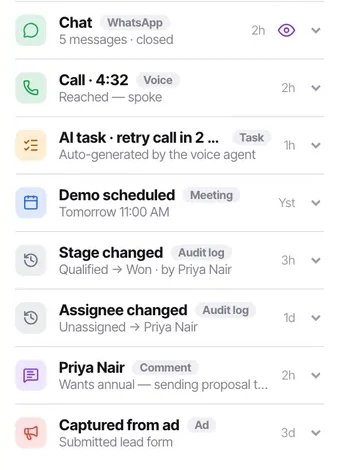
Let it land on the feed
The task appears on the contact's activity feed, so the next person sees the commitment as well as the reminder.
Check it worked
Look at your Tasks list. The task should be there with the right due time and the contact attached, and the SOURCE column should show it came from a chat.
The parts people get wrong
- A callback requested during a call also creates a task, at the time you set on the call logger. Same mechanism, different entry point.
- The Tasks list shows where each task came from — from a call, from a chat, from AI, or manual — which makes it easy to see whether your automations are generating noise.
The ones people actually ask
The reminder defaulted to 15 minutes and I missed it.
Fifteen minutes is right for I am about to do this and wrong for anything else. If you told the customer Thursday, set Thursday — a 15-minute reminder on a Thursday task trains you to ignore reminders, which costs far more than the one task.
Can I assign the task to somebody else?
Yes. Anyone can assign a task to anyone, because tasks are records rather than workload — the restriction that applies to conversations does not apply here. Do brief them in the task text, though: see chat is useless to an agent who cannot open a chat that is not assigned to them.
Where does the task show up?
In Tasks with its reminder, and on the contact's activity feed — so the next person sees the commitment as well as the reminder. That is what stops two people promising the same customer different things.