
Assign a conversation and take over from the AI
Assigning is the handover. There is no mode to toggle, no separate bot console, and no conversation being handled by a bot and a person at the same time.
Most products with an AI agent give you a mode switch: the bot is driving, you take the wheel, you hand it back. Convarza does not have one, and understanding why makes the rest of the Inbox obvious.
Here, assignment is the handover. A conversation nobody has taken is a conversation the bot handles. Assign it to a person and the bot stops. There is no third state, which is why you can always answer "who is talking to this customer right now?" with certainty.
Before you start
- A conversation to take. Agents can assign to themselves; only managers and admins can assign to somebody else.
Steps
Find the conversation
Bot-handled chats are the unassigned ones and carry an AI badge. Managers can see them all with assignee set to None.
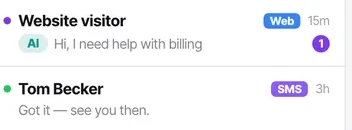
Assign it
To yourself, or — if you are a manager or admin — to a teammate through the picker. An agent can assign a conversation to themselves and can unassign themselves, but cannot push work onto a colleague.
Watch the badge disappear
The AI badge goes and the bot stops. That is the handover, complete. No mode switch, no separate console, and no risk of the bot replying over the top of you.
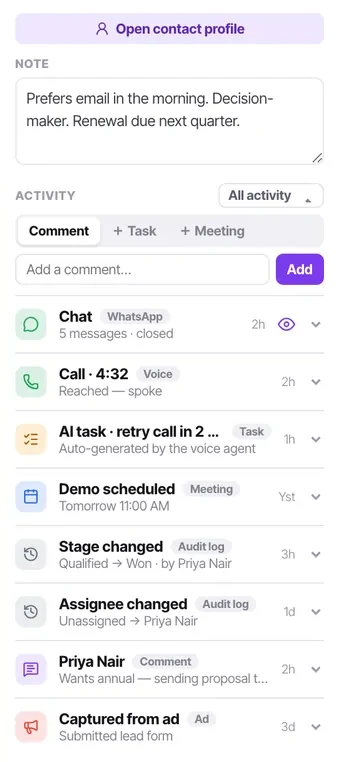
Read the contact panel before you type
The note a colleague left, the last call and how it ended, open tasks, the lead stage. Ten seconds here prevents asking a customer something they have already told you twice.
Reply in the same thread
The customer sees one continuous conversation, not a transfer. The history stays whole, which is what makes the handover feel like being helped rather than being passed around.
Do not unassign to "give it back to the bot"
Unassigning returns the conversation to the unassigned state, where the bot may pick it up again mid-thread. That is rarely what you want after a person has been involved — leave it assigned, or close it.
Check it worked
Check the activity feed on that contact. The assignment appears as an audit entry, so anybody looking later can see exactly when a person took over and who it was.
The parts people get wrong
- Because agents only see what is assigned to them, assigning a chat is also what makes it visible to that person at all. A handover is an act of visibility as much as ownership.
- A bot handing over does so on conditions you wrote. If handovers are not happening, the conditions are the place to look, not the Inbox.
The ones people actually ask
How do I hand a conversation from the AI bot to a person?
You assign it. Bot-handled chats are the unassigned ones, marked with an AI badge; assigning one to a teammate takes the bot out and puts a person in. That is the entire handover.
Can a bot and a person handle the same chat at once?
No, and that is deliberate. Assignment is a single state, which is why you can always say for certain who is answering.