
Reassign work across the team
Managers and admins move conversations and calls through a picker. Contacts and tasks follow a different rule, and knowing which is which saves an argument.
Assignment in Convarza splits along one line: workload versus records.
Conversations and calls are workload. Only managers and admins may move them, because moving one changes what somebody else has to do today. Contacts and tasks are records — anyone can assign either to anyone, because a restriction there would be noise rather than protection.
Before you start
- Manager or admin access. Agents can only unassign themselves.
- A reason, and the courtesy of telling the person you are moving work to.
Steps
Use the assignee filter to see the shape of things
All · None · then every teammate by name. Read it before you move anything: it tells you who is buried, and how much nobody has taken.
Reassign chats and calls through the picker
Managers and admins only, because reassigning a conversation changes what somebody else has to do today.
Tell the person you are moving work to. Reassignment does not announce itself beyond a notification, and an agent who suddenly has eleven conversations will not know why.
Assign contacts and tasks freely
Anyone can. If you find yourself unable to assign something you expected to, check whether it is workload or a record — that is almost always the explanation.
Watch what unassigning does
Taking a person off a chat returns it to the unassigned state, where the bot may answer it again if the channel is routed to one. Assign it to somebody else rather than unassigning it, unless you want the bot back on it.
Reassign before anybody is deactivated
Open conversations and tasks do not redistribute themselves. Once the account is inactive, that work is much harder to find, and the person who inherits it will not know it exists.
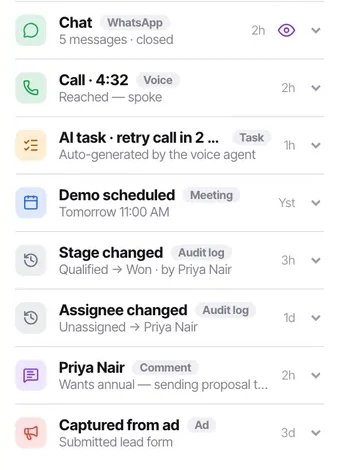
Check the audit trail if something moved unexpectedly
Assignee changes are entries on the contact's activity feed rather than silent edits, so "who moved this and when" always has an answer.
Check it worked
After a reassignment, confirm the new assignee can see it — ask them. An agent only sees what is assigned to them, so a mis-assignment is completely invisible to everyone except the person holding it.
The parts people get wrong
- The assignee filter only renders for managers and admins. An agent seeing only their own work would find it meaningless.
- Reassigning does not notify the previous assignee in any special way. If somebody was actively working a conversation, tell them.
The ones people actually ask
Why can my agents not reassign conversations?
Because reassigning changes what somebody else has to do today. Agents can unassign themselves; only managers and admins can move work onto a colleague. Contacts and tasks are the exception — anyone can assign either to anyone, because they are records rather than workload.
Somebody suddenly has eleven conversations and does not know why.
Tell people when you move work to them. Reassignment does not announce itself beyond a notification, and an agent watching their queue jump has no context for it. If you need to know who did it, assignee changes are entries on the contact's activity feed rather than silent edits.
Somebody is leaving next week. What do I do?
Reassign their open conversations and tasks while the account is still active. Once it is inactive that work is much harder to find, and whoever inherits it will not know it exists. Check too whether they own any workflows or are the WhatsApp channel message user.