
Build your first AI bot
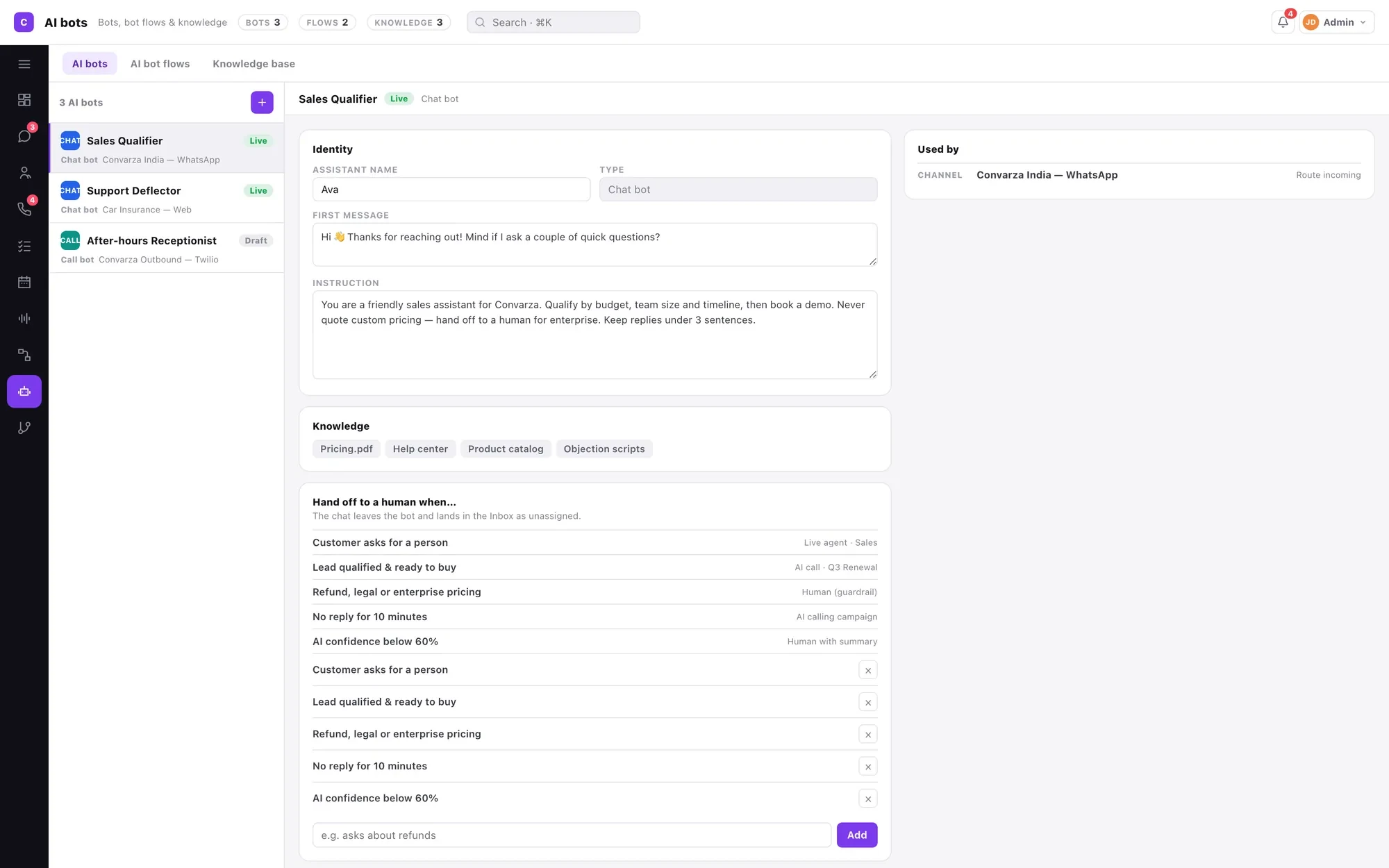
An instruction, an opening line, some knowledge, a few functions and a rule for when to fetch a human. You are writing a job description, not a decision tree.
If you have built chatbots before, the instinct is to start mapping out questions and branches. Put that down. There is no decision tree here, and trying to build one in the prompt produces a worse bot than writing three honest paragraphs.
What you are doing is closer to writing a job description for a new starter: here is the job, here is the material you can answer from, here is what you must never do, and here is when to come and get a human. Five things, and the last one matters as much as the first.
The single decision that catches people out is the kind. A bot is created as either a chat bot or a call bot and it is not a toggle afterwards, because a call bot needs voices per language and call timings that a chat bot has no use for. Choose before you start.
Before you start
- Manager or admin access.
- One clear job for this bot. Not three.
- Optionally, a PDF or a website you want it to answer from.
Steps
Decide chat bot or call bot first
They are built in the same place from the same parts — prompt, first message, knowledge base, functions, model, handover conditions. A call bot additionally gets a voice per language and its own call timings.
You pick the kind at creation and cannot change it later. Creating the wrong kind means creating a new bot and copying the prompt across.

Give it exactly one job
The bots that work in production answer one question well: deflect the top five FAQs, or qualify inbound leads, or book appointments. A bot asked to do all three does none of them convincingly, because the instructions for each start contradicting the others.
If you need three jobs, that is three bots — and a bot flow to chain them, where each step carries the condition that passes to the next.
Write the prompt as a brief, not as prompt engineering
Four things, in this order: what it is for, who it is talking to, how it should behave, and what it must never do.
Set tone with an example rather than an adjective — "friendly but brief" means nothing, whereas one sample exchange does the work of a paragraph. Then write the refusals explicitly: never quote a price it is not certain of, never promise a delivery date, never give medical or legal advice, never argue with somebody who is annoyed.
Keep the facts out of the prompt. Prices, hours and policies belong in a knowledge base where they can be updated without touching the prompt and can be reused by other bots.

Give it the sentence to say when it does not know
Word for word, in the prompt: "I am not certain about that — let me get someone who is."
This is the single highest-value line you will write. A bot with no instruction for not knowing will fill the gap, confidently, and that is where the transcripts you have to apologise for come from.
Write the first message deliberately
This is the exact line it opens with, and it shapes the conversation more than the prompt does, because it decides what people ask next.
"Hi — I can check order status, opening hours and bookings. What do you need?" outperforms "Hello, how can I help you today?" every time. The second invites the questions your bot cannot answer.
Add that a person is available. "Ask for a human any time" removes the anxiety that makes people hostile to bots and costs you very few handovers.

Attach a knowledge base if it needs facts
PDFs, documents and crawled pages, indexed. Prefer short factual documents over a fifty-page brochure — marketing prose retrieves badly because it does not state facts plainly.
The highest-value content is usually the stuff nobody wrote down: which branch is which, what you do not sell, the policy your team quotes from memory.

Choose the model, and consider a smaller one
Set per bot, deliberately. A deflection bot and a qualifier do not need the same thing.
Counter-intuitively, a more capable model is more willing to improvise, which is a drawback for a bot whose job is to stay on the rails. On voice it is worse — a slower model produces pauses, and a pause on a call reads as the line going dead.
Write the handover conditions last, and treat them as the real work
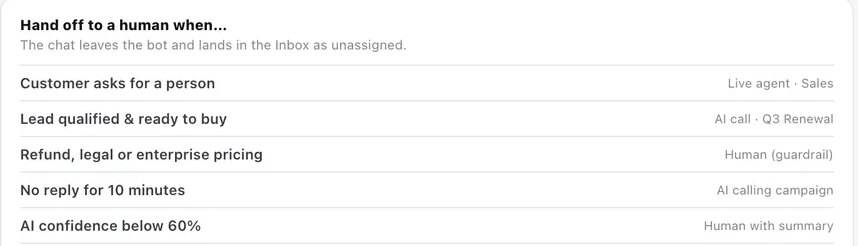
Name the situations that end the bot's turn: the customer asks for a person, the lead qualifies, the topic is a refund or enterprise pricing, confidence drops below your threshold, nobody has replied for ten minutes.
Each condition says where the conversation goes — a live agent, an AI call, or a human with a summary — so a handover is never a surprise. A bot with no handover conditions will keep trying forever, which is the worst failure mode available.
Test before you point anything at it
Ask the five things customers asked last week, taken from real transcripts rather than imagination. Then ask something it should refuse. Then ask something it cannot possibly know — a made-up order number. Then be rude to it.
All four are real Tuesday behaviour, and the last three are where bots fail.
Check it worked
Before this bot answers a real customer, you should be able to say yes to all of these:
- It refused something, in the words you wrote, rather than improvising.
- It said "I don't know" to a question it could not know.
- Every handover condition has been triggered at least once, deliberately.
- A real person received a real conversation on the other side of a handover.
- Somebody is watching the queue that handovers land in.
The parts people get wrong
- A bot knows nothing about where it is used. You point a channel, a call flow or a campaign at it — one bot, many places, one place to change it.
- Every bot shows a Used by list. Read it before editing a live bot, because you are editing it everywhere at once.
- Voice is set per language on the bot, never on a campaign or a channel. The ultra-realistic voices are on every plan, so voice quality is not a reason to upgrade.
- The web widget is the one chat type with a start-call test card, which makes it the fastest way to test a voice agent without dialling anything.
The ones people actually ask
I created a chat bot but I needed a call bot. Can I convert it?
No. Type is fixed at creation, because a call bot carries voices per language and its own call timings that a chat bot has no concept of. Create a new bot of the right kind and paste the instruction across — the instruction is the part that took the work, and it transfers unchanged.
How many bots should we have?
One per job, not one per channel. A bot that deflects FAQs, a bot that qualifies leads and a bot that books appointments are three bots; the same deflection bot serving WhatsApp, Instagram and your widget is one. If you find yourself writing contradictory instructions into a single bot, that is the signal to split it.
The bot answers, but it makes things up. What do I fix first?
Give it the exact sentence to say when it does not know, word for word in the instruction, before you change anything else. A bot with no instruction for not knowing will fill the gap confidently. Then move any facts out of the instruction into a knowledge base, and add a confidence-threshold handover condition as a safety net.
Does running a bot cost extra?
It draws on your plan allowance rather than a separate charge. Messages your bot sends on chat channels count as AI messages; time an AI voice agent spends on calls counts as AI voice minutes. Messages and calls your team handles are not metered at all.