
Create your first call flow
A call flow is not a programming environment. It is a short list of things that can happen to a call, arranged in the order they should happen.
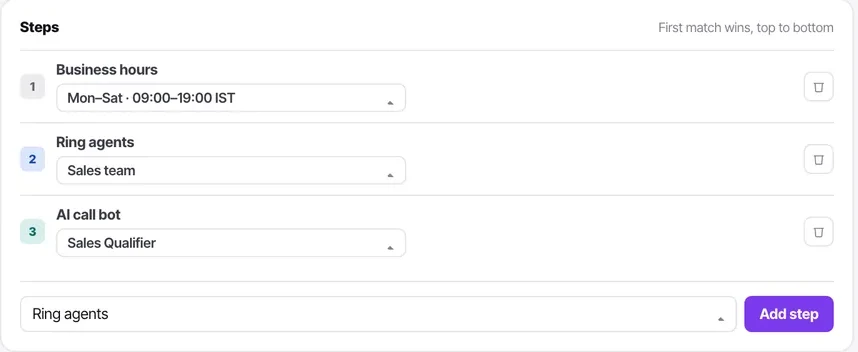
Every call flow is a numbered list of steps that runs top to bottom, first match wins. There is no canvas, no unlabelled nodes and no branching diagram to arrange — which means a flow can be read out loud in a stand-up, and anybody can say whether it is right.
A flow also has a Runs on setting: an incoming call, or an autodialler going out. And it has a Published / Draft state, so you can build one safely and publish it when you are ready. A draft flow is not answering anything.
Before you start
- A calling channel with incoming enabled.
- Calling hours set on that channel, with the right timezone.
- A sentence describing what should happen when somebody rings.
Steps
Write it in sentences before you open the builder
"If we are open, ring the sales team. If nobody picks up, hand to the AI agent. If we are closed, take a voicemail."
Building first and thinking afterwards is how flows become things nobody dares edit.
Create the flow and name it for what it does
"Inbound — sales" tells the next person everything. "Flow 2" guarantees somebody builds a duplicate in six months.
Set Runs on
Incoming call, or autodialler (outgoing). This is not cosmetic — it determines when the flow is even eligible to run, and it is why a flow you built for inbound will not appear where you expect on a campaign.

Put the cheapest check first
Business hours, almost always. There is no point ringing a team that is not there, and putting it first means every path below it already knows whether you are open.
Add steps in the order they should happen
Steps run top to bottom and the first match wins. Each step is picked from a list rather than configured freely, which is what keeps a flow readable.

End every path deliberately
Voicemail or hang up. A flow that simply runs out of steps leaves a call ringing into nothing, which is the worst outcome available and the one customers remember.
Publish it
A flow stays Draft until you publish. Building in draft and publishing when ready is the safe pattern — and Unpublish is how you take a flow out of service during an incident without deleting it.
Point a channel at it, then ring your own number
Walk your own flow as a customer. Then ring it again outside hours. Both paths, before any customer finds them.
Check it worked
Ring the number twice — once inside hours and once outside — and confirm you get what you designed. Then check the flow's Used-by panel to see which channels now depend on it.
The parts people get wrong
- Flows are meant to be shared. A single "after hours" flow behind six numbers is the point, not an accident.
- Every flow tells you what depends on it, so a shared flow can be edited knowing exactly what you are changing.
- A draft flow answers nothing. If a channel seems unrouted, check whether the flow it points at was ever published.
The ones people actually ask
My flow does not appear when I configure a campaign.
Check Runs on. A flow built for incoming calls is not eligible for an autodialler and will not be offered. This is the first field to check whenever a flow is missing from a picker.
The call rings out into nothing.
A path ran out of steps. Every path needs a deliberate ending — voicemail or hang up — because a flow that simply stops leaves the caller in silence, which is the worst outcome available and the one they remember.
My changes are not taking effect.
The flow is still in Draft. A flow stays Draft until you publish it, which is the safe pattern — build in draft, publish when ready. Unpublish is also how you take a flow out of service during an incident without deleting it.
What order should steps go in?
Cheapest check first, which is almost always business hours. There is no point ringing a team that is not there, and putting it first means every path below it already knows whether you are open. Steps run top to bottom and the first match wins.