
Install the web widget and allow your domains
Copy one embed snippet, allow your domains, and visitors can chat — or start a voice call with your AI agent straight from the page. The fastest channel to get live.
This is the channel to connect first. It needs no external account, no carrier, no Facebook login and no approval process — an embed snippet and a list of domains you allow it to load on. You can be live on one low-traffic page in ten minutes.
It is also the only chat channel that gets a start-call test card, which means you can exercise a voice agent end to end without dialling a phone number. If you are building AI voice agents, the web widget is the fastest feedback loop in the product even if you never ship it to customers.
Before you start
- Somewhere you can paste a script tag into your site's HTML — a template, a tag manager, or a single page while testing.
- The exact domains the widget should load on.
Steps
Add a web widget channel
Channels → add → Web widget. There are no external credentials, no provider account and no approval process — which is why this is the channel to connect first.
Everything you need is generated for you: a snippet to paste, and a list of domains you will allow it to load on.
Copy the embed snippet
The connection card shows a read-only code block with a copy button. Copy it rather than retyping it.
Paste it into your site before the closing body tag
Site-wide in your template, or on a single page while you are testing. It needs to load on every page you want the widget to appear on.
If you use a tag manager, that works too — but remember the widget then depends on the tag manager loading, which is one more thing that can fail.
Allow your domains
Allowed domains is an add/remove list, and the widget will only load on the domains you list. This is a security feature: without it, anyone could embed your widget on their own site.
Add your production domain and your staging domain. Depending on how your site handles
redirects, example.com and www.example.com may need listing
separately.
Choose what answers
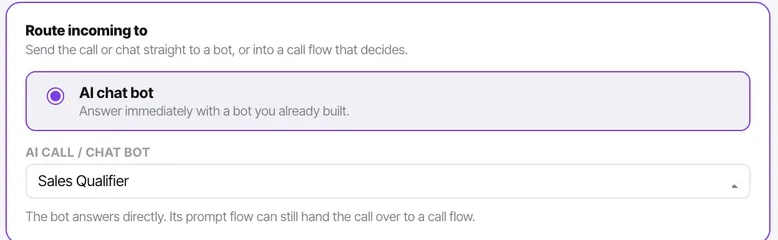
An AI bot, or your agents. A widget pointed at your agents outside working hours is a widget that collects silence — consider a bot, or at least honest opening copy.
Test a call from the test card
The web widget is the one chat type that also gets a start-call test card. Use it to hear your voice agent — its voice, its first message, its pacing — without touching a phone.
Set contact creation and auto-close
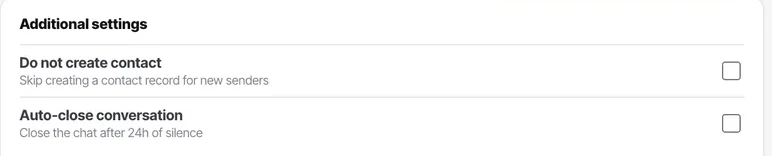
A widget on a high-traffic marketing page generates a lot of anonymous, low-intent conversations. Turning off contact creation there keeps your contact list meaningful.
Check it worked
Open your site in a private browser window — not the tab you have been working in — and confirm the widget appears and opens. Then check it does not appear on a domain you did not allow.
The parts people get wrong
- If the widget does not appear, check the allowed-domains list before anything else. A missing domain fails silently by design, and it is the cause the overwhelming majority of the time.
- This is the safest channel to launch first, because you control exactly which pages it appears on.
- Visitors can start a voice call with your AI agent from the page. That is a genuine differentiator on a pricing or contact page.
The ones people actually ask
The widget is not appearing on my site.
Three things, in order. Check the domain is on the allowed list — the widget only loads on domains you have listed, and example.com and www.example.com may need listing separately depending on how your site redirects. Check the snippet is actually on the page, before the closing body tag. If you loaded it through a tag manager, check the tag manager itself is firing.
Why does it need a domain allow-list at all?
Security. Without it, anyone could embed your widget on their own site and collect conversations into your Inbox. Add your production domain and your staging domain, and nothing else.
The widget is generating a lot of low-value conversations.
Expected on a high-traffic marketing page. Turn off contact creation for that channel so your contact list stays meaningful, and consider auto-close so your unreplied count keeps meaning something. Both are per channel, so this does not affect your sales WhatsApp line.
Can I test a voice agent through the widget?
Yes, and it is the fastest way. The web widget is the one chat type that also gets a start-call test card, which lets you hear a voice agent — its voice, its first message, its pacing — without dialling a number or connecting a carrier.