
Connect an SMS provider
Typed credential fields — a dial-code select and number for the phone, masked inputs for secrets — and SMS joins the same inbox as everything else.
SMS is a chat channel in Convarza, not a calling channel. It appears in the Inbox, it can be answered by a bot, and it gets do-not-create-contact and auto-close — but it has no calling hours, because a text message is not a call.
The one thing to confirm with your provider before you start is two-way capability. Plenty of SMS numbers can send and not receive. Such a number will connect perfectly, send perfectly, and never deliver a single inbound message.
Before you start
- An account with an SMS provider and its credentials.
- A number confirmed as capable of two-way SMS.
- Awareness of your local rules on business SMS and opt-out handling.
Steps
Confirm the number is two-way
Ask the provider explicitly. "Can this number receive inbound SMS and deliver it to a webhook?" is the question. A one-way sending number is the most common cause of a half-working SMS channel.
Add an SMS channel and enter the credentials
Fields are typed rather than generic: a dial-code select and number for the phone, masked inputs for secrets. The typing is what stops a plausible-looking wrong value being accepted.
Choose what answers
An AI bot, or your agents. SMS conversations are short and often transactional, which makes them a reasonable fit for a narrow bot.
Set auto-close and contact creation
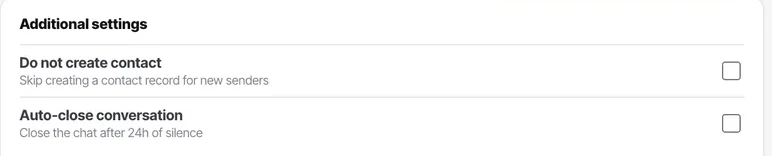
Both live under additional settings. SMS conversations rarely continue after the question is answered, so auto-close is usually the right call here.
Text the number from your own phone
Then reply from Convarza and confirm the reply arrives on your handset. Test both directions separately, because they fail independently.
Outbound working tells you the credentials are right. Only inbound tells you the provider knows where to deliver.
Check it worked
Text the number from your own phone and check it appears in the Inbox, then reply from Convarza and check that arrives. Both directions, separately.
If outbound works and inbound does not, the number is either one-way or the provider has not been told where to deliver inbound messages. Both are on the provider's side rather than in Convarza.
The parts people get wrong
- SMS is a chat channel, so it gets do-not-create-contact and auto-close and does not get calling hours. If you are looking for calling hours on it, they were never there.
- Opt-out handling ("reply STOP") is a legal requirement in many markets and is handled by your provider and your process, not automatically by the channel.
The ones people actually ask
Outbound texts send but replies never arrive.
Your number is probably send-only. Ask the provider directly: can this number receive inbound SMS and deliver it to a webhook? A one-way sending number is the most common cause of a half-working SMS channel, and nothing in the outbound path will reveal it.
Should I use a bot on SMS?
Often yes, but a narrow one. SMS conversations are short and transactional, which suits a bot with a small, well-defined job — order status, appointment confirmation, a simple qualifier. A broad conversational bot is a poor fit for a channel where every message costs money and length is constrained.
Should auto-close be on for SMS?
Usually. SMS conversations rarely continue once the question is answered, so leaving them open inflates your open count without representing outstanding work. Both auto-close and contact creation live under the channel's additional settings.