
Connect a shared mailbox as an email channel
The team address — support@, sales@, hello@ — as a channel. Your own personal mailbox is a different thing in a different place, and mixing them up hurts.
There are two email features in Convarza and they are easy to confuse.
The email channel, here under Channels, is a shared team address:
support@, sales@, hello@. Everything sent to it
becomes a conversation the whole team can see, filter, assign and answer — and that a bot
can answer.
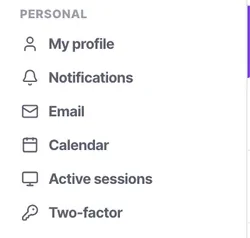
Your personal mailbox lives under Settings → Personal → Email, allows two syncs per user on every plan, and is your own one-to-one mail with your own signature.
Connecting a personal mailbox as a channel turns every private message you receive into a team conversation. It is recoverable, but it is not a pleasant afternoon.
Before you start
- A shared team mailbox — not a person's mailbox.
- Its credentials or sign-in.
- Agreement on which address is the public one.
Steps
Pick the right mailbox
The address customers already write to. If you are unsure, look at where your existing enquiries land.
Add an email channel and connect the mailbox
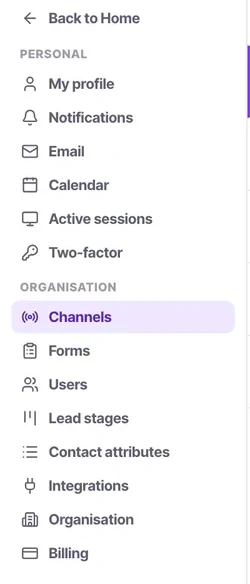
Channels → add → Email, then connect the mailbox.
Check twice that this is the shared address and not somebody's personal one. Connecting a personal mailbox here turns every private message that person receives into a team conversation, which is recoverable but unpleasant.
Choose what answers
An AI bot, or your agents. Email tolerates a slower response than chat, so this is a channel where routing straight to your team is often the right answer.
Keep your own mailbox out of it
Your personal mailbox and signature belong under Settings → Personal → Email, where every plan allows two syncs per user.
Send a test email in and reply to it
It becomes a conversation with the contact record beside it, filterable and assignable like any other. Check the reply arrives from the address you expect.
Check it worked
Reply to your test from a different address and confirm it continues the same conversation rather than opening a new one. Email threading is what keeps the contact timeline readable, and it is worth confirming early.
The parts people get wrong
- Auto-close behaves differently on email than on chat. People reply to email days later, and a conversation closed after 24 hours will be reopened constantly.
- If your mail provider requires an app-specific password or OAuth, sort that out before you start rather than in the middle of the connection.
The ones people actually ask
I connected my own mailbox by mistake.
Disconnect it immediately. An email channel is a shared team queue, so connecting a personal mailbox turns every private message that person receives into a team conversation. It is recoverable, but unpleasant, and the fix is to connect the shared address instead and put your own mailbox under Settings, Personal, Email — which is a different feature entirely.
Which address should we connect?
The one customers already write to. If you are unsure, look at where your existing enquiries land rather than creating a new address nobody knows. Note that if you used support@ or sales@ to create the workspace, you will need to untangle that first — which is why the sign-up tutorial argues for a named person's address.
Should I turn on auto-close for email?
Almost never. People reply to email days later, so a conversation closed after 24 hours will simply be reopened, and your reopened count becomes noise. Email is the clearest case in the product for leaving auto-close off.
Should email be answered by a bot?
Often not. Email tolerates a slower response than chat, so routing straight to your team is frequently the right answer — and the length people write at suits a person better than a bot. Use a bot here when volume is high and the questions are repetitive.