
Auto-close conversations and control contact creation
Two chat-channel settings that decide how tidy your queue and your contact list stay — and both have a real cost if you set them without thinking.
These two settings look like housekeeping and are not. Each trades something away, and which trade is right depends entirely on what kind of traffic the channel carries.
Do not create contact keeps your contact list meaningful, at the cost of those conversations having no record to hang notes, tasks or a lead stage on. Auto-close keeps your unreplied count honest, at the cost of hiding work if your team has not agreed what "finished" means.
Before you start
- A connected chat channel. Neither setting exists on calling channels.
- Manager access — both live under the channel's additional settings.
- An honest view of what that channel's traffic is actually worth to you.
Steps
Open a chat channel's additional settings
Both settings are chat-only. Calling channels do not have them, because a call is not a conversation that can go quiet and a caller is not somebody you can choose not to record.
They are also per channel rather than global, which is the point — the right answer for a marketing widget is the wrong answer for your sales WhatsApp line.
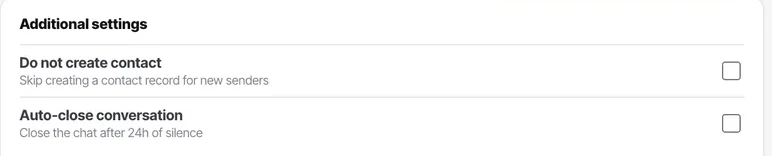
Decide whether every message should create a contact
By default a conversation creates a contact so it has a record to attach to.
Turn it off where traffic is anonymous or low-intent: a public Instagram account, or a widget on a high-traffic marketing page. Leave it on for anything where the person might become a customer.
Understand what turning it off costs
Those conversations have no contact record. No notes, no tasks, no lead stage, and no activity feed tying them to anything else that person ever does.
If somebody messages the widget anonymously and then rings you, those two events will not be connected.
Turn on auto-close for high-volume, low-value chats
Conversations close themselves after a quiet period. On a channel that receives a hundred one-line questions a day, this is what keeps the unreplied count meaningful.
Leave auto-close off where the thread matters
On a sales channel, an open conversation is a lead somebody has not finished. Closing it automatically hides work rather than completing it.
Email is the clearest case for leaving it off — people reply days later, and a conversation closed after 24 hours will simply be reopened.
Review the effect after a week
Compare your unreplied count against what your team believes is outstanding. If the product says four and the team says fifteen, your closing behaviour does not match what they mean by finished.
Check it worked
Check one closed conversation and ask whether it was resolved or just quiet. If it was only quiet, auto-close is too aggressive for that channel.
The parts people get wrong
- Both settings are per channel, so you can use them where they help and leave them off where they hide work.
- Turning off contact creation reduces duplicate contacts on anonymous channels, but it is not a deduplication feature — it just stops records being made at all.
The ones people actually ask
What exactly do I lose by turning off contact creation?
Everything the record carries: notes, tasks, a lead stage, and the activity feed that ties this person's conversations to their calls. If somebody messages your widget anonymously and later rings you, those two events will not be connected. That is an acceptable trade on anonymous marketing traffic and a bad one on a sales channel.
Conversations are closing while my team still considers them open.
Auto-close is too aggressive for that channel. Compare your unreplied count against what the team believes is outstanding after a week — if the product says four and the team says fifteen, your closing behaviour does not match what they mean by finished. Turn it off on that channel rather than adjusting everywhere.
Are these settings global?
No, they are per channel, and that is the point. The right answer for a marketing widget is the wrong answer for your sales WhatsApp line, so each channel decides for itself.