
Connect a SIP inbound gateway
Give the IP or domain of your gateway and pick the protocol. Incoming calls hit your flow or your AI agent — and half the work happens on your gateway, not here.
A SIP inbound gateway is how calls from your own telephony infrastructure reach Convarza. It is inbound only — you cannot dial out on it, and a campaign will not offer it as a line.
Roughly half of this setup happens on your side rather than in Convarza. Your gateway needs to be pointed at Convarza, and Convarza's address needs to be on your gateway's allow-list. The connection card gives you a copyable readout of everything your gateway needs.
Before you start
- A SIP server or gateway you control.
- Its IP address or domain, and the protocol it speaks.
- Access to configure that gateway — this is not a Convarza-only task.
Steps
Add a SIP inbound channel
Channels → add → SIP inbound. This type is inbound only — you cannot dial out on it, and it will not appear in a campaign's line picker.
If you need both directions, that is two channels: a SIP inbound gateway and a SIP outbound trunk.
Give the gateway address
The IP or domain of your server or gateway. This is where calls will be arriving from.
Pick the protocol
A dropdown rather than a text box, so the value always matches something real. It must match what your gateway speaks.
Route it
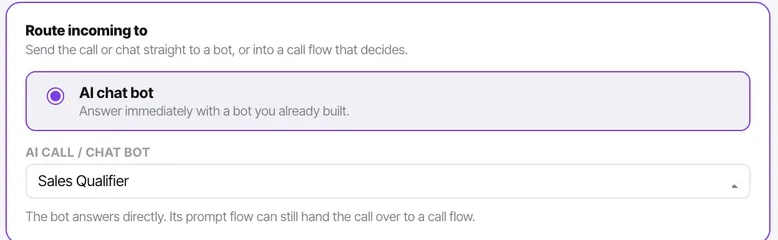
An AI voice agent answers immediately, or a call flow decides what happens first. For an inbound line a flow is usually the better answer — check business hours, ring agents, then overflow to the agent.
Configure your gateway from the readout
The connection card shows a gateway config readout — server IP, port, username, auth secret — each row copyable. Put those into your gateway.
Add Convarza to your gateway's allow-list
The IP/domain match list. A gateway that has not been told to accept traffic from Convarza will refuse it, and the refusal happens entirely on your side where Convarza cannot report it.
Ring in and confirm the whole path
Not just that it connects — check the call appears on the contact timeline afterwards as a call log entry. That confirms the whole path, not only the audio.
Check it worked
Ring in and confirm three things: the call connects, the right thing answers it, and a call log entry appears on the contact timeline afterwards. The third is the one people skip, and it is what proves the whole path rather than just the audio.
If the call never reaches Convarza the problem is on your gateway — either it is not pointed here, or its allow-list is refusing the traffic. If it reaches Convarza and nothing answers, the problem is routing.
The parts people get wrong
- An inbound gateway is inbound only. You cannot dial out on it, and it will not appear in a campaign's line picker.
- Ping timeout, under additional settings, is worth knowing about when a gateway is slow to respond.
The ones people actually ask
Calls are not reaching Convarza at all.
Your gateway has not been told to accept traffic from Convarza. Add Convarza to its IP or domain match list. This refusal happens entirely on your equipment, where Convarza has no visibility and therefore cannot report a problem — which is why an inbound gateway that looks correctly configured on our side can still receive nothing.
Can I dial out on a SIP inbound channel?
No. It is inbound only, and it will not appear in a campaign's line picker. If you need both directions, connect two channels: a SIP inbound gateway and a SIP outbound trunk.
Should an inbound line be answered by a bot or a call flow?
A flow, usually. A bot answers immediately, which is right for an after-hours line and wrong for your main number — a flow can check business hours, ring your team, and then overflow to the bot when nobody picks up. That ordering is where most of the value is.
The call connects but nothing appears on the contact timeline.
Audio working proves only the media path. Check the call appears as a call log entry on the contact afterwards, because that is what confirms the whole path rather than just the sound. If audio works and the log entry does not appear, raise it — that is a genuine fault rather than a configuration question.