
Connect your personal mailbox
Two email syncs per user on every plan. Your one-to-one mail, alongside the conversations rather than in another tab.
Two email features, one distinction, endlessly confused — and getting it wrong has a real cost.
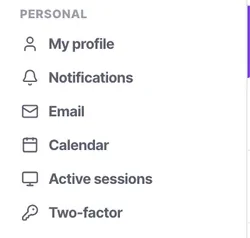
Your personal mailbox, under Personal → Email, is your own one-to-one mail with your own signature. Two syncs per user, on every plan. The email channel, under Channels, is the shared team address that everybody works.
Connect a personal mailbox as a channel and every private message you receive becomes a team conversation. It is recoverable and it is not a pleasant afternoon.
Before you start
- Your own mailbox credentials or sign-in.
- An app-specific password or OAuth, if your provider requires one.
Steps
Go to Personal → Email
Not Channels. This is the distinction people get wrong, and the settings rail makes it visible if you look.
Connect your mailbox
Every plan allows two email syncs per user, from Starter upwards — useful if you carry both a company address and a regional or personal one.
If your provider requires an app-specific password or OAuth consent, sort that out before you start rather than halfway through the connection.
Set your signature
It lives here with your mailbox rather than being a workspace setting, so it is genuinely yours.
Understand what stays private
This is your one-to-one mail. It is not the shared team queue, it is not assignable, and it is not routed to a bot.
Connect a second mailbox if you have one
Two per user — useful if you carry both a company address and a regional or personal one.
Leave the shared address to Channels
support@, sales@ and hello@ belong there, where
they can be assigned, filtered and answered by a bot.
Check it worked
Send yourself an email and confirm it appears in your personal mail rather than in the team Inbox. If it lands in the team queue, you have connected it in the wrong place.
The parts people get wrong
- Two email syncs per user on every plan, from Starter upwards.
- The shared mailbox belongs under Channels. The distinction is Personal versus Organisation, and it holds throughout the product.
The ones people actually ask
If I sync my personal email, does the whole team read my mail?
No, personal email sync is strictly one-to-one and separate from the shared team email channel.
Can I use an alias?
Yes, provided your email client and integration allow sending out through that alias.
Does personal email count towards my AI channel limits?
No, syncing your personal inbox is an account-level feature and does not consume a workspace channel slot.
Why is my signature not showing?
Ensure you configured your personal signature under Personal → Email, and not on the workspace channels.
Can I disconnect my mailbox?
Yes, simply click Disconnect in settings. Data historically synced may still appear in timelines where relevant.
Is this the same as an email channel?
No, and this is the distinction people get wrong most often. This is your one-to-one mail: private, not assignable, not routed to a bot. The email channel is the shared team address — support@, sales@, hello@ — and lives under Channels where it can be assigned and filtered.
How many mailboxes can I connect?
Two per user, on every plan from Starter upwards — useful if you carry both a company address and a regional one.
The connection fails partway through.
Your provider probably requires an app-specific password or OAuth consent. Sort that out before you start rather than halfway through.