
The settings every channel has, and the ones only some do
Chat channels and calling channels deliberately do not share controls. Knowing which set you are looking at saves hunting for a field that was never meant to exist.
A recurring support question is some version of "where is X on this channel?" — and the answer is usually that X does not exist on that kind of channel, on purpose.
The product refuses to show a control that cannot mean anything. A web widget has no trunk, so it has no trunk settings. A chat has no calling hours, so it has none. This is better than greying out a dozen irrelevant fields, but only if you know the rule.
Before you start
- A connected channel to look at.
- Manager access for the operational settings; admin for anything on the connection card.
Reference
Both kinds share three things
The connection card (credentials, health, and for manual setups the webhook), the routing decision, and the Enabled checkbox. Those exist on all thirteen types.
Chat channels get contact and closing behaviour
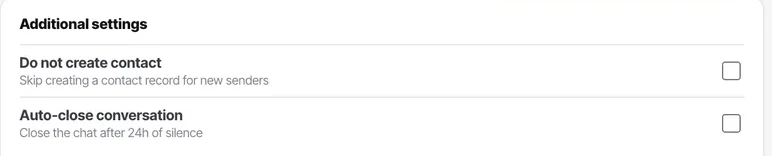
Do not create contact, and auto-close conversation. Both live under additional settings.
Calling channels get resource, region and direction
Plus restricted call timings and a larger additional-settings block. None of these appear on a chat channel.
Calling channels have more under additional settings
Forwarded-from numbers, forward-to number, the IP/domain match list, ping timeout and allowed calls count.
Allowed calls count is the one you will use. The rest matter mainly on SIP.
WhatsApp gets a card nothing else has
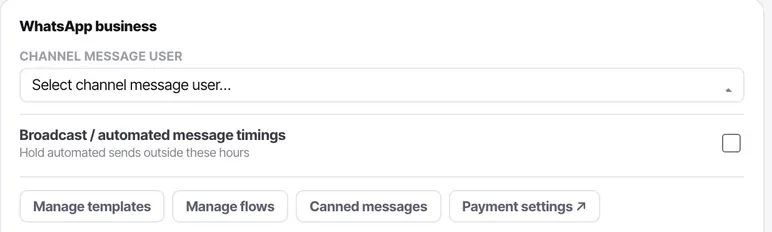
Templates, flows, canned messages, payment settings, the QR block, the channel message user and broadcast timings. No other channel type has those concepts.
Know which fields are admin-only
Credential fields and the connected-account row. A manager owns everything operational: routing, hours, additional settings, enable and disable, and the health readout.
The product shows those controls to managers rather than hiding them, so a manager can see what to ask an admin for.
Put it to use
Open one chat channel and one calling channel side by side and compare them once. Ten minutes of that is worth more than reading any list, and you will not have to look up which controls exist again.
The parts people get wrong
- The two sets never borrow each other's controls. If you are hunting for calling hours on a web widget, they were never there.
- Enabled is not the same as connected. A channel can be perfectly connected and switched off.
The ones people actually ask
I am looking for calling hours on a chat channel.
They were never there. A chat has no calling hours and a web widget has no trunk, so the two sets of controls never borrow each other's — calling settings are absent on chat channels rather than disabled. If you want to hold automated WhatsApp sends outside certain hours, that is broadcast timings on the WhatsApp card, which is a different setting.
Why can I see credential fields I am not allowed to edit?
Because the product shows them to managers deliberately rather than hiding them. A manager looking at a greyed credential field knows exactly what to ask an admin for; a manager looking at a screen with the field removed concludes the feature does not exist.
Which settings can a manager change?
Everything operational: routing, calling hours, additional settings, enabling and disabling the channel, and reading its health. Credential fields and the connected-account row are admin-only, because they involve a carrier account and a bill.