
Personal settings configuration
Configure your profile from updating password to changing theme,linking accounts, notifications, email, calendar.
Personal settings include My profile (personal information, preferences, linked accounts, theme, and password), Notifications, Email and Calendar connections. These settings only affect your account and do not impact the organisation.
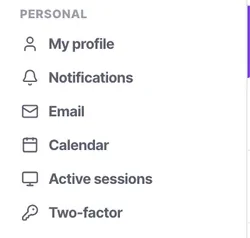
Before you start
- A login to the workspace.
Steps
Update My Profile
Your profile consists of personal information like name, email, and mobile number. You can also configure preferences like language and date format. Connect your Google and LinkedIn accounts for faster sign-in and syncing your data. Change your theme and update your password here too.
Configure Notifications
Configure notifications across web, email, and mobile for each activity, such as added comments, new contacts, or updates in assigned items etc. You decide what type of notification is required for each event. It is fully customisable according to user preferences.
Connect your Email
Under Personal → Email, you can connect Gmail, Outlook, or standard IMAP/SMTP accounts. Configure Email Signature for New Email and Forward Emails by clicking on Email Signature section..
Sync your Calendar
Under Personal → Calendar, sync Google or Microsoft calendars to allow AI voice agents and booking links to read your availability.
Check it worked
Once you finish configuring your personal settings, your profile, notifications, connected accounts, email, calendar, and preferences are ready to use. These changes apply only to your account and can be updated whenever your preferences change.
The parts people get wrong
- Personal settings only affect your own account experience, never the workspace.
- Changing your theme, language, or date format changes how information is displayed for you and does not affect other users.
- Updating your password changes the password for your own account only.
- Linked Google or LinkedIn accounts are connected to your user profile and can be disconnected or updated when needed.
- Email and calendar connections may require you to grant the required permissions before syncing can work.
- If an email or calendar connection stops syncing, check whether the connected account still has the required permissions.
The ones people actually ask
Can I set a different language from my team?
Yes, your language and date format preferences are personal and do not alter what your colleagues see.
What does linking Google or LinkedIn do?
It enables faster Single Sign-On (SSO) and seamlessly syncs your basic profile data like names and avatars.
Why aren’t I getting mobile notifications?
Check if you enabled mobile push in Personal Settings, and ensure your phones OS hasn’t suppressed the app.
How do I disconnect a linked account?
You can unlink your Google or LinkedIn accounts directly from the My Profile section anytime.
Do theme changes affect external booking links?
No, themes only dictate your internal workspace experience. Customer-facing items use the organisation’s white-label settings.
Where do I change my notifications?
Under Settings → Under Personal → Notifications. You can set them per activity (web, email, mobile).
Where can I change my password?
Under Settings → Go to Personal → My Profile and use the update password option to update your account password.
Can I change the theme of my workspace?
You can change your theme from Under Settings → Personal → My Profile. The theme preference applies only to your account and does not change the appearance for other users.
Can I change my language and date format?
Yes. These preferences can be configured from Under Settings → Personal → My Profile. They control how information is displayed for your account.
Which accounts can I connect to my profile?
You can connect supported accounts such as Google and LinkedIn for easier sign-in and account-related syncing.
Can I connect my Gmail or Outlook account?
Yes. Under Settings → Go to Personal → Email to connect Gmail, Outlook, or a standard IMAP/SMTP account.
Why should I connect my calendar?
Connecting your calendar allows supported AI voice agents and booking links to check your availability when scheduling appointments.
Do personal settings affect other users in the workspace?
No. Personal settings apply only to your account. They do not change settings or preferences for other users or the organisation.
What should I do if my email or calendar stops syncing?
Check the connected account and its permissions under Settings → Personal → Email or Personal → Calendar. If the connection has expired or access was removed, reconnect the account and grant the required permissions.