
Your own account settings
The settings that are yours rather than the workspace's — and the one people most often confuse with a channel.
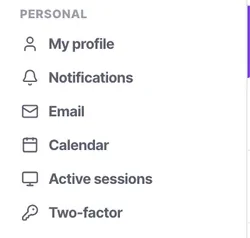
Settings splits in two, and the split is worth internalising because it explains where everything is. Personal holds what is yours: your profile, notifications, your own email, your calendar, active sessions and two-factor. Organisation holds what belongs to the workspace.
The mistake that split prevents — and that people still make — is connecting a personal mailbox as an email channel, which turns every private message into a team conversation.
Before you start
- A login. Everything here is yours and affects nobody else.
Steps
Open Settings and notice the two groups
Personal above, Organisation below. If you are looking for something and cannot find it, ask which group it belongs to.
Set your name and photo properly
They appear on notes, mentions, assignments and audit entries. "Stage changed by Priya Nair" is readable; a record showing an unlabelled account is not.
Change your password from here
Under Personal, not from user management — that is for admins acting on other people.
Set your personal email under Personal → Email
Your one-to-one mailbox and signature. Two syncs per user on every plan.
This is not the email channel. That is the shared team address and lives under Channels.
Connect your calendar under Personal → Calendar
Everything that offers a time reads it: booking links, the meeting composer on a conversation, and an AI voice agent booking mid-call.
That makes it one of the highest-leverage two minutes in your personal settings. An unconnected calendar means every one of those three is guessing.
Check your notification preferences
Especially if you use the mobile app, where notifications are the entire reason to have installed it.
Check it worked
Have a colleague mention you on a contact. If the notification arrives and your name renders properly on the mention, your personal settings are doing their job.
The parts people get wrong
- Put your own mailbox under Personal → Email. Attach it as a channel instead and the whole team inherits your private correspondence.
- Everyone has Personal settings regardless of role. Only admins see most of Organisation.
The ones people actually ask
Can someone else change my profile picture?
No, your profile information is located under Personal settings and is controlled only by you.
Why does my calendar sync matter?
It prevents AI voice agents or booking links from scheduling meetings when you are already busy.
Can I use multiple personal emails?
Every plan allows you to sync up to two personal mailboxes per user.
What happens if I link an invalid email?
The sync will fail, and you will not receive calendar or email updates until you connect with valid credentials.
Is my personal email visible to the team?
No, your personal email sync remains strictly one-to-one, unlike email channels which are shared.
I cannot find a setting.
Ask which half it belongs to. Personal is yours — profile, password, two-factor, sessions, your own email and calendar, notifications. Organisation is everybody's. Almost every I cannot find it is a question about which of the two.
Where do I change my password?
Under Personal, not from user management — that is for admins acting on other people.
Which personal setting is worth the most?
Connecting your calendar. Booking links, the meeting composer on a conversation, and an AI voice agent booking mid-call all read it, so an unconnected calendar means all three are guessing. It is two minutes.