
Two-factor authentication and active sessions
Two controls under Personal settings that matter far more for admins than for anybody else.
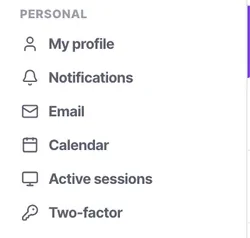
Two settings sit under Personal and both are worth five minutes, particularly if you are an admin.
Two-factor matters here more than in most products because an admin account can reach carrier credentials, API keys, every contact you hold and your billing. Active sessions is the control most people never open and most need after losing a laptop.
Before you start
- An authenticator app on your phone, if you are enabling two-factor.
Steps
Turn on two-factor, starting with admins
Under Personal → Two-factor. If you only do it for some people, do it for the ones who can reach credentials and billing.
Store the recovery codes somewhere real
Not in the same password manager you will be locked out of, and not only on the phone you might lose. A printed copy in a safe place is unfashionable and effective.
Review active sessions occasionally
Under Personal → Active sessions. It lists where your account is signed in.
End sessions you do not recognise
Or that you recognise and no longer need — a browser on a laptop you have replaced, a device you no longer own.
End sessions immediately after losing a device
This is the control that exists for that moment, and it is faster than changing your password everywhere.
Include both in offboarding
When somebody leaves, deactivating their user account is the main thing. Knowing that active sessions exists is what lets you confirm they are signed out.
Check it worked
Sign in from a second device and check the session appears in the list. Then end it from the first. Knowing the control works before you need it urgently is the whole point.
The parts people get wrong
- An admin account can reach carrier credentials, API keys, every contact record and your billing. Two-factor on admins is not optional in any serious setup.
- Ending a session does not deactivate the user. For a departure, do both.
The ones people actually ask
Can I enforce 2FA for all users?
Currently, 2FA is a personal setting. Admins cannot globally enforce it, but should mandate it conceptually for their team.
What if I lose my 2FA phone?
Use the recovery codes you saved during setup. This is why printing them and storing them safely is critical.
How long do active sessions last?
Sessions persist until explicitly revoked or until they expire after a period of prolonged inactivity.
Can a manager view my active sessions?
No. Personal session management is private to your login.
I ended a session, but they are still logged in?
Revoking a session immediately invalidates the token. They will be kicked out upon their next page load or API request.
Who should have two-factor on?
Everybody eventually; admins first. If you only do it for some people, do it for the ones who can reach credentials and billing.
Where should recovery codes go?
Not in the password manager you will be locked out of, and not only on the phone you might lose. A printed copy somewhere safe is unfashionable and effective.
I have lost a device.
End the session under Personal, Active sessions. That is the control that exists for exactly this moment, and it is faster than changing your password everywhere.