
Advanced process settings, and how to find the one you need
A Growth-and-above feature gating part of Organisation settings. How to tell whether a missing control is plan-gated, role-gated, or simply not in the product.
Advanced process settings are included on Growth, Scale and Enterprise and not on Starter. They gate the controls that change how work behaves for everybody in the workspace, rather than for one person.
Most people arrive at this page for one of two reasons: they are looking for a specific control and cannot find it, or somebody told them a setting exists and they want to know where. This tutorial answers both — first by showing you where organisation settings actually live, then by giving you a way to tell which of three things is going on when a control is not where you expected.
Before you start
- Admin access. Every organisation setting is admin-only.
- A Growth, Scale or Enterprise plan for the gated controls.
- Ideally, a specific friction you have felt — rather than a tour.
Steps
Learn the two halves of Settings before you hunt for anything
Settings splits into Personal and Organisation, and almost every "I cannot find it" is a question about which half something belongs to.
Personal is yours: your name and photo, your password, two-factor and active sessions, your email sync and signature, your calendar, your notification preferences. Nobody else is affected by anything you change there.
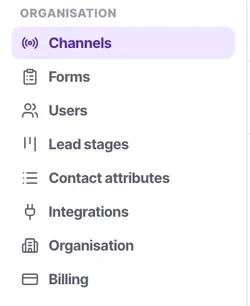
Organisation is everybody's, and it holds exactly eight items: Channels, Forms, Users, Lead stages, Contact attributes, Integrations, Organisation and Billing. If a control changes how the product behaves for the whole team, it is in one of those eight. There is no ninth place.
Work out which of the eight owns what you are looking for
The mapping is more predictable than it looks, and knowing it saves the hunt:
- Channels — anything about how conversations and calls arrive: routing, calling hours, auto-close, contact creation, concurrency, credentials.
- Forms — what a public form asks for and what a submission creates.
- Users — who has a login and what role they hold.
- Lead stages — the stage list, and which stages are terminal. This one changes what the calling list contains for everybody, which is why it sits here.
- Contact attributes — the whole contact schema: the seventeen attribute types, required, admin-only, defaults and visibility.
- Integrations — developer options and API credentials.
- Organisation — workspace-wide identity and behaviour, including white labelling on Scale and Enterprise.
- Billing — plan, payment method, usage summary, cancellation.
Each of those has its own tutorial. If you now know which item you want, go there rather than reading on — this page is for when you still do not.
Diagnose a missing control: three causes, in order
Three causes, in the order worth checking. Guessing between them is where the afternoon goes.
It is gated by your plan. Advanced process settings are Growth and above; white labelling is Scale and Enterprise. On a lower plan the option is simply absent rather than greyed out, so there is nothing on screen to tell you it exists. Check your plan on Billing first — it is a ten-second check that resolves this whole class of question.
It is gated by your role. Credential fields and the connected-account row on a channel are admin-only. Note that the product deliberately shows those fields to managers rather than hiding them, precisely so a manager knows what to ask an admin for. So a control you can see but cannot change is a role question, and a control that is not on the page at all usually is not.
It does not exist. Some things people expect are genuinely not in the model, on purpose — there is no per-campaign concurrency, no inbound campaign, no priority on the calling list, and no way for a campaign to widen a channel's calling hours. Those are design decisions rather than gaps, and each is explained in its own tutorial.
Change a default only when you have felt the friction
The defaults are opinionated on purpose. "We tried it and it does not fit how we work" is a reason to change something. "It might not fit" is not, and teams that reconfigure everything in week one usually spend month two changing it back — while debugging behaviour they introduced themselves.
The two that most often genuinely need changing early are lead stages, because they should match the words your team already uses, and the contact schema, because it should match the questions you need answered. Both are much cheaper to get right before there is data than after.
Change one thing, then wait a week before the next
These settings change how work arrives for everybody, which makes simultaneous changes impossible to attribute. If you change three things and the team reports that something feels wrong, you have three suspects and no way to separate them without reverting all three.
This is the same discipline as turning workflows on one at a time, and for the same reason.
Tell the team, and write down why — outside the product
A setting changed silently produces a week of confused questions, because the people affected have no way to know anything changed.
Then record the reason somewhere your successor will find it. A heavily customised workspace with no explanation reads as an accident to whoever inherits it, and they will change it back. One line per change — what, when, and what problem it solved — is enough.
Review after a quarter
Settings changed to work around a problem that has since been fixed elsewhere are pure drag on everybody who joins afterwards. Read your own list of changes and ask, for each, whether the reason still holds.
Check it worked
You should now be able to answer "where is that setting" without hunting: two halves, eight organisation items, and three reasons a control might not be on screen.
If you came here for a specific setting and now know which of the eight owns it, that item has its own tutorial with the actual detail.
The parts people get wrong
- Exactly which controls your plan gates behind advanced process settings depends on your plan and can change as the product does. Billing is the authority — check your plan there rather than inferring it from what you can see.
- A missing control is far more often a plan or role question than a bug. Check both before raising it.
- Personal settings never affect anybody else. If you are worried a change will disrupt the team, check which half of Settings it is in first.
The ones people actually ask
Are advanced settings reversible?
Yes, you can always revert a setting to its default state, though this may cause temporary confusion among your team.
Should I document my settings changes?
Absolutely. Maintain a log outside of Convarza detailing what you changed and why, so future admins understand the setup.
Why does changing a lead stage affect everyone?
Lead stages drive the calling list and pipeline visibility for the entire organisation. It is a shared baseline.
Do advanced settings affect billing?
No, they only affect product behaviour. Changing them will not result in surprise charges.
What if I cannot find a setting?
Check if your plan includes it (Growth or above), verify you are an admin, and confirm you are looking in the Organisation half of settings.
Which plans include advanced process settings?
Growth, Scale and Enterprise. Not Starter. On Starter the gated options are absent rather than shown as unavailable, so there is nothing on the screen indicating they exist.
I cannot find a setting somebody told me about. What should I check?
In this order: your plan on Billing, then your role, then whether the thing exists at all. A control you can see but cannot edit is a role question; a control that is not on the page is usually a plan question or a feature that is not in the product.
Where do white labelling settings live?
Under Organisation, and only on Scale and Enterprise. On Starter and Growth the option is not available at all.