
Billing: change plan, see usage, manage payment
One pane holds the subscription, the change plan tier, the payment method, the usage summary and cancellation. No exit interview.
Everything financial lives on one pane — subscription, meters, payment method, usage summary and cancellation. Including cancellation, deliberately: you should not have to email anybody to leave.
The decision this screen exists to inform is the plan change, and the right way to make it is from the meters rather than from a feeling. Look at what is running out, then compare that against the next tier.
Before you start
- Admin access.
- A look at Home first, to see what is constraining you.
Steps
Read the meters before you touch the plan
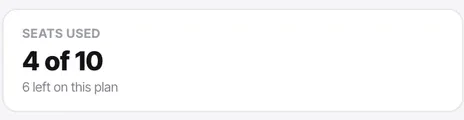
Users, channels, automations and telephony numbers, each reading "used N of M". Home shows the same information as capacity bars.
Identify what is constraining you
The longest bar is the only one that matters. Upgrading for headroom you are not using is how teams end up on Scale while consuming Starter volumes.
Change plan from the subscription card
Starter, Growth, Scale and Enterprise. All thirteen channel types are on every plan — what changes is volume, plus white labelling (Scale and Enterprise) and advanced process settings (Growth upwards).
Check nothing breaks on a downgrade
Downgrading below what you are using will bite. Check users and channels against the meters first — you cannot have ten users on a plan that allows three.
Consider yearly
Ten months instead of twelve. The yearly price is exactly ten times the monthly one on every plan, which is often cheaper than moving up a tier for occasional headroom.
Download the usage summary when you need evidence
Useful for deciding between plans, and for answering "where did the minutes go".
Keep the payment method current
Change payment method sits on the same pane. A failed renewal is the most avoidable outage in any SaaS product.
Check it worked
After any plan change, go back to Home and check the capacity bars against the new allowances. That confirms the change took effect and shows you your new headroom.
The parts people get wrong
- Billing is admin-only, deliberately. Make sure at least two people can reach it.
- Prices are in Indian rupees, exclusive of applicable taxes. For another currency or something beyond Enterprise, talk to sales.
- The calling balance is separate from the plan and covers carrier minutes and AI voice.
The ones people actually ask
When does my billing cycle reset?
Depending on your plan, it resets exactly one month or one year from the day you upgraded to a paid subscription.
Do I lose data if I downgrade?
You will not lose contacts, but if you have more users or channels than the lower plan allows, you must deactivate the excess before downgrading.
What happens if my payment fails?
Renewals are retried. However, repeated failures will result in the suspension of access until the payment method is updated.
Are taxes included in the listed prices?
No, prices are listed exclusive of applicable taxes. Taxes will be calculated and added during checkout based on your region.
Where can I download my invoices?
Admins can download them directly from the Billing pane under Usage Summary and Invoices.
How do I know which plan I need?
Read the meters and find the longest bar — that is your binding constraint and the only one worth paying to fix. Upgrading for headroom you are not using is how teams end up on Scale while consuming Starter volumes.
Can I downgrade?
Yes, but check first. Downgrading below what you are using will bite — you cannot have ten users on a plan that allows three. Compare users and channels against the meters before you commit.
Is yearly worth it?
You pay ten months instead of twelve on every plan, which is often cheaper than moving up a tier for headroom you only need occasionally.
How to buy a plan in Convarza?
Under Settings - On Billing section you can see Change Plan button on click of it. Choose a plan and click on Buy plan and purchase.
How to buy a plan in Convarza?
Under Settings - On Billing section you can see Change Plan button on click of it. Choose a plan and click on Buy plan and purchase.
I consumed all my monthly calling minutes, what can i do?
No need to worry. In Billing section you can see Add Funds option. Click on it and purchase.
Can I add individual users or extra storage as add-ons?
No, you cannot purchase individual add-ons for users or storage. If you need more capacity in those areas, you will need to upgrade your plan.
How are calling minutes priced?
All calling usage is priced and billed based on a 30-second pulse.
What should I check before downgrading my plan?
Before downgrading, make sure to review your channel, user, and automation consumption from the previous month to ensure you do not exceed the limits of the lower tier.
What payment methods are supported for billing?
Billings are processed through Pabbly. You can use any standard card option or UPI option to complete your purchase.
How can I view my usage and download invoices?
You can filter your usage summary based on date, transaction type, channel, product, and more. You also have the option to download invoices directly.
What should I do if I run into billing or payment issues?
If you encounter any issues during the billing or payment process, please connect directly with our support team for assistance.