
Create a task from a workflow
The step that turns a system event into a human obligation with a name and a due time on it.
Notifications tell somebody. Tasks make somebody accountable. Choosing between them correctly is what keeps automation useful rather than noisy.
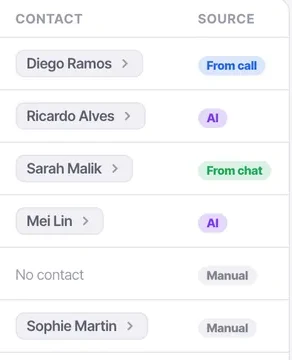
Tasks created by automation appear in the same list as manual ones but are labelled with their source, so you can always tell what your automations are generating — and whether anybody is completing it.
Before you start
- A person to own the task.
- A due time that matches whatever you told the customer.
Steps
Add a create-task step
Set what it says, who it is for, and when it is due.
Assign it to a person
Anyone can be assigned a task. A task with no clear owner is a task nobody does, and automated ones are the easiest to ignore.
Write the task as an outcome
"Call back about the delivery date they asked about" beats "follow up". The person reading it in three days was not there and has no context beyond these words.
Set a due time that matches the promise
If the automated message said "we will call you back this morning", the task is due this morning. A mismatch between what you told the customer and what you told your team is how promises get broken.
Watch the volume in week one
A task on every missed call is realistic at twenty calls a day and useless at two thousand. Narrow with "only if" rather than asking people to work through noise.
Check whether they are being completed
If automated tasks are consistently ignored, the automation is generating noise. Fix the condition rather than the people.
Check it worked
Open Tasks and filter to automated ones. If there are more open than completed after a week, your workflow is creating work faster than anybody can absorb it.
The parts people get wrong
- Tasks land on the contact's activity feed, so whoever opens the record next sees the commitment as well as the reminder.
- The Tasks list shows each task's source — from a call, from a chat, from AI, or manual — which makes auditing your automations straightforward.
The ones people actually ask
Automated tasks are piling up uncompleted.
The condition is too broad, and that is a workflow problem rather than a discipline problem. Narrow it with an only if rather than asking people to work through noise — a task on every missed call is realistic at twenty calls a day and useless at two thousand.
How should I word an automated task?
As an outcome, as carefully as a manual one. It will be read hundreds of times by people who were not there. Call back about the delivery date they asked about beats follow up, and Missed call from an existing customer, ring back before noon beats Workflow: missed call.
What due time should it have?
Whatever you told the customer. If the automated message said you would call back this morning, the task is due this morning — a mismatch between what you told the customer and what you told your team is how promises get broken.