
Tasks created by bots and workflows
Automation turns an event into somebody's obligation. Useful — until the volume makes the list unreadable, which happens faster than you expect.
Tasks arrive from four places and the list tells you which: manual, from a call, from a chat, and from AI. That source column is more useful than it looks, because it lets you audit your automations by their output rather than by reading their definitions.
The failure mode to watch for is volume. A task on every missed call is realistic at twenty calls a day and produces an unusable list at two thousand — and the symptom is not complaints, it is people quietly ignoring the task list altogether.
Before you start
- Workflows or an AI voice agent already creating tasks.
- Manager or admin access to change the automation producing them.
Steps
Know where automated tasks come from
A workflow step, a callback outcome on a call, or an AI voice agent generating a follow-up — "AI task · retry call in 2 days · auto-generated by the voice agent".
Read the source column to audit them
Filter your task list by source and see what each automation is producing. This is faster than reading workflow definitions and tells you what is happening.
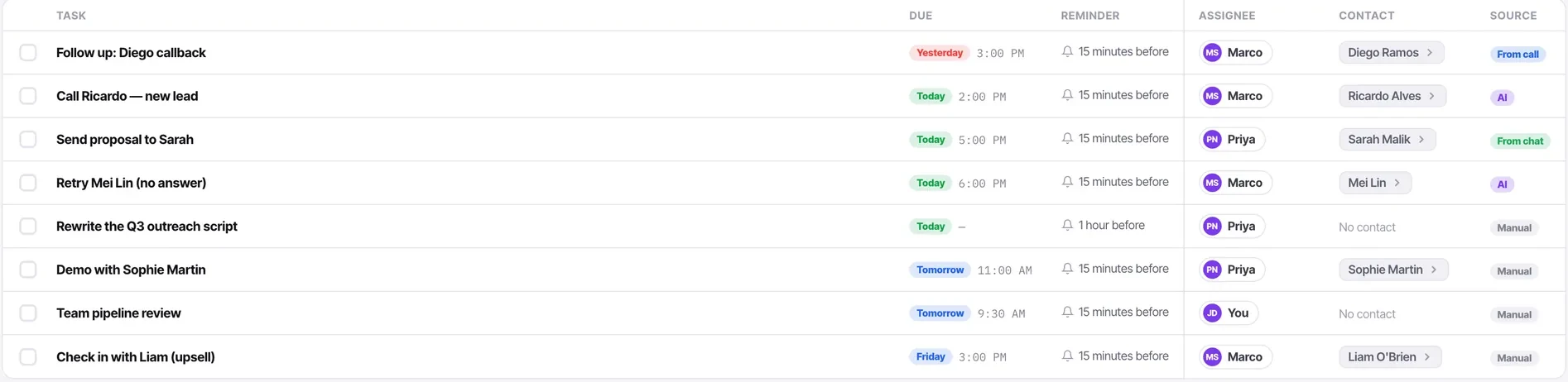
Make sure each has a real owner
A task assigned to nobody in particular is a task nobody does, and automated ones are the easiest of all to ignore.
Write automated task text as carefully as manual text
It will be read hundreds of times by people who were not there. "Missed call from an existing customer — ring back before noon" beats "Workflow: missed call" every time.
Watch the volume in week one
Narrow the workflow with "only if" rather than asking people to work through noise. This is also the cheapest way to reduce your automation action usage.
Check whether they are being completed
A stream of automated tasks nobody completes is a signal about the condition that created them, not about the team's discipline.
Check it worked
Compare the completion rate of automated tasks against manual ones. If automated tasks are completed far less often, they are either too numerous or too vague — and both are fixable in the workflow.
The parts people get wrong
- Every workflow step counts against your automation action allowance, including creating a task.
- AI tasks are labelled distinctly, so you can tell what the voice agent generated from what a person did.
The ones people actually ask
How do I tell which tasks came from automation?
The source column, which distinguishes calls, chats, AI and people. Filtering by it is faster than reading workflow definitions and tells you what is actually happening rather than what should be.
Automated tasks are being ignored.
Check two things. Whether each has a real owner, because a task assigned to nobody in particular is a task nobody does. And whether the text is worth reading — Missed call from an existing customer, ring back before noon beats Workflow: missed call, and it will be read hundreds of times by people who were not there.