
Generate a PDF from a workflow
Produce a document automatically — a quote, a confirmation, a summary — and attach it where it belongs. On every plan.
PDF generation turns data you already hold into a document a customer can keep: a booking confirmation, a quote, a call summary, a receipt.
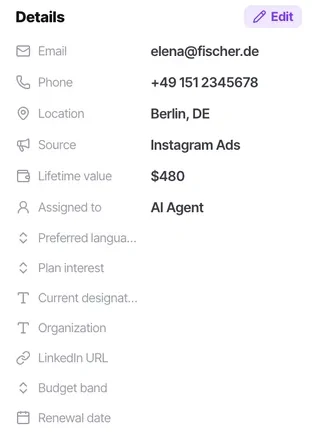
Because the content comes from contact fields, this is the feature that most directly rewards a well-defined contact schema. A document can only include what the record actually holds — and it will happily generate with a gap where a missing field should have been.
Before you start
- A contact schema that holds the fields the document needs.
- Storage headroom — generated files count against your plan.
- A decision about what happens if a required field is empty.
Steps
Add a PDF generation step to a workflow
Included on every plan, from Starter upwards.
Decide what the document is for before you build it. A PDF generated on every workflow run and opened by nobody is storage you are paying for and an automation action spent on nothing.
Decide what the document is for
Something the customer or a colleague needs as a file. A PDF nobody opens is storage you are paying for.
Build the content from contact fields
This is where a well-defined schema pays off. If the document needs a company name and a renewal date, those need to be attributes rather than notes.
Guard against empty fields
An "only if" checking the required attributes are present is worth adding. Without it the document generates with a blank where the price should be, and gets sent.
Decide where it goes
Attached to the contact, sent to the customer, or both. Sending is a separate send-message step.
Test with awkward data
Long names, missing fields, non-Latin scripts, large numbers, a very long address. A template that only works with tidy data will break in week two.
Watch storage
Generated files draw on the same 2GB to 120GB as knowledge bases and recordings.
Check it worked
Generate one for a real contact and read it as the customer. Then generate one for a contact with several fields empty and see what arrives — that second document is the one that will embarrass you.
The parts people get wrong
- A document generated with a missing field still generates. The gap is silent, which is why the guard condition matters.
- PDF generation is on every plan, from Starter upwards.
The ones people actually ask
The PDF generated with blanks where the data should be.
Add an only if checking the required attributes are present. Without it the document generates with a blank where the price should be, and gets sent.
What should I test it with?
Awkward data: long names, missing fields, non-Latin scripts, large numbers, a very long address. A template that only works with tidy data will break in week two.
Is it worth generating one on every run?
Only if somebody opens it. A PDF nobody reads is storage you are paying for and an automation action spent on nothing, and generated files draw on the same allowance as knowledge bases and recordings.