
A tour of the workspace: the rail, the top bar and notifications
Where everything lives and, more usefully, why it lives there. Ten minutes here saves a fortnight of hunting through menus for something that was never in them.
Most product tours list the menus. That is not very useful, because the problem people have in Convarza AI is not finding a menu — it is looking for something in the wrong place because they have assumed a structure the product does not have.
Three assumptions cause almost all of it. People look for calls in the Inbox. People look for a list of conversations per bot. And people look for a way to see a colleague's work when their role does not allow it. None of those exist, and none of them are missing features — each one is a deliberate decision with a consequence worth understanding.
Before you start
- A login. Anything else is optional — this is a tour.
- Knowing your own role, because it changes what is on screen.
Reference
The rail is the product
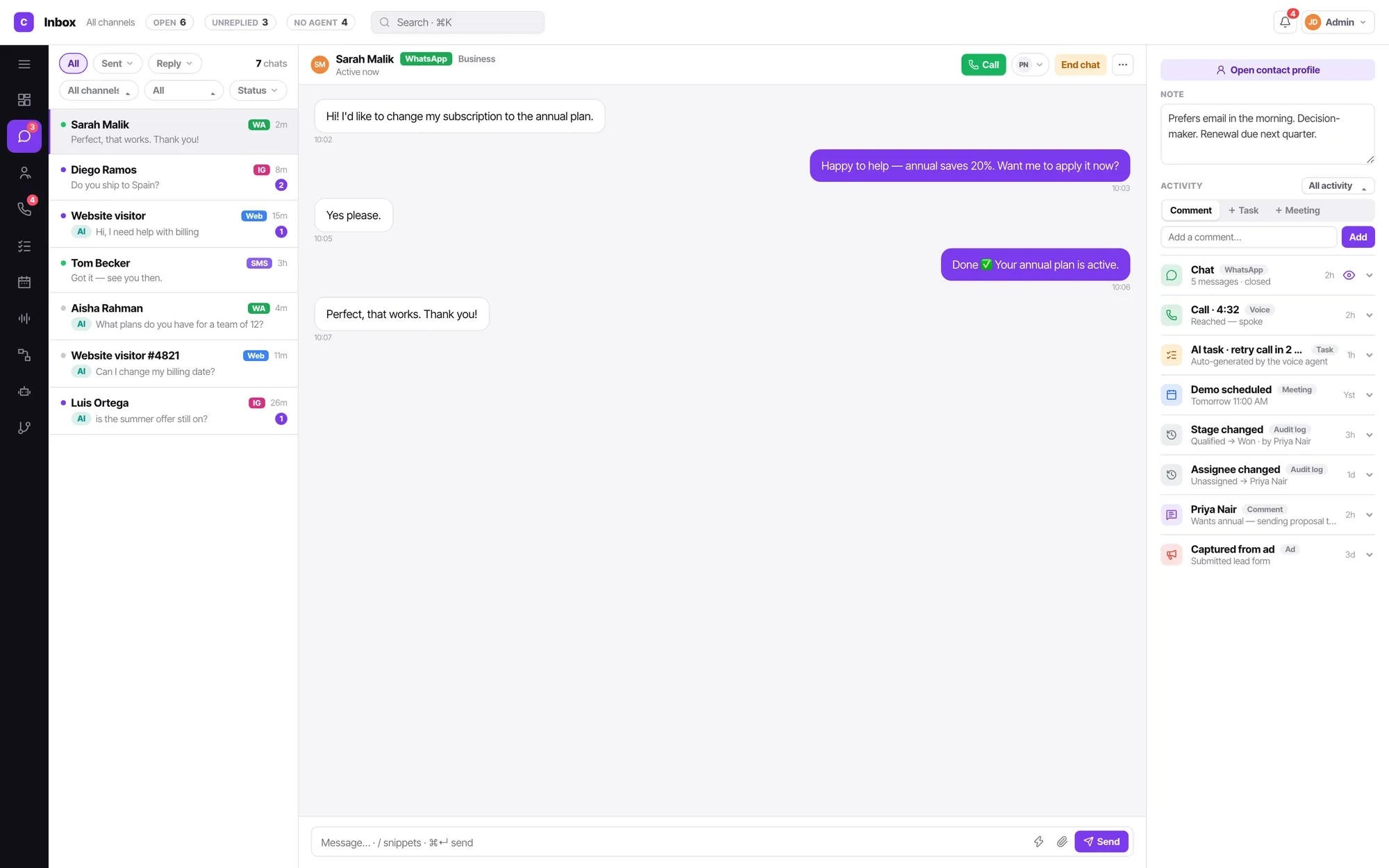
Everything is a rail item: Inbox, Calls, Contacts, Tasks, Calendar, AI bots, Call flows, Campaigns, Workflows, Channels and Insights.
There is no second-level configuration area holding half the features. If something is a thing you build or work, it is on the rail. If it is a thing you set once, it is in settings.
What you see depends on your role, and that is not subtle
An agent does not see the Workflows rail item at all, because automations change how everyone's work arrives. Managers and admins do.
This matters on day one: if a colleague is describing a screen you cannot find, check your role before you conclude something is broken. A new agent looking at an empty Inbox and a missing rail item usually assumes the product has failed, when both are correct.
The counts in the top bar are the health check
OPEN, UNREPLIED and NO AGENT sit across the top. Unreplied is the one worth watching daily — it is a first-class state rather than a report you build.
NO AGENT is the count of conversations nobody has taken, which is the same thing as conversations your bot is handling. If that number climbs while unreplied climbs too, your bot is not coping and nobody has noticed.

Inbox is the only conversation list there is
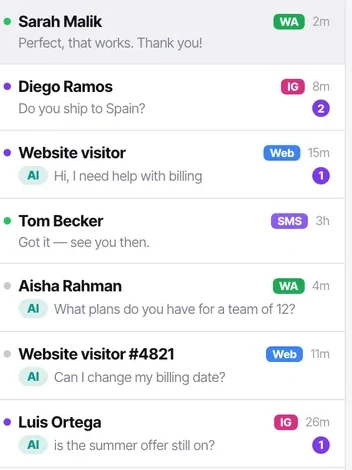
Chats are never listed per bot. One bot can serve WhatsApp, Instagram and your web widget at the same time, so a per-bot list would be a fiction — it would have to invent a grouping the product does not model.
Whatever you are looking for, it is in the Inbox with a filter on it. The filter chain is the skill worth learning early.
Calls are not conversations, and they are not in the Inbox
This trips up almost everybody on day one. Calls live under Calls and on the contact timeline.
The reasoning is that a chat is a thread you reply to, while a call is an event that happened to a person. Putting a completed call in a reply queue would mean a queue full of things nobody can reply to.
The contact record sits beside the work, always
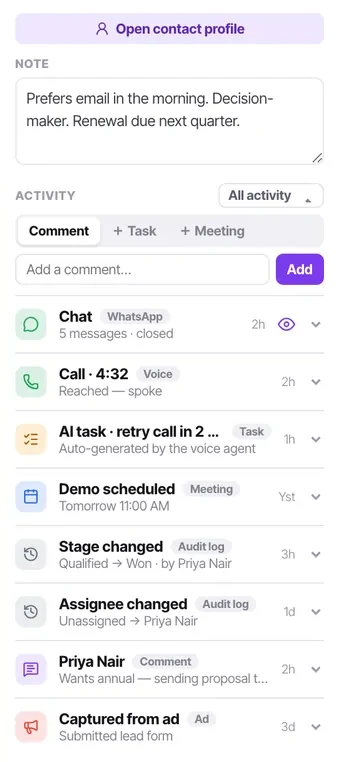
Open any conversation and the person is on the right: the note a colleague left, the last call and how it ended, open tasks, the lead stage, and the whole activity feed.
You should almost never need to open Contacts separately while working a queue. If you find yourself doing it, something is probably missing from your contact schema.
Three entities share the AI bots rail item
Bots, bot flows and knowledge bases. They are siblings rather than a hierarchy — a knowledge base is not owned by a bot, which is exactly why one knowledge base can serve many bots.
The notification feed is the only thing that comes to you
Everything else in the product waits for you to look at it. The notification feed does not: template approvals and rejections, workflow failures for workflows you own, mentions and assignments all land there.
If you own workflows, this is the difference between finding out an automation broke today and finding out next month.
Put it to use
A quick self-test. If you can answer these four without looking, the tour has done its job:
- Where do you find a call from last Tuesday? Calls, or the contact timeline.
- How do you see every conversation your bot is currently handling? Inbox, assignee filter set to None.
- Why can a new agent not see the Workflows item? Agents never see it.
- Where does a WhatsApp template rejection appear? The notification feed.
The parts people get wrong
- Your personal mailbox and signature live under Settings → Personal → Email. The email channel is the shared team address and lives under Channels. Connecting a personal mailbox as a channel turns every private message into a team conversation.
- Search in the top bar is workspace-wide. It is usually faster than navigating to Contacts and filtering.
- Lead stages and contact attributes are settings pages, not rail items, because they define what things are rather than being work you do.
The ones people actually ask
Why is my Inbox empty?
If you are an agent, because nothing has been assigned to you yet — agents see only their own assigned work, so an empty Inbox on a busy workspace is correct rather than broken. If you are a manager or admin and the Inbox is genuinely empty, check that a channel is connected and that something has actually been sent to it.
Where are my calls? They are not in the Inbox.
Under Calls on the rail, and on each contact's activity feed. Calls are deliberately not in the Inbox: a chat is a thread you reply to, a completed call is an event that happened, and putting the second into a reply queue would fill it with things nobody can reply to.
I cannot see the Workflows item on the rail.
You are an agent. Agents never see Workflows, because automations change how work arrives for everybody. It is absent rather than disabled, which is why it looks like a missing feature. Ask a manager or admin if something needs automating.
What is the fastest way to find one specific customer?
Search in the top bar, which is workspace-wide. It is usually quicker than going to Contacts and building a filter, and it reaches conversations as well as records.