
Your first week: a go-live checklist
Eleven checks between a configured workspace and one you can let customers touch. Most bad launches fail one of these, not something exotic.
Nothing on this list is clever. That is the point — launches rarely fail on something subtle. They fail because a timezone was wrong, or because the handover worked perfectly and landed in a queue nobody was watching.
Work through it in order. The first four are about whether the plumbing is connected; the middle four are about whether it behaves correctly at the edges; the last three are about whether anybody will notice when it does not.
One piece of strategy before the list: launch one channel properly rather than five badly. A working WhatsApp queue teaches you more in a week than five half-connected channels teach you in a month, and it gives you one place to look when something is odd.
Before you start
- Every channel you intend to launch with, connected.
- At least one bot or call flow built and tested.
- An hour, and the willingness to change your hours temporarily to test out-of-hours behaviour.
Steps
Every channel is green, checked today
Connected account showing, and on calling channels a trunk status you have refreshed now. A channel that connected last week is not evidence it is connected today — tokens expire and authorisations lapse when people leave.
Every channel points at exactly one thing
Walk the channel list and read the routing on each row. A channel nobody routed will drop conversations into an unassigned queue, and your agents cannot see unassigned traffic, so it is invisible to the people who would notice.
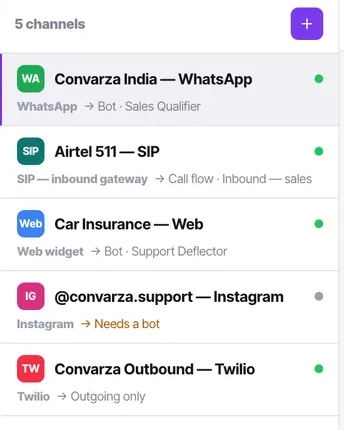
Somebody is named as watching the unassigned queue
Bot-handled chats are the unassigned ones. When your bot hands over, the conversation becomes assigned — but if a handover condition fails or the bot stalls, the chat sits unassigned.
Name a person, not a team. "Everyone keeps an eye on it" means nobody does.
Calling hours are set, and the timezone is right
Restricted call timings live on the channel: per-day on/off, Copy Mon→Fri, one timezone and date exceptions.
Check the timezone specifically. It is the single most common go-live mistake in the product, and a correct 9-to-6 in the wrong timezone is a compliance problem rather than a cosmetic one.
Test the handover end to end, every condition
Trigger each handover condition as a customer would, one at a time, and confirm a real person receives a real conversation with the history intact.
A condition that has never fired in testing has not been tested. This is where most disappointing deployments actually fail — at the seam, not at the answer.
Test outside business hours
Temporarily change your hours so that "now" is out of hours, then ring the number and message the channel. See what a customer gets at 2am.
Change the hours back afterwards. Write yourself a note — people forget.
Concurrency is set on calling channels
Allowed calls count, under the channel's additional settings. It belongs to the line, not to a campaign, and every campaign and inbound call shares it.
Too low and a campaign crawls; above what your carrier sold you and they reject the calls.
Your lead stages match how you sell
Six stages are terminal — Qualified, Won, Lost, Not interested, DND and Wrong number — and a contact in any of them leaves the calling list.
Make sure that matches what your team means by those words, before six months of data is filed under a definition you disagree with.
Workflows are all off
Build them, leave the Live toggle off, and turn them on one at a time after launch. Turning on five at once and seeing odd behaviour tells you nothing about which one caused it.
Check each has an owner who is not on holiday.
Consent and DND are settled before any campaign
An autodialler will happily break rules you have not read. Confirm your legal basis, the do-not-call regime in every market you dial, and your carrier's own requirements — before the first campaign, not after.
Check the meters
Users, channels, automations and telephony numbers each read "used N of M" in Billing. Know where you are before launch day multiplies your volume, particularly AI messages and calling minutes.
Check it worked
Do one final end-to-end run as a customer, on a real phone, on the channel you are launching. Send a message, get the bot's answer, ask for a human, and watch a colleague pick it up. If that works twice in a row, you are ready.
Then agree who checks the unreplied count tomorrow morning. Launches do not fail on day one; they fail on day four when everybody has stopped watching.
The parts people get wrong
- The web widget is the safest first live channel: the allowed-domains list means you control exactly which pages it appears on, so you can launch on one page.
- The calls you miss between 7pm and 9am have a floor of zero, which makes an after-hours flow the lowest-risk place to put an AI agent first.
- Keep a note of what you changed temporarily for testing — business hours especially. More than one team has launched with test hours still in place.
The ones people actually ask
How long should we run in test before going live?
Long enough to have triggered every handover condition at least once and to have placed a call both inside and outside your hours. That is usually an afternoon, not a fortnight. The failures this catches are structural rather than statistical, so more time does not find more of them — more paths does.
Should workflows be on or off at launch?
Off, and turned on one at a time afterwards with a day between each. Enabling five at once and then noticing something odd leaves you five suspects and no way to separate them. Build them all now; enable them slowly.
What is the single most common go-live mistake?
The timezone on restricted call timings. A correct nine-to-six in the wrong timezone is a compliance problem rather than a cosmetic one, and it is invisible until somebody is rung at the wrong hour. Read the timezone aloud, and place a test call just before your window opens and just after it closes.