
Connect Twilio
Point a Twilio number at Convarza and choose what answers it: your agents, an AI voice agent, or a call flow. The numbers and the carrier relationship stay yours.
Convarza connects to your Twilio account rather than reselling numbers. You keep the numbers, the billing relationship and the console. What changes is what happens when a call arrives or when you dial out.
Two settings on a calling channel carry more weight than the credentials do. Direction decides whether the channel is inbound, outbound or both — and an outbound-only channel correctly shows no routing at all, because nothing will arrive on it. Allowed calls count is your concurrency, and it belongs to the line rather than to any campaign that uses it.
Before you start
- A Twilio account with at least one voice-capable number.
- Your Twilio account credentials.
- The concurrency your Twilio account permits.
Steps
Add a Twilio channel and connect the account
Enter your Twilio Account SID and Auth Token, both from the Twilio console dashboard. Secrets are masked with a Show toggle so you can verify a paste without leaving them on screen.
Use credentials with access to the subaccount holding the numbers you want. If the number you expect is missing from the resource picker later, this is usually why.
Pick the resource
Resource is a picker with Change and Clear — never a free text box you can typo. Choose the number or resource this channel represents.
If the number you expect is not listed, it is usually not voice-capable, or it belongs to a subaccount the credentials cannot see.
Set region and direction
Incoming, outgoing, or both. Set this deliberately: a channel with incoming off reads "Outgoing only" and shows no routing, which is correct rather than a missing control.
Region should match where your numbers actually are. A mismatch shows up as poor audio or failed connections rather than as a clear error.
Route it
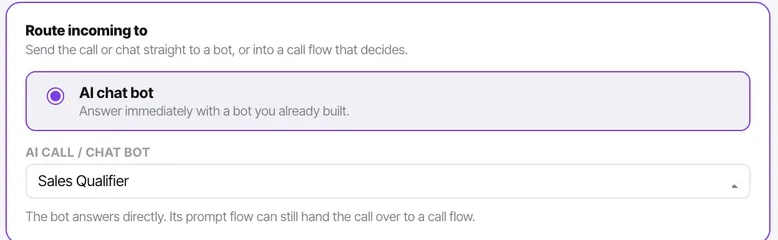
An AI voice agent, or a call flow. Use a flow whenever the answer depends on the time of day or on ringing people first — the flow can hand to the agent as one of its steps.
Set restricted call timings
Per-day on/off, Copy Mon→Fri, one timezone, date exceptions. Campaigns inherit these and can only narrow them, which is what stops a campaign dialling at midnight by accident.
Check the timezone. It is the single most common mistake on this screen.
Set the allowed calls count
Under additional settings, alongside forwarded-from numbers, forward-to number, the IP/domain match list and ping timeout.
Set it at or below what Twilio permits. Above that number, Twilio rejects the calls and your campaign appears broken.
Ring the number, then refresh trunk status
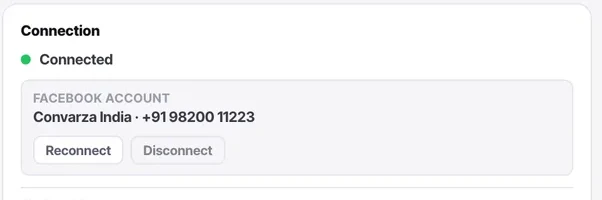
The connection card carries trunk status with a refresh button. Refresh it after your test call rather than trusting what the page loaded with.
Check it worked
Test in both directions you enabled. Ring in and confirm the right thing answers; place an outbound call and confirm it connects and that the outcome logger appears when it ends.
The parts people get wrong
- Concurrency belongs to the line, not to a campaign. Two campaigns on one Twilio channel share the same allowed calls count, along with every inbound call and every manual dial.
- You keep your Twilio numbers and the carrier relationship throughout. Disconnecting only stops Convarza handling them.
The ones people actually ask
Do I keep my Twilio numbers?
Yes. Convarza connects to your account; the numbers stay yours and so does the carrier relationship.
Can I stop it calling at night?
Restricted call timings on the channel: per-day on/off, Copy Mon→Fri, one timezone and date exceptions. Campaigns inherit them and can only narrow them.
Why does my channel show no routing?
Because incoming is switched off. An outgoing-only channel has nothing arriving to route, so the control is correctly absent.