
White label your workspace
Available on Scale and Enterprise. Put your own brand on the product your team and your customers see.
White labelling replaces Convarza's branding with your own. It is available on Scale and Enterprise and not on Starter or Growth, so the first step is confirming your plan.
It matters most in two situations: agencies operating the product on behalf of clients, and businesses whose customers see enough of the product — booking pages, widgets — that a third party's branding is a distraction.
Before you start
- A Scale or Enterprise plan.
- Your logo in the formats the settings ask for, including a version that works on a light background and one that works on dark.
Steps
Confirm your plan supports it
Scale and Enterprise only. On Starter and Growth the option is not available at all.
If white labelling is essential to how you sell — an agency operating on behalf of clients, for instance — it is a factor in your plan choice rather than something to discover afterwards.
Open the white labelling settings
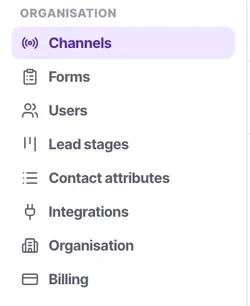
Under Organisation, with the other settings that change the product for everybody.
Have both logo variants ready before you start: one that works on a light background and one that works on dark. Supplying only the first is how a logo ends up as a white box in half the product.
Upload branding that works small
Most of the places a logo appears are small. A detailed logo that reads beautifully on a billboard becomes a smudge at 32 pixels.
Check it in both light and dark contexts
A logo with a baked-in white background looks fine in one and wrong in the other. Supply a transparent version if you can.
Look at it as an agent would
Sign in as a test agent account and check the screens they use rather than the settings pages you have been working in.
Check the customer-facing surfaces
Booking pages and the web widget are what your customers see. Those matter more than the internal screens.
Check it worked
Open a booking link and the web widget as an outsider. Those two are what customers experience, and they are the reason to do this at all.
The parts people get wrong
- White labelling changes presentation. It does not change what a role can do or how anything is billed.
- Not available on Starter or Growth. If it is essential, it is a factor in your plan choice.
The ones people actually ask
Can agents toggle white-labelling off?
No, white-labelling is an organisation-wide setting controlled exclusively by admins.
Why do I need a dark and light mode logo?
Because the workspace interface adapts to user preferences. A logo designed for a white background will often become invisible in dark mode.
Does white-labelling affect my billing invoices?
No, billing invoices from Convarza will still carry the Convarza branding for compliance and accounting clarity.
Does this remove Convarza from API endpoints?
White-labelling is purely cosmetic for the workspace UI, booking links, and web widgets. API endpoints and documentation remain Convarza.
Why can’t I see white-labelling on Growth plan?
White-labelling is exclusively available on Scale and Enterprise plans. The option is hidden on lower tiers.
Why can I not find white labelling?
It is Scale and Enterprise only, and on Starter and Growth the option is not available at all rather than shown as unavailable. If branding is essential to how you sell — an agency operating on behalf of clients, for instance — it belongs in your plan choice rather than being discovered afterwards.
My logo looks wrong in some places.
You have supplied only one variant. Have both ready before you start: one that works on a light background and one that works on dark. Supplying only the first is how a logo ends up as a white box in half the product. A transparent version helps too.
Which screens should I check?
Sign in as a test agent and check the screens they actually use, rather than the settings pages you have been working in. Then check the customer-facing surfaces — booking pages and the web widget — because those matter more than the internal screens.