
Create a workflow
Three blocks and you are done. If an automation cannot be read out loud in a stand-up, nobody will trust it enough to leave it on.
A workflow is three blocks: When this happens, Only if, and Then, in order. There is no trigger builder with numeric operators, no condition matrix, and no canvas of unlabelled nodes.
That constraint is the whole design. An automation you can read out loud is one a colleague can check, and an automation nobody can check is one nobody trusts enough to leave switched on. Every workflow in your workspace should pass the stand-up test: read the three blocks aloud, and somebody who was not involved should be able to say whether it is right.
Before you start
- Manager or admin access — agents never see the Workflows rail item.
- One sentence describing what should happen, written before you open the builder.
- A named owner who will be told when it fails.
Steps
Open Workflows and create one
A rail item beside Campaigns and AI bots, because building automations is daily work rather than a settings pane you visit twice a year.
Say it in one sentence first
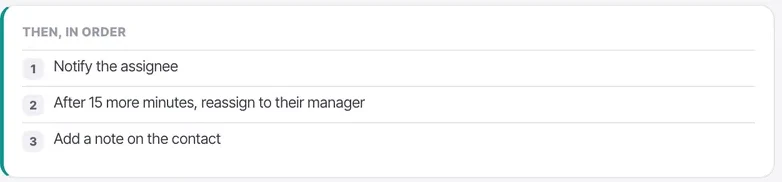
"When a chat goes 30 minutes without a reply, if it is assigned and inside calling hours, notify the assignee and then escalate to their manager."
Write that down before you touch the builder. If you cannot say it in a sentence, the workflow is doing more than one thing.
Fill in "When this happens"
One trigger. One event. There is no operator dropdown, no value field and no combination of events — the trigger is a sentence.
If two different events should produce the same outcome, build two workflows. Both will stay readable, which is worth more than avoiding the duplication.

Fill in "Only if", if you need it
The optional narrowing, written as bullets. "The chat is assigned to an agent." "It is inside calling hours."

Add the steps under "Then, in order"
Numbered, running top to bottom. Notice that a delay can be expressed inside a step — "After 15 more minutes, reassign to their manager" — rather than needing its own block.
Set an owner
Required, and for a specific reason: the owner is told when the workflow fails. A broken automation should be somebody's problem rather than nobody's.

Leave it off and read it out loud
Read the three blocks to a colleague. If they cannot confirm it is right, rewrite it before turning it on.
Check it worked
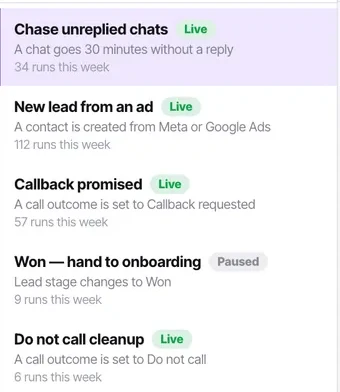
Look at your workflow in the list. It should read as a sentence, carry a status, and — once live — show how many times it ran this week. If that run count is far higher or lower than you expected, the condition is wrong.
The parts people get wrong
- What you will not find: a numeric trigger builder, a condition matrix, or a canvas of unlabelled nodes. That is deliberate.
- Agents never see the Workflows rail item at all, because automations change how everyone's work arrives.
- Automation actions are counted per step. A six-step workflow running a hundred times uses six hundred.
The ones people actually ask
How do I know a workflow is well-scoped?
You can say it in one sentence before you touch the builder. When a chat goes 30 minutes without a reply, if it is assigned and inside calling hours, notify the assignee and then escalate to their manager. If you cannot say it in a sentence, it is doing more than one thing.
Can one workflow have two triggers?
No. One trigger, one event, no operator dropdown and no combination. If two different events should produce the same outcome, build two workflows — both stay readable, which is worth more than avoiding the duplication.
Why is an owner required?
Because the owner is told when the workflow fails, and a broken automation should be somebody's problem rather than nobody's. A workflow owned by a deactivated user is one whose failures go nowhere.