
Make an automation wait with time-hold
The step that lets a workflow do something later — which is what most genuinely useful automations need.
Most valuable automations have a wait in them, because most valuable automations are of the form "do something, give it a chance, then escalate if nothing happened".
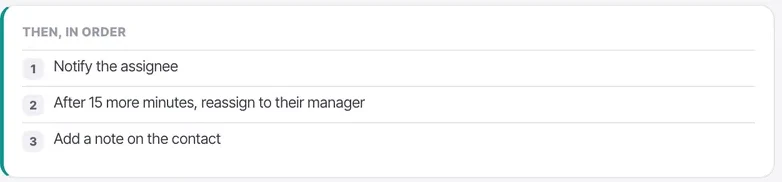
Short waits live inside a step — "after 15 more minutes, reassign to their manager". For anything longer, use a time-hold. And the thing to internalise: the world changes during the hold. The customer may have replied, the chat may have been assigned, the stage may have moved. Check the condition again afterwards rather than assuming.
Before you start
- A workflow where a genuine wait belongs — hours rather than minutes.
- A recheck after the hold, because circumstances change while it waits.
Steps
Add a time-hold where a genuine delay belongs
Included on every plan. It pauses the workflow and continues afterwards, which is what makes the do-something, wait, escalate pattern possible.
For a short delay inside an escalation, an in-step delay is simpler. Reach for a time-hold when the wait is hours rather than minutes.
Use it for the "and if they still have not replied" pattern
Send an acknowledgement, hold two hours, then check whether anyone replied and escalate if not. That is the shape of most workflows that earn their keep.
Pick a delay that lands in working hours
A two-hour hold starting at 5pm resumes at 7pm. Pair it with a business-hours condition, or choose the delay with the clock in mind.
Re-check the condition after the hold
Everything may have changed. A workflow that escalates without rechecking will escalate conversations that were resolved twenty minutes ago, which is worse than doing nothing.
Do not use it to build a calling cadence
That is what a campaign follow-up sequence is for, written in sentences. A workflow with four time-holds is a campaign badly reimplemented, and it will be harder to change.
Test with a two-minute hold first
While you are watching. Not twenty-four hours while you are not.
The thing you are testing is what happens after the hold when circumstances have changed — the customer replied, somebody took the chat, the stage moved. You cannot observe that on a delay you have gone home during.
Check it worked
Run the workflow, resolve the situation manually during the hold, and confirm the workflow does not escalate afterwards. That is the behaviour that separates a helpful automation from an annoying one.
The parts people get wrong
- Steps after a hold still consume automation actions when they run.
- Turning a workflow off with the Live toggle does not necessarily cancel runs already waiting in a hold. Check before assuming nothing is pending.
The ones people actually ask
Should I use a time-hold or an in-step delay?
In-step delay for a short escalation — after 15 more minutes, reassign to their manager. A time-hold when the wait is hours rather than minutes, because it pauses the workflow and continues afterwards.
My workflow escalated something that had already been resolved.
It did not re-check the condition after the hold. Everything may have changed while it waited — the customer replied, somebody took the chat, the stage moved. A workflow that escalates without rechecking is worse than doing nothing.
Can I build a calling cadence with time-holds?
Do not. That is what a campaign follow-up sequence is for, written in sentences. A workflow with four time-holds is a campaign badly reimplemented and it will be harder to change.
How do I test one?
With a two-minute hold, while you are watching. The thing you are testing is what happens after the hold when circumstances have changed, and you cannot observe that on a twenty-four hour delay you have gone home during.