
Set the channel message user and broadcast timings
Who outbound WhatsApp appears to come from, and the hours automated messages are allowed to go out. The chat equivalent of restricted calling hours.
Two settings sit together on the WhatsApp card and both are easy to set once and never think about again — which is when they cause problems.
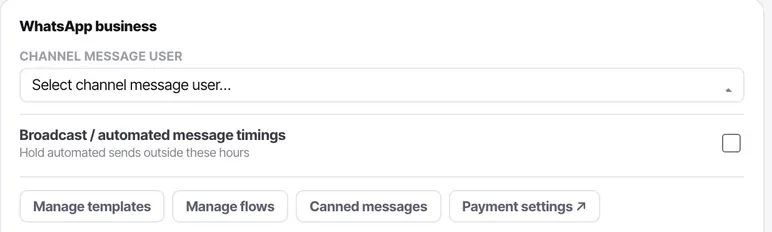
The channel message user is who outbound messages are attributed to when no person sent them: automation and broadcasts. If that account is later deactivated, automated messages lose their sender.
Broadcast / automated message timings hold automated sends outside the hours you set. It is the chat equivalent of restricted calling hours on a phone line, and it exists for the same reason — an automation with no time bound will message somebody at 3am.
Before you start
- A connected WhatsApp channel.
- A durable shared account to use as the channel message user — not a named individual who might change job.
- An honest answer to when somebody can actually reply, which is not your opening hours.
Steps
Open the WhatsApp channel
The channel message user and the broadcast timings sit together on the WhatsApp business card.
Set the channel message user to a durable account
Pick an account that will not be deactivated when somebody changes job. A shared operations account is safer than a named individual.
Set the timings to when a reply can be answered
This is the real constraint, and it is not the same as your opening hours. A broadcast at 9pm produces replies at 9pm — if neither a bot nor a person is answering then, you have manufactured a queue of irritated people for the morning.

Check the timezone alongside the hours
Same trap as calling hours. If you message a market in another timezone, this is about their clock.
Re-check before every campaign
Both settings are set once and forgotten. Confirming them takes ten seconds and prevents the kind of mistake that ends up on social media.
Check it worked
Trigger an automated message just outside the window and confirm it is held rather than sent. That is the behaviour you are relying on.
The parts people get wrong
- These timings govern automated WhatsApp only. A person typing a reply is not restricted by them.
- If the channel message user is deactivated, automated messages lose their sender. Add this to your offboarding checklist.
- AI messages are metered against your plan; messages your team types are not. Broadcasts and workflow messages count.
The ones people actually ask
Our automated WhatsApp messages went out at 2am.
Broadcast timings were not set, or the timezone is wrong. This is a setting rather than an accident — automated sends are held outside the hours configured here. Set them to when a reply can actually be answered, which is not the same as your opening hours.
Why does the channel message user matter?
Because it stops working when that account is deactivated. Pick a durable shared operations account rather than a named individual — otherwise your automated WhatsApp quietly stops the week somebody changes job, and nothing connects those two events for you.
Do these hours affect what agents send?
No. They hold automated and broadcast sends. A person typing a reply is not affected, which is correct — somebody replying at 9pm is answering a customer who is awake.