
Read the contact record beside a conversation
The person, not just the thread. Everything on the right exists so nobody has to ask the room whether this customer already complained.
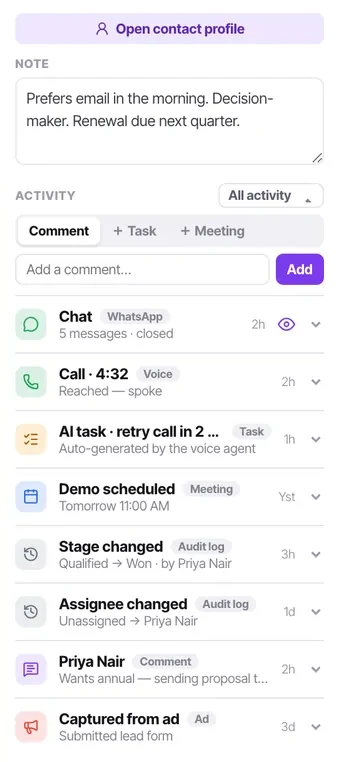
The panel on the right of every conversation is the difference between answering a message and helping a person. It is always there, it is the same record the calling list and the campaign write into, and reading it takes about ten seconds.
The habit worth building is reading it before you type rather than after something goes wrong.
Before you start
- An open conversation. The panel is on the right of it.
Steps
Check the lead stage first
It tells you whether this is a new enquiry, somebody mid-conversation, or a person who has already said no. Opening a sales pitch at a contact marked Not interested is the kind of mistake customers remember.
Read the note
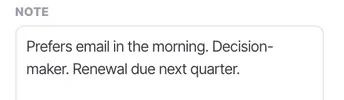
The note is where context that never made it into a message lives — "prefers email in the morning", "decision maker", "renewal due next quarter".
Check the last call and how it ended
An outcome of "not interested" three days ago changes how you open. So does a callback that was requested and missed — that one deserves an apology before anything else.
Look at open tasks
If a colleague already promised to follow up on Thursday, you do not need to promise it again, and you certainly should not promise something different.
Scan the activity feed for anything recent
A campaign that rang them twice this week, a form they submitted, a stage change somebody made. All of it is on one feed in order.
Add what you learn before you leave
Comment, task and meeting composers sit at the top of the feed — no modal. The next person gets what you got.
Check it worked
After your next five conversations, ask yourself whether the panel told you anything useful. If it consistently does not, your contact schema is probably missing the one or two fields your business actually runs on.
The parts people get wrong
- If a conversation has no contact record, the channel has "do not create contact" switched on. That is a setting, not a bug — and it means notes, tasks and lead stage are unavailable there.
- The panel is the same record everywhere. A note left here is visible to whoever calls this person next week.
The ones people actually ask
What should I read first?
The lead stage. It tells you whether this is a new enquiry, somebody mid-conversation, or a person who has already said no — and opening a sales pitch at a contact marked Not interested is the kind of mistake customers remember. Then the note, then the last call and how it ended.
The panel is nearly empty for this customer.
Either they are genuinely new, or the channel they arrived on has contact creation turned off, in which case there is no record to carry anything. Check the channel's additional settings if this keeps happening on one channel in particular.
Do I need to open Contacts separately while working the queue?
Almost never — that is the point of the panel. If you find yourself doing it regularly, something is probably missing from your contact schema that ought to be on the record.