
The contact record
Fields, timeline and panels — the thing every conversation, call and campaign writes into, and the reason nothing needs syncing.
The contact record is the join between every other part of the product. A chat writes to it, a call writes to it, a campaign writes to it, a booking writes to it — which is why there is no sync job, no field mapping and no nightly reconciliation anywhere in Convarza.
It has three parts worth learning separately: the fields, which come from a schema an admin defines; the activity feed, which is everything that ever happened; and the note, which is the human summary neither of the other two can give you.
Before you start
- A contact to open. It is the same record from Contacts, the conversation panel or the calling list.
Steps
Open a contact from anywhere
From Contacts, from the panel beside a conversation, or from the calling list. It is the same record — there is only one.
Read the field list
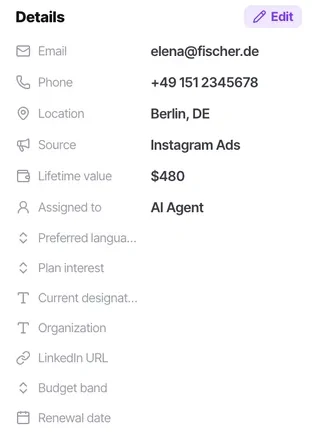
It comes entirely from your schema. Required attributes sort first and carry a red asterisk, which is what makes a long field list navigable.
Read the lead stage
One field describing the person over their lifetime. It decides whether they appear in a calling list and whether a campaign will dial them, which makes it the highest-consequence field on the record.
Read the note before anything else
The note is the human summary — "prefers email in the morning, decision maker, renewal due next quarter". It is the thing most worth reading and the thing most often skipped.
Read the activity feed
Chats, calls with outcomes, AI tasks, meetings, stage changes, assignee changes, comments and captured form submissions, in order.
Add context before you leave
Comment, task and meeting composers sit at the top of the feed. The next person gets what you got.
Check it worked
Open a contact somebody else has worked and try to answer three questions without asking anyone: what do they want, what did we last promise, and what stage are they at? If you cannot, your schema or your note habit needs work.
The parts people get wrong
- What the record shows is entirely determined by the schema an admin defined. A missing field is a schema question, not a display setting.
- Admin-only attributes exist for genuinely sensitive fields — margin, internal scoring. Agents see the record without them.
The ones people actually ask
What should I read first on a contact?
The lead stage, then the note. The stage tells you whether this is a new enquiry, somebody mid-conversation or a person who has already said no. The note is the human summary and it is the thing most worth reading and most often skipped.
Why does this contact have different fields from that one?
It does not — the field list comes entirely from your schema and is the same for everybody. Required attributes sort to the top with a red asterisk, which is what makes a long list navigable and can make two records look differently arranged.
Is there more than one record per person?
No, there is only one. Whether you open it from Contacts, from the panel beside a conversation or from the calling list, it is the same record. If you are seeing two, you have duplicates — usually a phone number format problem or a create-only integration.