
Read the audit trail on a contact
Stage and assignee changes are entries on the activity feed, not silent edits. You can always see who moved what, and when.
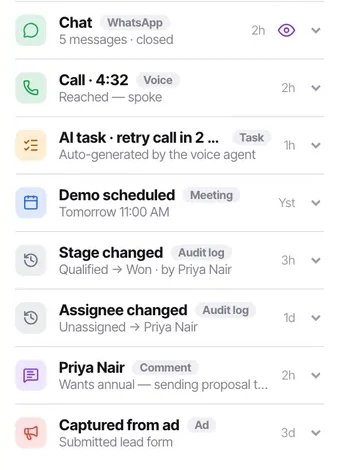
Nothing in this product edits a contact silently. Stage changes and assignee changes both land on the activity feed as audit entries, attributed and timestamped — including changes made by call outcomes, workflows and bulk edits.
That means the two questions that are unanswerable in most CRMs — "who put them on DND?" and "why is this suddenly assigned to me?" — both take about ten seconds here.
Before you start
- A contact whose history you need to understand.
- The patience to read the trail before undoing somebody else work.
Steps
Open the contact's activity feed
The audit entries sit in order with everything else that ever happened.
Look for stage changes
"Qualified → Won · by Priya Nair" states the before, the after and the person. Changes made by an automation are attributed too, so you can tell a workflow from a human.
Look for assignee changes
"Unassigned → Priya Nair". Useful when work has quietly moved and nobody remembers agreeing to it.
Use it to settle "who put them on DND"
The most common audit question in the product, and the one with the most consequence attached.
Read it before undoing something
Whoever made the change may have had a reason that is not obvious from the record alone. Reverting first and asking later is how the same thing gets changed back and forth.
Check it worked
After any bulk edit, open one affected contact and confirm the audit entry is there. That trail is the difference between a mistake you can trace and one you cannot.
The parts people get wrong
- The audit trail is per contact, on every plan. It is not a workspace-wide log of every action.
- Automations are attributed, so you can always tell whether a workflow or a person moved somebody.
The ones people actually ask
Who put this contact on DND?
The audit entries on the activity feed, which is the most common audit question in the product and the one with the most consequence attached. Stage changes state the before, the after and the person — and changes made by an automation are attributed too, so you can tell a workflow from a human.
Work moved and nobody remembers agreeing to it.
Assignee changes are entries rather than silent edits — Unassigned to Priya Nair. That question always has an answer.
Should I just undo a change I disagree with?
Read the trail first. Whoever made the change may have had a reason that is not obvious from the record alone, and reverting first and asking later is how the same thing gets changed back and forth.