
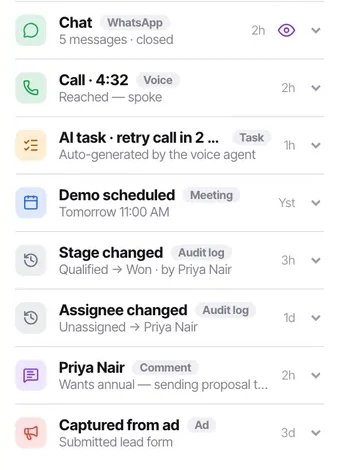
Read a call log entry on the contact timeline
Every attempt — by a person or by a campaign — lands on the feed. It is how "why is this customer annoyed" becomes answerable in ten seconds.
The call log entry is where manual calling and automated campaigns become the same thing. A call placed by a person and a call placed by a campaign land on the same feed in the same format with the same outcomes — so there is never a question about which system rang somebody.
This is what makes the most important question in outbound answerable: how many times have we contacted this person, and how did each attempt go?
Before you start
- A contact with call history. On a new record there is nothing to read.
Steps
Open the contact's activity feed
Calls sit there with chats, tasks, meetings, notes and stage changes, in order.
Read the outcome, not just the fact of the call
"Call · 4:32 · Reached — spoke" is a conversation. "Call · no answer" three times in two days is a pattern, and the second tells you far more.
Count the attempts before you dial again
Every campaign attempt lands here too. Four entries in three days is a reason to stop, not a reason to try harder — and the customer will certainly have noticed.
Check for a terminal outcome anywhere in the history
DND, Not interested or Wrong number should stop you cold, even if something has since put the contact back into a list. That is worth checking explicitly.
Look at what AI generated
AI tasks are labelled, so you can tell what the voice agent produced from what a person did — "AI task · retry call in 2 days · auto-generated by the voice agent".
Use it to answer "what did we tell them"
Between the calls, the notes and the chats, the answer is one scroll away. That question arrives more often than any other in a support escalation.
Check it worked
Pick a contact a campaign has been working and read their feed as if you were them. If the sequence looks unreasonable, you have found something to change in the campaign's follow-up wording.
The parts people get wrong
- Stage and assignee changes are audit-log entries on the same feed, so you can see who or what moved something and when.
- The feed is per contact, not a workspace-wide log. For a broader view, use Insights or an export.
The ones people actually ask
How do I tell a campaign attempt from a manual call?
Every campaign attempt lands on the same feed as a call log entry, so the count is what tells you. Four entries in three days is a reason to stop rather than a reason to try harder, and the customer will certainly have noticed.
How do I tell what the AI did from what a person did?
AI-generated entries are labelled — AI task, retry call in 2 days, auto-generated by the voice agent. That labelling is what lets you audit an automation without reading its definition.
Somebody is back in a calling list after saying no.
Check the history for a terminal outcome — DND, Not interested or Wrong number. Those should stop you cold even if an import, a bulk edit or a workflow has since put the contact back into a list. Then fix whatever put them back.